Get started with REST development
At the IntelliJ IDEA level, the RESTful Web Services development support is based on the Jakarta EE: RESTful Web Services (JAX-RS) plugin. This plugin is bundled with IntelliJ IDEA Ultimate and enabled by default.
Make sure that the RESTful Web Services plugin is enabled
In the Settings dialog (Ctrl+Alt+S) , select Plugins.
Switch to the Installed tab and make sure that the Jakarta EE: RESTful Web Services (JAX-RS) plugin is enabled.
If the plugin is disabled, select the checkbox next to it.
Apply the changes and close the dialog. Restart the IDE if prompted.
Enable REST support when creating a project
Click New Project on the Welcome screen or select .
From the Generators list, select Jakarta EE.
Name the new project, select a build tool, a language you want to use, and select the REST service project template.
Select the Create Git repository option to place the new project under version control.
From the JDK list, select the JDK that you want to use in your project.
If the JDK is installed on your computer, but not defined in the IDE, select
 Add JDK from Disk… and specify the path to the JDK home directory.
If you don't have the necessary JDK on your computer, select
 Download JDK.
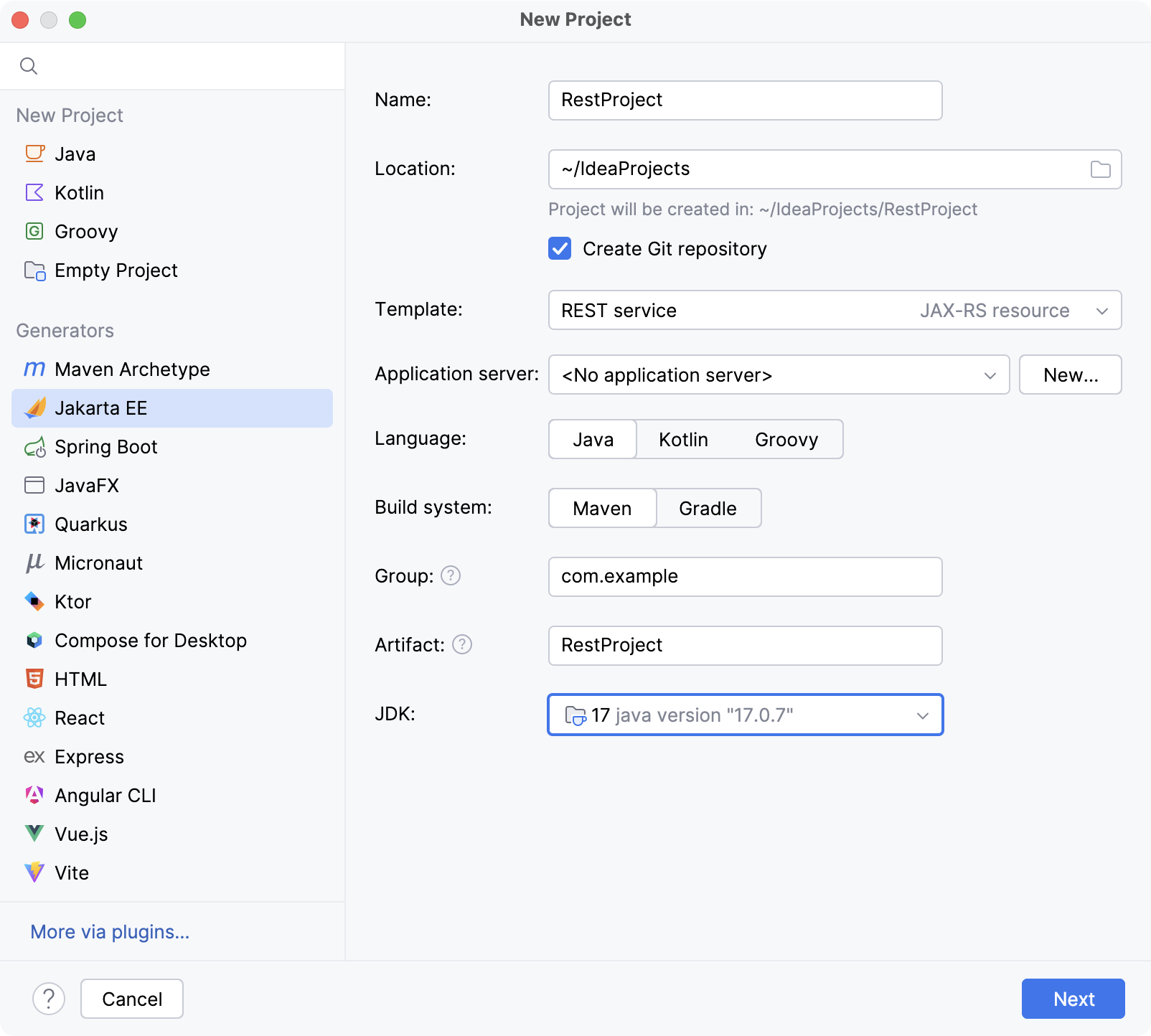
On the next step of the wizard, select the Java EE version to be supported.
From the Dependencies list, select RESTful Web Services (JAX-RS).
Click Create.
Add JAX-RS to an existing project
Open the build file in the editor (pom.xml or build.gradle depending on the build tool used in your project).
Add the JAX-RS library, and make sure its version matches the rest of your project:
- Jakarta EE
- <dependency> <groupId>jakarta.ws.rs</groupId> <artifactId>jakarta.ws.rs-api</artifactId> <version>4.0.0</version> </dependency>
- Java EE
- <dependency> <groupId>javax.ws.rs</groupId> <artifactId>javax.ws.rs-api</artifactId> <version>2.1.1</version> </dependency>
- Jakarta EE
- implementation 'jakarta.ws.rs:jakarta.ws.rs-api:4.0.0'
- Java EE
- implementation 'javax.ws.rs:javax.ws.rs-api:2.1.1'
- Jakarta EE
- implementation("jakarta.ws.rs:jakarta.ws.rs-api:4.0.0")
- Java EE
- implementation("javax.ws.rs:javax.ws.rs-api:2.1.1")
Press Ctrl+Shift+O to import the changes.
For more information about working with build tools, refer to Maven or Gradle.