# Extract method
> **TL;DR**
> `Refactor | Extract/Introduce | Method`
>
>
>
> `Ctrl+Alt+M` (Windows), `⌘ ⌥ M` (macOS), `⌘ ⌥ M` (IntelliJ IDEA Classic (macOS)), `⌘ ⌥ M` (macOS System Shortcuts), `Ctrl+Alt+M` (XWin), `Ctrl+Alt+M` (GNOME), `Ctrl+Alt+M` (KDE), `Ctrl+Alt+M` (Emacs), `Ctrl+Alt+M` (Sublime Text), `⌘ ⌥ M` (Sublime Text (macOS)), `Alt+Shift+M` (NetBeans), `Ctrl+R, M` (Visual Studio), `⌘ R, M` (Visual Studio (macOS)), `Alt+Shift+M` (Eclipse), `⌘ ⌥ M` (Eclipse (macOS))
The Extract Method refactoring lets you take a code fragment that can be grouped, move it into a separated method, and replace the old code with a call to the method.
> **Note:**
> This refactoring is also available as an [intention action](intention-actions.html) in the editor. Select code that you want to extract, press, `Alt+Enter` (Windows), `⌥ ⏎` (macOS), `⌥ ⏎` (IntelliJ IDEA Classic (macOS)), `⌥ ⏎` (macOS System Shortcuts), `Alt+Enter` (XWin), `Alt+Enter` (GNOME), `Alt+Enter` (KDE), `Alt+Enter` (Emacs), `Alt+Enter` (Sublime Text), `⌥ ⏎` (Sublime Text (macOS)), `Alt+Enter` (NetBeans), `Alt+Enter` (Visual Studio), `⌥ ⏎` (Visual Studio (macOS)), `Ctrl+1` (Eclipse), `⌘ 1` (Eclipse (macOS)) and select Extract Method.
When you extract the method, you need to check for variables. If there is one output variable, it is used as a return value for the extracted method. In case there are multiple output variables, the Extract Method refactoring may not be applied, and the error message appears.
There are several workarounds to allow Extract Method work in this case. For example, you may introduce a special data-class that contains all output values.
> **Note:**
> The Extract Method refactoring has the following limitations:
>
>
>
> * Refactoring does not work when there are references to generic types.
>
> * Refactoring does not work with multiple output values in automatic mode. You have to change your code before applying the refactoring.
Procedure: Extract method
1. Select a code fragment you want to extract to a method.
2. Press `Ctrl+Alt+M` (Windows), `⌘ ⌥ M` (macOS), `⌘ ⌥ M` (IntelliJ IDEA Classic (macOS)), `⌘ ⌥ M` (macOS System Shortcuts), `Ctrl+Alt+M` (XWin), `Ctrl+Alt+M` (GNOME), `Ctrl+Alt+M` (KDE), `Ctrl+Alt+M` (Emacs), `Ctrl+Alt+M` (Sublime Text), `⌘ ⌥ M` (Sublime Text (macOS)), `Alt+Shift+M` (NetBeans), `Ctrl+R, M` (Visual Studio), `⌘ R, M` (Visual Studio (macOS)), `Alt+Shift+M` (Eclipse), `⌘ ⌥ M` (Eclipse (macOS)) or go to `Refactor | Extract | Method` in the main menu.
Alternatively, on the [floating toolbar](working-with-source-code.html#floating_toolbar) that appears when a code fragment is selected, click Extract and select Method.
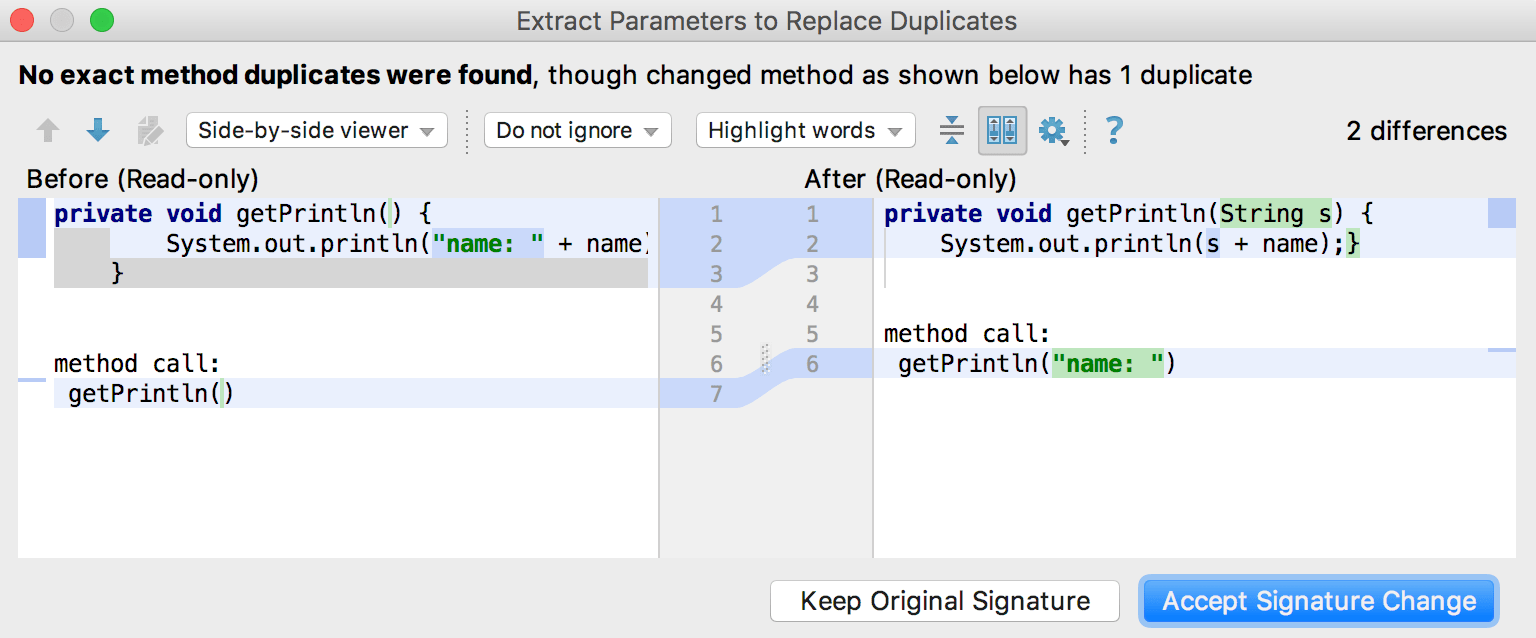
3. If IntelliJ IDEA detects code that is only partially duplicated, it suggests extracting a parameter to proceed with the refactoring.
> **Tip:**
> To reverse the Extract Method refactoring, press `Ctrl+Alt+N` (Windows), `⌘ ⌥ N` (macOS), `⌘ ⌥ N` (IntelliJ IDEA Classic (macOS)), `⌘ ⌥ N` (macOS System Shortcuts), `Ctrl+Alt+N` (XWin), `Ctrl+Alt+N` (GNOME), `Ctrl+Alt+N` (KDE), `Ctrl+Alt+N` (Emacs), `Ctrl+Alt+N` (Sublime Text), `⌘ ⌥ N` (Sublime Text (macOS)), `Ctrl+Alt+N` (NetBeans), `Ctrl+R, I` (Visual Studio), `⌘ R, I` (Visual Studio (macOS)), `Alt+Shift+I` (Eclipse), `⌘ ⌥ I` (Eclipse (macOS)) to invoke the [Inline refactoring](inline.html).
> **Tip:**
> By default, this extract refactoring will be applied in the editor. To change your settings to apply the refactoring [via a modal](extract-method-dialog.html), open the Settings dialog (`Ctrl+Alt+S` (Windows), `⌘ Comma` (macOS), `⌘ Comma` (IntelliJ IDEA Classic (macOS)), `⌘ Comma` (macOS System Shortcuts), `Ctrl+Alt+S` (XWin), `Ctrl+Alt+S` (GNOME), `Ctrl+Alt+S` (KDE), `Ctrl+Alt+S` (Emacs), `Ctrl+Alt+S` (Sublime Text), `⌘ Comma` (Sublime Text (macOS)), `Ctrl+Alt+S` (NetBeans), `Ctrl+Alt+S` (Visual Studio), `⌘ Comma` (Visual Studio (macOS)), `Ctrl+Alt+S` (Eclipse), `⌘ Comma` (Eclipse (macOS))), go to Editor | Code Editing, and in the Refactorings area select In modal dialogs.
## Example
Let's extract the `a+b` expression into a method (function for Kotlin), and replace duplicates .
Java:
| Before | After |
| --- | --- |
| ```JAVA public void method() { int a=1; int b=2; int c=a+b; int d=a+c; } ``` | ```JAVA public void method() { int a=1; int b=2; int c=add(a,b); int d=add(a,c); } ... private int add(int a, int b) { return a+b; } ``` |
Kotlin:
| Before | After |
| --- | --- |
| ```KOTLIN fun method(){ val a = 1 val b = 2 val c = a + b val d = a + b } ``` | ```KOTLIN fun method(){ val a = 1 val b = 2 val c = add(a, b) val d = add(a, b) } private fun add(a: Int, b: Int) = a + b ``` |
## Extract a method using Java records
Starting with the Java 16 version, you can extract a method using Java records. That might be helpful when you have multiple variables. In these cases, the IDE first suggests wrapping these variables into a new record or bean class and then performing method extraction.

Before:
```JAVA
class SomeClass {
public static void main(String[] args) {
int values[] = {1, 2, 3, 4, 5};
int sum = 0;
int num = 0;
for (int n : values) {
sum += n;
num++;
}
System.out.println("Sum: " + sum + " - Num: " + num);
}
}
```
After:
```JAVA
class SomeClass {
public static void main(String[] args) {
Statistics result = getStatistics();
System.out.println("Sum: " + result.sum() + " - Num: " + result.num());
}
private static Statistics getStatistics() {
int values[] = {1, 2, 3, 4, 5};
int sum = 0;
int num = 0;
for (int n : values) {
sum += n;
num++;
}
Statistics result = new Statistics(sum, num);
return result;
}
private record Statistics(int sum, int num) {
}
}
```