# Extract trait in Scala
With the Extract Trait refactoring you can extract selected members from a Scala class, object, or a trait into a new trait. IntelliJ IDEA supports `def`, `val`, and `var` type members.
Procedure: Extract trait
1. In the editor, select code members that you want to refactor.
2. In the main menu, go to `Refactor | Extract | Trait`.
Alternatively, right-click anywhere in the editor to open the context menu and select `Refactor | Trait`.
3. In the dialog that opens, enter a new trait name and select members you want to extract.
If you need to select all of the listed members in the Members to extract section, press `Ctrl+A` (Windows), `⌘ A` (macOS), `⌘ A` (IntelliJ IDEA Classic (macOS)), `⌘ A` (macOS System Shortcuts), `Ctrl+A` (XWin), `Ctrl+A` (GNOME), `Ctrl+A` (KDE), `Ctrl+X, H` (Emacs), `Ctrl+A` (Sublime Text), `⌘ A` (Sublime Text (macOS)), `Ctrl+A` (NetBeans), `Ctrl+A` (Visual Studio), `⌘ A` (Visual Studio (macOS)), `Ctrl+A` (Eclipse), `⌘ A` (Eclipse (macOS)) first and then `Space` (Windows), `Space` (macOS), `Space` (IntelliJ IDEA Classic (macOS)), `Space` (macOS System Shortcuts), `Space` (XWin), `Space` (GNOME), `Space` (KDE), `Space` (Emacs), `Space` (Sublime Text), `Space` (Sublime Text (macOS)), `Space` (NetBeans), `Space` (Visual Studio), `Space` (Visual Studio (macOS)), `Space` (Eclipse), `Space` (Eclipse (macOS)).
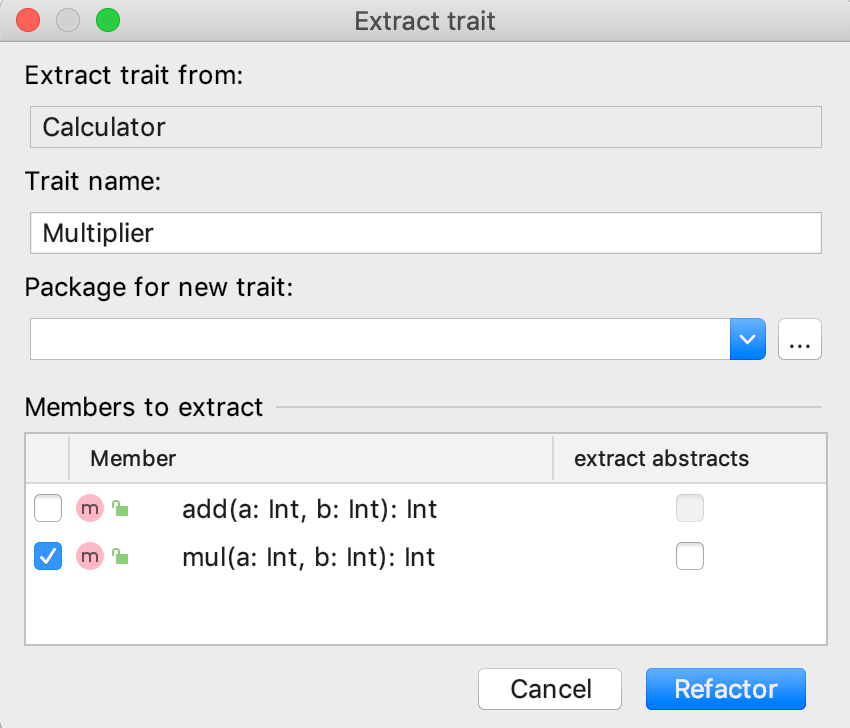 Click Refactor.
## Example
Let's create a class `Calculator` with several methods and extract one of the methods (`mul`) into a trait.
Class Calculator:
```SCALA
class Calculator {
def add(a: Int, b: Int): Int = a + b
def mul(a: Int, b: Int): Int = a match {
case 0 =>0
case _ => add(b, mul(a-1, b))
}
}
```
Method mul is extracted to a new trait Multiplier:
```SCALA
trait Multiplier {
this: Calculator =>
def mul(a: Int, b: Int): Int = a match {
case 0 => 0
case _ => add(b, mul(a - 1, b))
}
}
```
Class Calculator after the refactoring:
```SCALA
class Calculator extends Multiplier {
def add(a: Int, b: Int): Int = a + b
}
```
IntelliJ IDEA creates a new trait `Multiplier` that contains the `mul` method with its definition body. The class `Calculator` extends the trait `Multiplier`.
## Extract trait dialog reference
| Item | Description |
| --- | --- |
| Extract trait from | This field contains the name of the class, object, or trait from which you are trying to extract a member. |
| Trait name | Use this field to enter a name for your new trait. |
| Package for trait | Use this field to add a package for the newly created trait. We recommend that you use the same package as the original class, object, or trait from which you are extracting. |
| Members to extract | Use this area to select members you want to extract. When the extract abstracts checkbox is selected then the new trait will only contain a declaration without a definition body. For example, an abstract method that doesn't contain a body in such case will be overridden in the original class, and the definition will be left there. When this checkbox is not selected, the method will be moved to the new trait with its definition as in the [example](#trait_example). |