# Generate code
> **TL;DR**
> `Code | Generate` or `Alt+Insert` (Windows), `⌘ N` (macOS), `⌃ N` (IntelliJ IDEA Classic (macOS)), `⌘ N` (macOS System Shortcuts), `Alt+Insert` (XWin), `Alt+Insert` (GNOME), `Alt+Insert` (KDE), `Alt+Insert` (Emacs), `Alt+Insert` (Sublime Text), `⌘ N` (Sublime Text (macOS)), `Alt+Insert` (NetBeans), `Alt+Insert` (Visual Studio), `⌘ ⌃ N` (Visual Studio (macOS)), `Alt+Insert` (Eclipse), `⌘ N` (Eclipse (macOS))
IntelliJ IDEA provides multiple ways to generate common code constructs and recurring elements, which helps you increase productivity. These can be either [file templates](using-file-and-code-templates.html) used when creating a new file, custom or predefined [live templates](using-live-templates.html) that are applied differently based on the context, various wrappers, or automatic pairing of characters.
Additionally, IntelliJ IDEA provides [code
completion](auto-completing-code.html) and [Emmet](using-zen-coding-support.html) support.
This topic describes ways to generate standard code constructs specific to Java: constructors, method overrides and implementations, getters and setters, and so on. Go to `Code | Generate` `Alt+Insert` (Windows), `⌘ N` (macOS), `⌃ N` (IntelliJ IDEA Classic (macOS)), `⌘ N` (macOS System Shortcuts), `Alt+Insert` (XWin), `Alt+Insert` (GNOME), `Alt+Insert` (KDE), `Alt+Insert` (Emacs), `Alt+Insert` (Sublime Text), `⌘ N` (Sublime Text (macOS)), `Alt+Insert` (NetBeans), `Alt+Insert` (Visual Studio), `⌘ ⌃ N` (Visual Studio (macOS)), `Alt+Insert` (Eclipse), `⌘ N` (Eclipse (macOS)) to open the popup menu with available constructs that you can generate.
## Generate constructors
IntelliJ IDEA can generate a constructor that initializes specific class fields using values of corresponding arguments.
Procedure: Generate a constructor for a class
1. In the main menu, go to Code and select Generate (`Alt+Insert` (Windows), `⌘ N` (macOS), `⌃ N` (IntelliJ IDEA Classic (macOS)), `⌘ N` (macOS System Shortcuts), `Alt+Insert` (XWin), `Alt+Insert` (GNOME), `Alt+Insert` (KDE), `Alt+Insert` (Emacs), `Alt+Insert` (Sublime Text), `⌘ N` (Sublime Text (macOS)), `Alt+Insert` (NetBeans), `Alt+Insert` (Visual Studio), `⌘ ⌃ N` (Visual Studio (macOS)), `Alt+Insert` (Eclipse), `⌘ N` (Eclipse (macOS))).
2. In the Generate popup, click Constructor .
3. If the class contains fields, select the fields to be initialized by the constructor and click OK.
The following code fragment shows the result of generating a constructor for a class:
```JAVA
public class MyClass {
int aInteger;
double bDouble;
public MyClass(int myAIntegerParam, double myBDoubleParam) {
aInteger = myAIntegerParam;
bDouble = myBDoubleParam;
}
}
```
## Generate delegation methods
IntelliJ IDEA can generate methods that delegate behavior to the fields or methods of your class. This approach makes it possible to give access to the data of a field or method without directly exposing this field or method.
Procedure: Generate a delegation method for a class
1. In the main menu, go to Code and select Generate (`Alt+Insert` (Windows), `⌘ N` (macOS), `⌃ N` (IntelliJ IDEA Classic (macOS)), `⌘ N` (macOS System Shortcuts), `Alt+Insert` (XWin), `Alt+Insert` (GNOME), `Alt+Insert` (KDE), `Alt+Insert` (Emacs), `Alt+Insert` (Sublime Text), `⌘ N` (Sublime Text (macOS)), `Alt+Insert` (NetBeans), `Alt+Insert` (Visual Studio), `⌘ ⌃ N` (Visual Studio (macOS)), `Alt+Insert` (Eclipse), `⌘ N` (Eclipse (macOS))).
2. In the Generate popup, click Delegate Methods.
3. Select the target field or method, and click OK.
4. Select the desired methods to be delegated and click OK.
The following code fragment shows the result of delegating the `get(i)` method of the `Calendar` class inside another class:
```JAVA
Calendar calendar;
public int get(int i) {
return calendar.get(i);
}
```
## Generate equals() and hashCode() methods
The Java super class `java.lang.Object` provides two methods for comparing objects:
* `public boolean equals(Object obj)` returns `true` if the object passed to it as the argument is equal to the object on which this method is invoked. By default, this means that two objects are stored in the same memory address.
* `public int hashCode()` returns the hash code value of the object on which this method is invoked. The hash code must not change during one execution of the application but may change between executions.
> **Note:**
> It is generally necessary to override the `hashCode()` method if you override `equals()` because the contract for `hashCode()` is that it must produce the same result for objects that are equal. For more information, refer to the [API specification for the Object class](https://docs.oracle.com/en/java/javase/13/docs/api/java.base/java/lang/Object.html).
Procedure: Generate equals() and hashCode() for a class
1. In the main menu, go to Code and select Generate (`Alt+Insert` (Windows), `⌘ N` (macOS), `⌃ N` (IntelliJ IDEA Classic (macOS)), `⌘ N` (macOS System Shortcuts), `Alt+Insert` (XWin), `Alt+Insert` (GNOME), `Alt+Insert` (KDE), `Alt+Insert` (Emacs), `Alt+Insert` (Sublime Text), `⌘ N` (Sublime Text (macOS)), `Alt+Insert` (NetBeans), `Alt+Insert` (Visual Studio), `⌘ ⌃ N` (Visual Studio (macOS)), `Alt+Insert` (Eclipse), `⌘ N` (Eclipse (macOS))).
2. In the Generate popup, click equals() and hashCode()
.
3. Select a velocity template from the Template list.
You can also click  to open the [Templates](templates-dialog.html) dialog, where you can select an existing template or [create a custom template](#customize-templates).
4. Select an expression to generate within the method. Hover over the question mark icon to open a tooltip with an explanation of advantages and disadvantages of using each of the expressions.
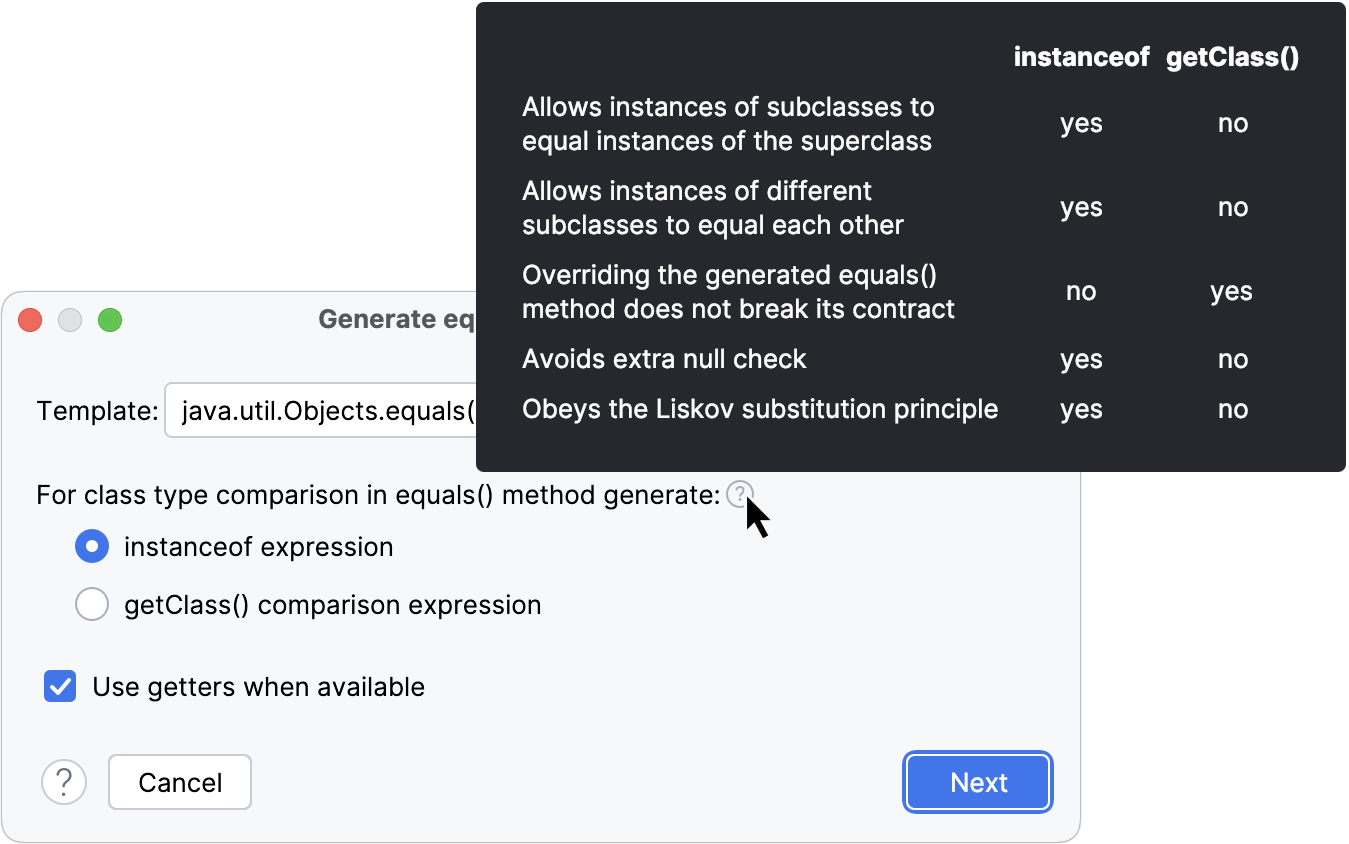
5. Click Next.
6. Select the fields that should be used to determine equality, and click Next.
7. Select the fields to use for calculating the hash code value. You can choose only from fields that were selected on the previous step (for determining equality). Click Next.
8. Select the fields that contain non-null values. This optional step helps the generated code avoid checks for null and thus improves performance. Click Finish.
> **Note:**
> If the overrides for `equals()` and `hashCode()` methods already exist in the class, you will be prompted whether you want to delete them before generating new ones.
The following code fragment shows the result of overriding the `equals()` and `hashCode()` methods:
```JAVA
public boolean equals(Object o){
if(this==o)return true;
if(o==null||getClass()!=o.getClass())return false;
FixedRateCurrencyExchangeService that=(FixedRateCurrencyExchangeService)o;
if(Double.compare(that.rate,rate)!=0)return false;
return true;
}
public int hashCode(){
long temp=rate!=+0.0d?Double.doubleToLongBits(rate):0L;
return int(temp^(temp>>>32));
}
```
## Generate getters and setters
IntelliJ IDEA can generate accessor and mutator methods (getters and setters) for the fields in your classes. Generated methods have only one argument, as required by the JavaBeans API.
The getter and setter method names are generated by IntelliJ IDEA according to your [code generation naming preferences](code-style-java.html).
Procedure:
1. In the main menu, go to Code and select Generate (`Alt+Insert` (Windows), `⌘ N` (macOS), `⌃ N` (IntelliJ IDEA Classic (macOS)), `⌘ N` (macOS System Shortcuts), `Alt+Insert` (XWin), `Alt+Insert` (GNOME), `Alt+Insert` (KDE), `Alt+Insert` (Emacs), `Alt+Insert` (Sublime Text), `⌘ N` (Sublime Text (macOS)), `Alt+Insert` (NetBeans), `Alt+Insert` (Visual Studio), `⌘ ⌃ N` (Visual Studio (macOS)), `Alt+Insert` (Eclipse), `⌘ N` (Eclipse (macOS))).
2. In the Generate popup, click one of the following:
* Getter to generate accessor methods for getting the current values of class fields.
* Setter to generate mutator methods for setting the values of class fields.
* Getter and Setter to generate both accessor and mutator methods.
3. Select the fields to generate getters or setters for and click OK.
You can [add a custom getter or setter method](#customize-templates) by clicking  and accessing the [Getter/Setter Templates](null) dialog. If a field is not in the list, then the corresponding getter and setter methods are already defined for it.
If you select the Copy all annotations option, all applicable annotations from fields will be copied to new methods or to parameters of new methods. Otherwise, only applicable nullability annotations will be copied.
The following code fragment shows the result of generating the getter and setter methods for a class with one field `var`:
```JAVA
public class MyClass {
int field;
public int getField() {
return field;
}
public void setField(int field) {
this.field = field;
}
}
```
## Generate toString()
The `toString()` method of the Java super class `java.lang.Object` returns the string representation of the object. This method can be used to print any object to the standard output, for example, to quickly monitor the execution of your code. By default, `toString()` returns the name of the class followed by the hash code of the object. You can override it to return the values of the object's fields, for example, which can be more informative for your needs.
Procedure: Override the toString() method for a class
1. On the Code menu, click Generate `Alt+Insert` (Windows), `⌘ N` (macOS), `⌃ N` (IntelliJ IDEA Classic (macOS)), `⌘ N` (macOS System Shortcuts), `Alt+Insert` (XWin), `Alt+Insert` (GNOME), `Alt+Insert` (KDE), `Alt+Insert` (Emacs), `Alt+Insert` (Sublime Text), `⌘ N` (Sublime Text (macOS)), `Alt+Insert` (NetBeans), `Alt+Insert` (Visual Studio), `⌘ ⌃ N` (Visual Studio (macOS)), `Alt+Insert` (Eclipse), `⌘ N` (Eclipse (macOS)).
2. In the Generate popup, click toString().
3. Configure the following:
* Select the template for generating the `toString()` method from the Template list.
* Select the fields that you want to return in the generated `toString()` method. Press and hold `Shift` (Windows), `Shift` (macOS), `Shift` (IntelliJ IDEA Classic (macOS)), `Shift` (macOS System Shortcuts), `Shift` (XWin), `Shift` (GNOME), `Shift` (KDE), `Shift` (Emacs), `Shift` (Sublime Text), `Shift` (Sublime Text (macOS)), `Shift` (NetBeans), `Shift` (Visual Studio), `Shift` (Visual Studio (macOS)), `Shift` (Eclipse), `Shift` (Eclipse (macOS)) to select multiple members. By default, all the available fields are selected. Click Select None to generate a `toString()` method that returns only the class name.
* Select the Insert @Override checkbox if necessary.
* Click the Settings button to open the [toString() Generation Settings](generate-tostring-settings-dialog.html) dialog. where you can tune the behavior and [add custom templates](#customize-templates).
4. Click OK.
If the `toString()` method is already defined in the class by default, you will be prompted whether you would like to delete this method before proceeding. You can use the When method already exists group of options in the [toString() Generation Settings](generate-tostring-settings-dialog.html) dialog to change this behavior: either automatically replace the existing method or generate a duplicating method.
The following code fragment shows the result of generating the `toString()` method for a class with several fields defined:
```JAVA
public class MyClass {
private String name;
private String url;
private int port;
private String[] validIPs;
...
public String toString() {
return "MyClass{" +
"name='" + name + '\'' +
", url='" + url + '\'' +
", port=" + port +
", validIps=" + Arrays.toString(validIps) +
'}';
}
...
}
```
The following [code inspections](code-inspection.html) are related to the `toString()` method:
* Class does not override 'toString()' method can be used to identify classes in which the `toString()` method is not defined. This inspection uses the [exclude settings](generate-tostring-settings-dialog.html#exclude) to ignore classes with fields that are not supposed to be dumped. An additional setting is to exclude certain classes using a regular expression matching their class name. As default, this is used to exclude any exception classes.
* Field not used in 'toString()' method can be used to identify fields that are not dumped in the `toString()` method. For example, if you added new fields to a class, but forgot to add them to the `toString()` method. [Change the severity of this inspection](configuring-inspection-severities.html) to show errors as warnings. This will highlight any unused fields in the editor and indicate their location as yellow markers on the scroll bar.
## Custom code generation templates
Templates used for generating getters and setters, as well as `equals()`, `hashCode()`, and `toString()` methods are written in the [Velocity
template language](http://velocity.apache.org/). Although you can't modify predefined templates, you can add your own custom templates to implement necessary behavior.
IntelliJ IDEA provides the following variables for Velocity templates:
Getter/Setter:
The following variables can be used in templates for generating getters and setters:
| Variable | Description |
| --- | --- |
| `$java_version` | The current version of the Java Runtime Environment (JRE). |
| `$class` | The current class. |
| `$helper` | Provides access to various code generation helper methods. |
| `$settings` | Provides the ability to format names according to the current code style. |
| `$field` | Field for which getter or setter is generated. |
toString():
The following variables can be used in templates for generating the `toString()` method:
| Variable | Description |
| --- | --- |
| `$java_version` | The current version of the Java Runtime Environment (JRE). |
| `$class` | The current class. |
| `$helper` | Provides access to various code generation helper methods. |
| `$settings` | Provides the ability to format names according to the current code style. |
| `$fields` | List of fields in the current class. |
equals():
The following variables can be used in templates for generating the `equals()` method:
| Variable | Description |
| --- | --- |
| `$java_version` | The current version of the Java Runtime Environment (JRE). |
| `$class` | The current class. |
| `$helper` | Provides access to various code generation helper methods. |
| `$settings` | Provides the ability to format names according to the current code style. |
| `$fields` | List of fields in the current class. |
| `$instanceBaseName` | Predefined name of the object on which the `equals()` method is called. |
| `$baseParamName` | Predefined name of the `equals()` method parameter. |
| `$superParamName` | The name of the parameter in the `equals()` method of the superclass if applicable. |
| `$checkParameterWithInstanceof` | Option passed from the wizard. |
| `$superHasEquals` | Whether the superclass has `equals()` declared. |
hashCode():
The following variables can be used in templates for generating the `hashCode()` method:
| Variable | Description |
| --- | --- |
| `$java_version` | The current version of the Java Runtime Environment (JRE). |
| `$class` | The current class. |
| `$helper` | Provides access to various code generation helper methods. |
| `$settings` | Provides the ability to format names according to the current code style. |
| `$fields` | List of fields in the current class. |
| `$superHasHashCode` | Whether the superclass has `hashCode()` declared. |
## Productivity tips
Procedure: Use code completion
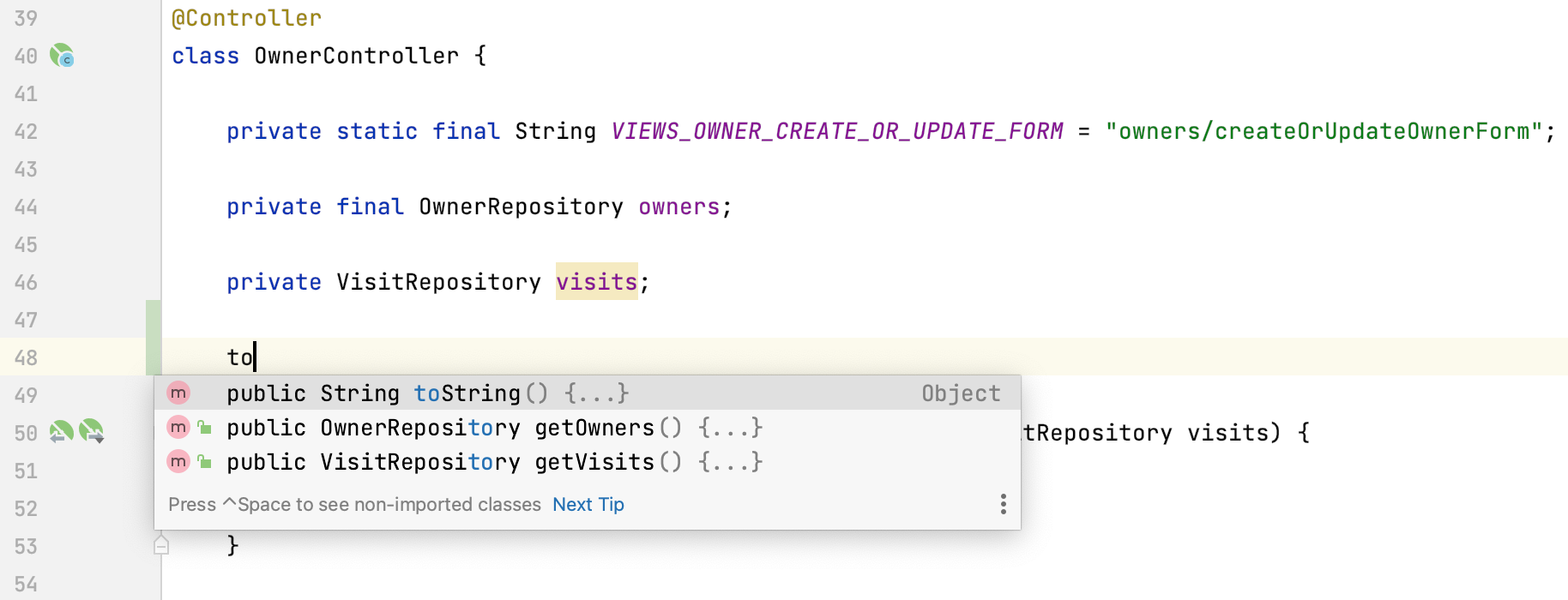
Depending on the current context, IntelliJ IDEA can suggest generating relevant code constructs in the [code completion](auto-completing-code.html) popup. For example, when the caret is inside a Java class, the completion popup will contain suggestions for adding getters, setters, `equals()`, `hashCode()`, and `toString()` methods.