# Structural search and replace examples
As you know the main difference between regular search and the structural search is that in the structural search we are looking for a structural template in a programming language.
The beauty of a structural search is that you can create a pattern based on the existing template and save yourself time when searching and replacing code.
The extensive list of existing templates covers a lot of use-cases from simple patterns to more complex ones.
Each item in a pattern consists of variables that are limited by $ sign on both sides.
## Example pattern
Let's start with a simple task and search for an open lock objects using the `synchronized` keyword. The `synchronized` keyword can have two cases:
* as a block statement ``` class ClassA { public void someMethod() { synchronized(this) { // ... } } } ```
* as a method modifier ``` class ClassA { public synchronized void someMethod() { // ... } } ```
Let's look for something like that
```
synchronized ($parameter$){
$statement$;
}
```
We can add the Count modifier for the $parameter$ variable form 0 to infinity. So, the pattern can search for all the synchronizable methods with an arbitrary number of parameters, but with only one line of code in the body. We also set the same zero-to-infinity limitation for the $statement$ variable in order to correct this.
## One statement
```JAVA
$Statement$;
```
Increasing the number of occurrences count to a certain number, you can find sequences of statements that contain up to the specified number of elements.
## Method call
```JAVA
$Instance$.$MethodCall$($Parameter$)
```
This template matches method call expressions. If the number of occurrences is zero, it means that a method call can be omitted.
```JAVA
@Deprecated
$Instance$.$MethodCall$($Parameter$)
```
You can use this template to find deprecated methods and use it as prototype for creating other annotated method templates. Specifically for searching method calls to deprecated methods you can select the already existing template method calls to deprecated methods.
For more information about creating a search template, refer to [Structural search and replace](structural-search-and-replace.html).
## If statement
```JAVA
if ($Expr$) {
$ThenStatements$;
}
else {
$ElseStatements$;
}
```
## Search in comments and string literals
Consider one wants to find comments or literal containing 'foo'. Search template would be like `$SomethingWeWantToFind$` or `"$SomethingWeWantToFind$"`. In case one wants to find comments/string containing some particular words (say, foo as a word), this should be specified as a text constraint.
## Add try/catch/finally code
If one wants to replace a statement with a `try/catch/finally` construct, the following pair of search and replace templates can be suggested. The search template is:
```JAVA
$Statements$;
```
with a certain maximum number of occurrences specified as a constraint.
The replacement template is:
```JAVA
try {
$Statements$;
}
catch(Exception ex) {
}
```
## Finding all descendants of a class or all classes that implement a certain interface
Consider the following search templates:
```JAVA
class $Clazz$ extends $AnotherClass$ {}
```
or
```JAVA
class $Clazz$ implements $SomeInterface$ {}
```
As the text constraint for the variables $AnotherClass$ or $SomeInterface$, specify the name of the base class or implemented interface.
## Finding all such methods
To look for the different implementations of the same interface method, use the following search template:
```JAVA
class $a$ {
public void $show$();
}
```
Specify text constraint for the `$show$` variable, and enable the option This variable is the target of the search.
## Using @Modifier for finding package local and instance methods
IntelliJ IDEA suggests pre-defined templates for the package local and instance fields of a class. These templates make use of the @Modifier annotation, which helps describe search target, when there is no way to express it using the natural language means.
However, if you need to search for package local or instance methods, you will have to create the corresponding search templates yourself, applying the @Modifier annotation.
To specify criteria for finding all methods with the visibility modifiers package local and instance, use the following search template:
```JAVA
class
$Class$ {
@Modifier("packageLocal") @Modifier("Instance" ) $ReturnType$ $MethodName$($ParameterType$ $Parameter$);
}
}
```
## Using 'Contained in Constraints' field in a search
The existing example uses the following template:
```JAVA
LOG.debug($params$);
```
Placing `if('_a) { '_st*; }` where `_a` and `_st` are variables and `*` denotes zero or more occurrences in Contained in Constraints field and selecting Invert condition checkbox of Complete Match variable will result a search of logging statements that are not contained in the `if` statement.
## Examples for HTML and XML
The following examples show how you can use structural search in HTML and XML code.
Procedure: Searching for XML and HTML tags, attributes, and their values
The simplest template to search for a tag is `<$tag$/>`.
1. By placing constraints on the variable `$tag$`, you can specify tags that you want to find. For example, if you specify `li`, you will get all `li` tags.
2. Consider the following template for searching in XML and HTML: `<$tag$ $attribute$=$value$ />`. For example, if you specify the text filter `id` for the `$attribute$` variable and the `\d+` regular expression as the text filter for the `$value$` variable, you can find all tags that have numeric values in the `id` attribute.
Procedure: Delete all lines with the id attribute greater than 2
1. Create an HTML file and paste the following code:
```HTML
Structural Search Example
- Example line 1
- Example line 2
- Example line 3
- Example line a
- Example line 5
```
2. In the main menu, go to `Edit | Find | Search Structurally`.
3. From the Language list, select HTML.
4. Paste the following string to the Search template field:
```
<$tag$ $attribute$="$value$">
```
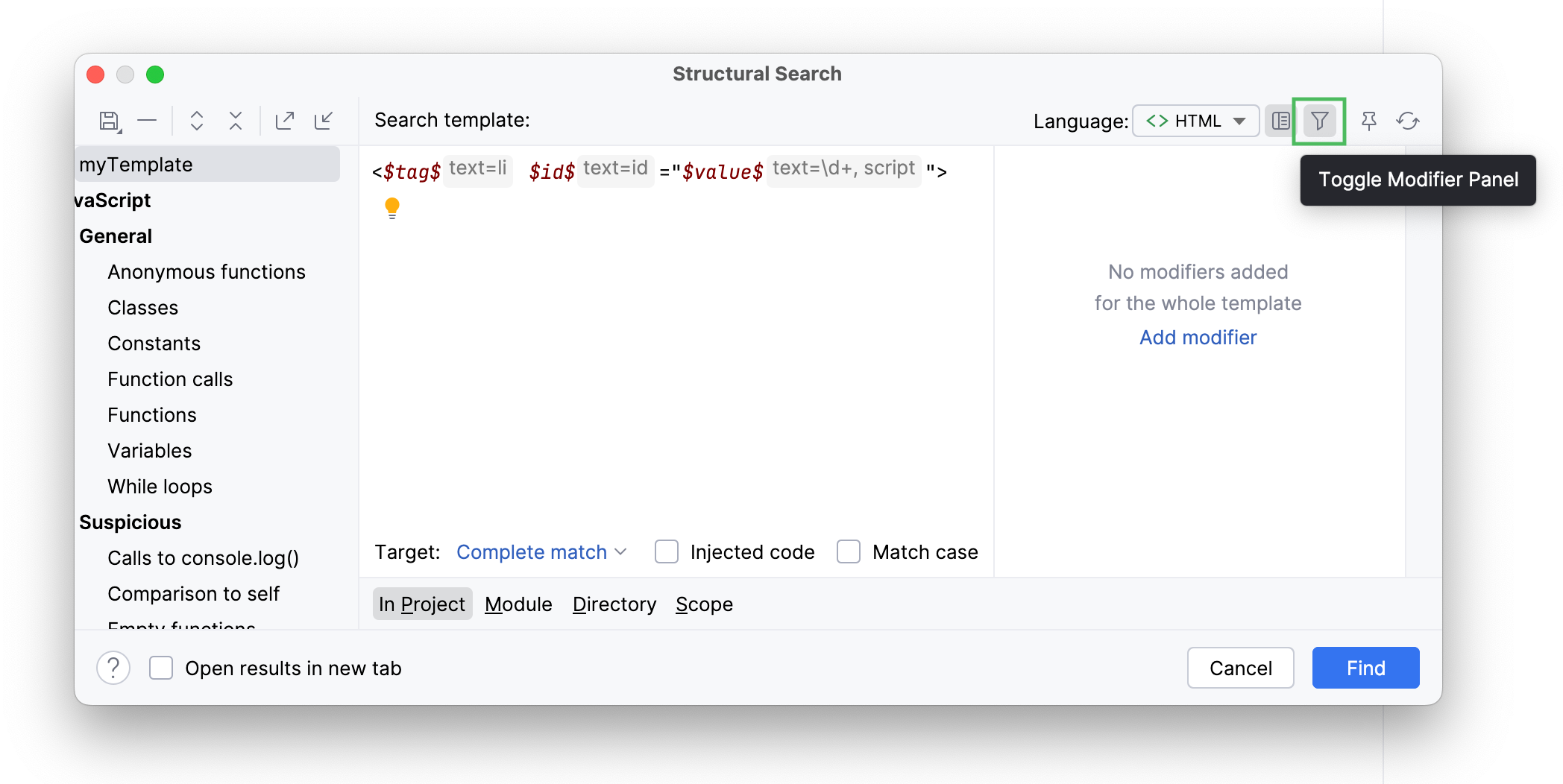
5. Click the `$tag$` variable.
6. In the filter panel, click Add modifier, select Text and type `li` in the value field.
If the filter panel is not visible, click  Toggle Modifier Panel.
7. Click the `$attribute$` variable.
8. In the filter panel, click Add modifier, select Text and type `id` in the value field.
9. Click the `$value$` variable.
10. In the filter panel, click Add modifier, select Text and type `\d+` in the value field.
The `\d+` regular expression limits search results to numeric values. So, the line with the `id="a"` will be filtered out.
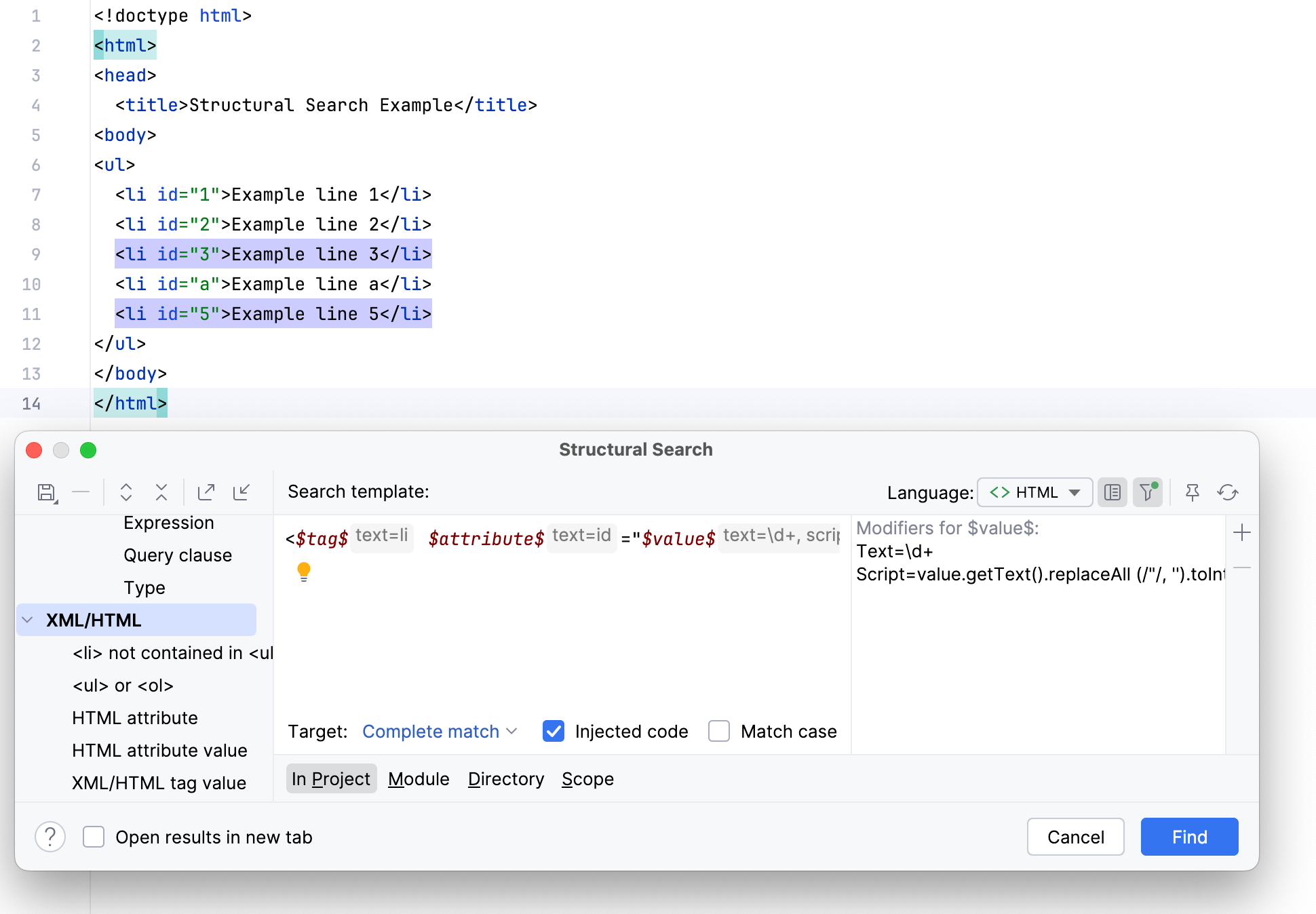
11. Without switching the focus from the filter panel, click the Add button, select Script and paste the following code:
```GROOVY
value.getText().replaceAll (/"/, '').toInteger() > 2
```
The script reads the content of the `$value$` variable and returns it as a string (for example, `"1"`). Then the script replaces all the quotes and converts the string value to integer and compares it with `2`.
> **Note:**
> To switch between different selection scopes, select the necessary value from the Target list. For example, to select the whole line that matches the template, select Complete match.
Procedure: Convert uppercase values of the class attribute in li tags to lowercase
1. Create an HTML file and paste the following code:
```HTML
Structural Replace Example
- Example line 1
- Example line 2
- Example line 3
- Example line a
- Example line 5
```
2. In the main menu, go to `Edit | Find | Replace Structurally`.
3. From the Language list, select HTML.
4. Paste the following string to the Search template field:
```
<$tag$ $attribute$="$value$">
```
5. Select the Match case checkbox.
6. Click the `$tag$` variable.
7. In the filter panel, click Add modifier, select Text and type `li` in the value field.
8. Click the `$attribute$` variable.
9. In the filter panel, click Add modifier, select Text and type `class` in the value field.
10. Click the `$value$` variable.
11. In the filter panel, click Add modifier, select Text and type `[A-Z].*` in the value field.
The `[A-Z].*` regular expression limits search results to uppercase values.
> **Note:**
> Sometimes you might need to use inline flags. In this case the regular expression will be the following: `(?-i)\b[A-Z]+\b`. `(?-i)` ensures that case-insensitive mode is turned off.
12. From the Target list, select value. This procedure highlights all the uppercase values of the `class` attribute.
13. In the Replace template field, paste the `$to_lower_case$` variable.
14. Click the `$to_lower_case$` variable.
15. In the filter panel, click Add modifier, select Script and paste the following code:
```GROOVY
value.getText().toLowerCase()
```
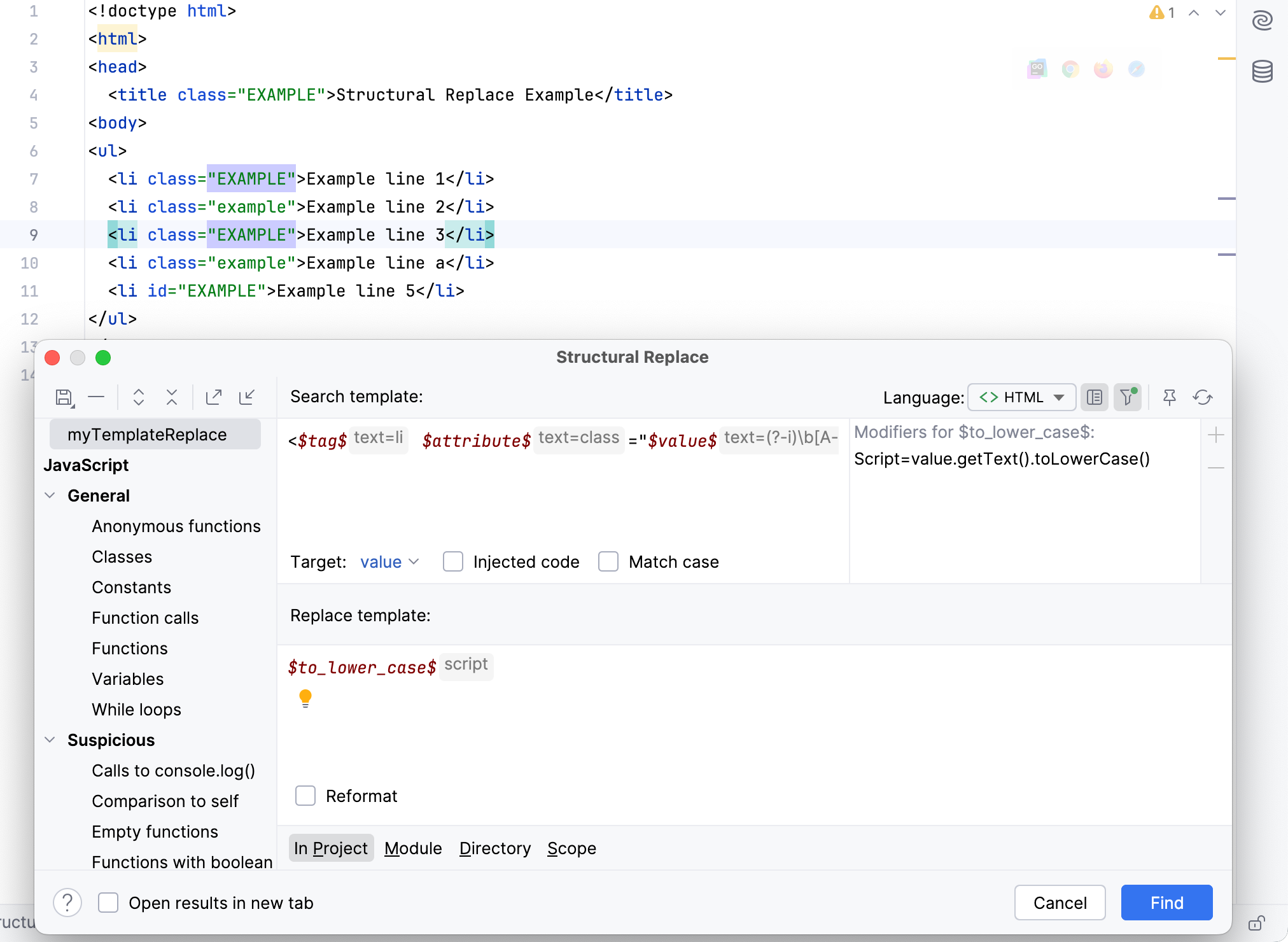
16. Click Find.
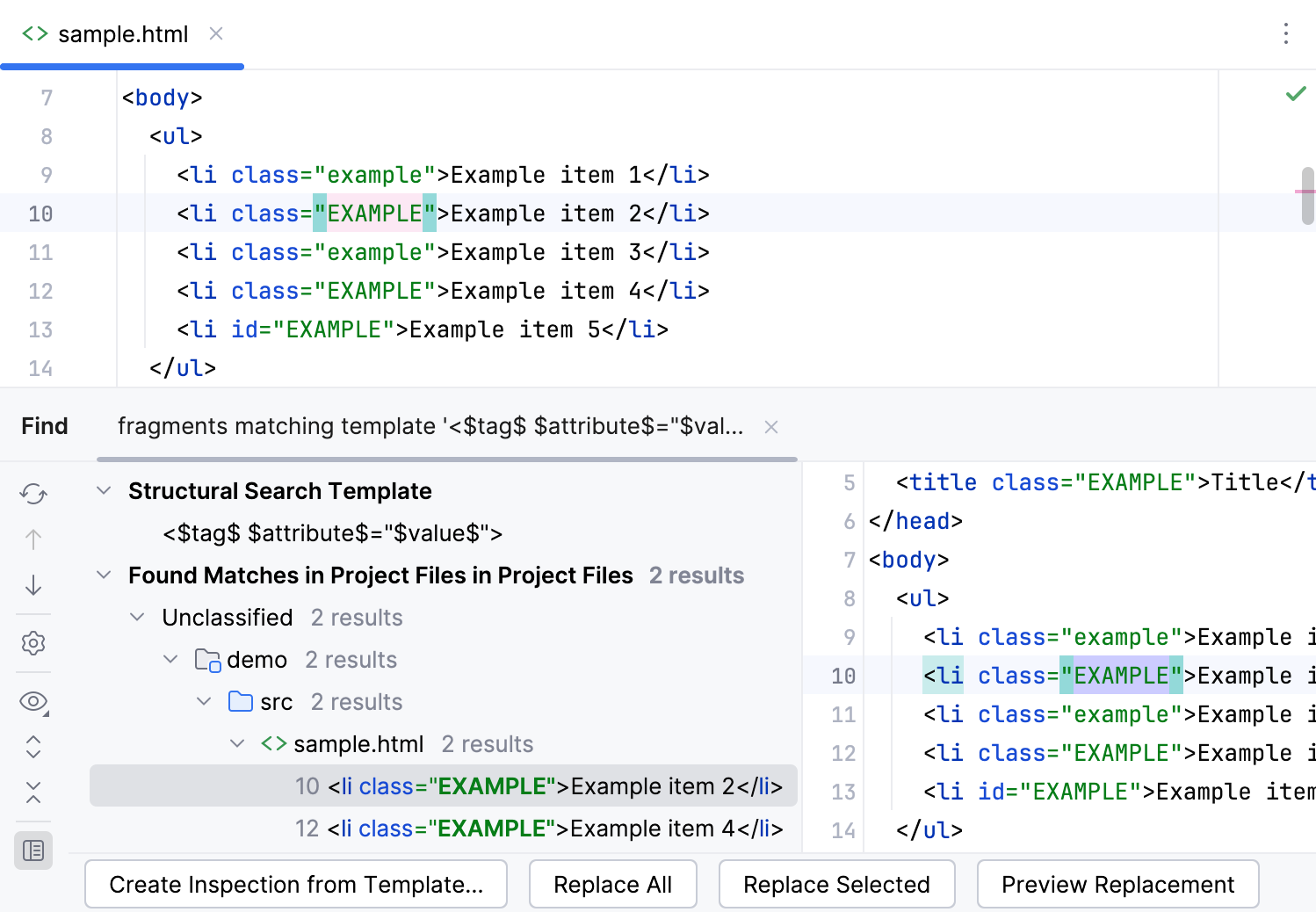
17. In the Find tool window, preview the found results and click Replace All.
## See also
### Procedures
[Structural search and replace](structural-search-and-replace.html)