Introduction
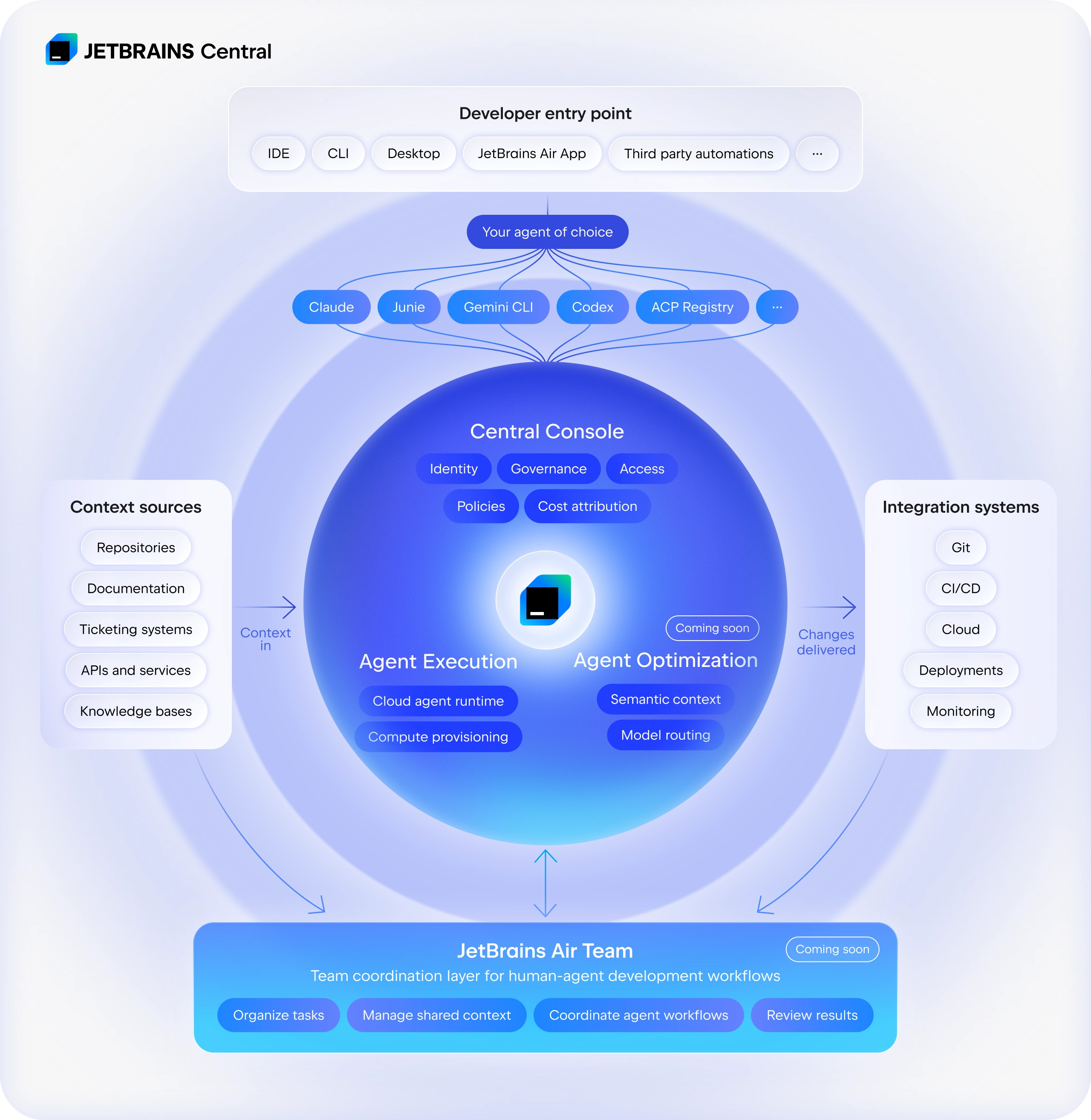
JetBrains Central is a platform for agent-driven software development that connects tools, agents, and infrastructure. It enables automated AI workflows to run, be monitored, and be managed across teams – with clear visibility into results, costs, and performance.
At the core of JetBrains Central are the following capabilities:
Entry points for your developers to start and coordinate agentic workflows.
Support for leading agents and custom ACP-compatible ones.
Agentic team collaboration through remote cloud execution, automations, and shared context.
Governance and control through JetBrains Central Console.
For more information, see JetBrains AI for teams and organizations.
JetBrains Central Console is a cloud-based service that helps organizations manage JetBrains products and services with a focus on adopting AI-powered development tools. It provides centralized management, usage-based billing, and visibility into AI consumption patterns.
JetBrains Central Console is designed for team leads, CTOs, and engineering managers who need to:
Control access to various JetBrains products and services across teams
Monitor and limit spending on AI tools and features
Track usage patterns and adoption
Manage organizational policies for AI tool usage
Key features
JetBrains Central Console includes the following key features:
Organization and team management
Control which users access which tools.
Monitoring and analytics
Track consumption, costs, and quotas at team and organization levels.
Usage-based billing
Pay only for what you consume.
Policy controls
Set limits and manage which AI models and features are available.
Supported products
JetBrains Central Console currently supports managing access to all JetBrains products, including IDEs, plugins, services, and team tools.
With JetBrains Central Console, you can granularly manage and monitor access to and usage of AI-powered features integrated in JetBrains IDEs:
AI Assistant – a plugin that provides context-aware AI chat, next edit suggestions, smart code completion, generated inline documentation and commit messages, explanations of errors and exceptions.
Junie – a smart coding agent by JetBrains.
Claude Agent – a coding agent powered by Anthropic.
OpenAI Codex – a coding agent powered by OpenAI.
You can also use JetBrains Central Console with the following JetBrains tools:
JetBrains Air – an agentic development environment (ADE) built by JetBrains. With Air, you can delegate coding tasks to multiple AI agents and run them concurrently. Air helps you define tasks precisely, run them in isolation, and review results with full code intelligence – all in one place.
JetBrains Central CLI – a local command-line proxy that routes requests from CLI coding agents through JetBrains Central, enabling unified billing without the need for separate provider-specific API keys. For more information, see JetBrains Central CLI documentation.
Future releases will support more JetBrains products, AI tools, features, and coding agents.
Getting started
If you have a JetBrains Account, you can access JetBrains Central Console using your existing credentials.
JetBrains Central Console features most organization management sections familiar to you from JetBrains Account, making it easy to find your way around. For a detailed comparison between JetBrains Account and JetBrains Central Console interfaces, see Transition from JetBrains Account to JetBrains Central Console.