File Colors
for Windows and Linux
for macOS
N/A 
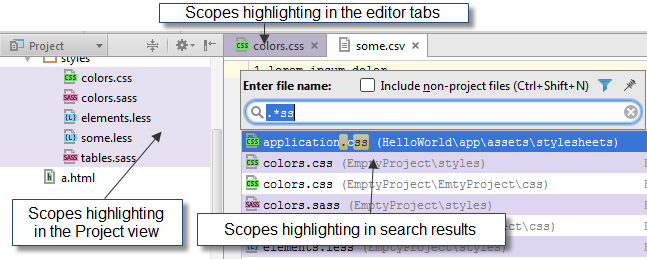
Use this page to set different background colors for distinguishing between project files of specific scopes. The settings apply to the following UI elements:
- The headers of editor tabs.
- Navigation lists when one searches for files or classes by their names
- Project Tool Window
Common Options
| Item | Description |
|---|---|
| Enable File Colors | Select this checkbox to apply background color settings to navigation lists. |
| Use in Editor Tabs | Select this checkbox to apply background color settings to the headers of editor tabs. |
| Use in Project View | Select this checkbox to apply background color settings to the Project view. |
| Manage Scopes | Click this button to define the required scopes. |
Local Colors
In this area, configure the color-scope associations to be applied locally.
Once defined, a color-scope association cannot be changed. To re-assign a color to a scope, remove the existing association and define a new one.
| Item | Tooltip | Description |
|---|---|---|
| Scope | This read-only field shows the scope to apply the color setting to. | |
| Color | This read-only field shows the color to be applied to the corresponding scope. | |
 | Add | Click this button to open the Add Color Label dialog in which you can configure a new color-scope association. |
 | Remove | Click this button to remove the selected color-scope association. |
 or or  | Move up or Move down | Use these buttons to resort the color-scope associations and thus determine the order in which they are applied. |
 | Share | Click this button to have the selected scope-color association shared among the members of the team. The selected association will be accordingly moved to the list in the Shared Colors area. |
Shared Colors
Use the controls in this area to configure the color-scope associations to be shared among all the members of the team.
Once defined, a color-scope association cannot be changed. To re-assign a color to a scope, remove the existing association and define a new one.
| Item | Tooltip | Description |
|---|---|---|
| Scope | This read-only field shows the scope to apply the color setting to. | |
| Color | This read-only field shows the color to be applied to the corresponding scope. | |
| | Add | Click this button to open the Add Color Label dialog in which you can configure a new color-scope association. |
| | Remove | Click this button to remove the selected color-scope association. |
| or | Move up or Move down | Use these buttons to resort the color-scope associations and thus determine the order in which they are applied. |
 | Unshare | Click this button to have the selected scope-color association applied only locally. The selected association will be accordingly moved to the list in the Local Colors area. |