Switching Between Schemes
You can quickly switch between various color schemes, keyboard layouts, and look-and-feels without actually invoking the corresponding page of the Settings dialog box.
Choose on the main menu or press Ctrl+`.
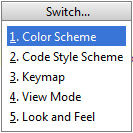
In the pop-up window that opens select the desired scheme (Color Scheme, Code Style, etc.).
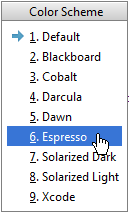
In the suggestion list, click the desired option.
Last modified: 17 January 2019