Menu Trace Tool Window
Basics
The Menu Trace tool window shows the trace of editor menu items, such as code completion or context assistant menu items.
Since the transformation and substitute menus may include other menus, each editor menu item has a trace. The trace is the list of the transformation/substitute menus and their parts. It starts with the initial transformation menu, consists of the included menus and parts, and ends with the item itself.
The trace is represented by a tree, where the child item is included in the parent item. Thus the initial transformation menu is at the tree top, and the editor menu item is at the bottom.
When you show the trace for the context assistant submenu, the corresponding item in the trace will also be shown at the bottom of the trace, but it can be expanded, so you see the children of the submenu.
Viewing the tool window
To show this tool window, do one of the following:
Place the caret in the editor, and:
Press Ctrl+Space.
Using the arrow keys, select the required completion item.
Place the caret in the cell with the context assistant and choose an item within the context assistant by pressing Ctrl+Alt+Enter.
After that, press Ctrl+Alt+B.
Toolbar buttons
Icon | Tooltip and shortcut | Description |
|---|---|---|
| Close Ctrl+Shift+F4 | Close the current tab. |
| Pin Tab | Click this button to pin or unpin the current tab. You may need to pin a tab to prevent it from closing automatically when the maximum number of tabs is reached in this window. |
| Help F1 | Open a browser and show the corresponding help page. |


Legend
If the item in the trace is in italic:
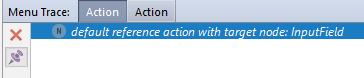
An italic item has no definition node for the corresponding menu/menu part — it was either created at runtime or at generation time. Such menus/menu parts are called implicit.
If the item in the trace is bold:
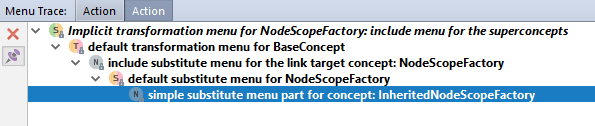
A bold item has a navigable node — either the declaration of the menu/menu part (if it is not implicit), or the node that helps you understand where the menu part comes from (if it is implicit).
To open a node, double-click the trace item.