Projectional Agent Toolkit
The Projectional Agent Toolkit makes MPS projects accessible to AI coding agents. It bundles an MCP (Model Context Protocol) server with a curated catalog of MPS-specific skills, so that agents such as Claude Code, JetBrains AI Assistant, and other MCP-aware tools can navigate, understand, and modify MPS languages and models in a structurally safe way — without resorting to brittle text edits of .mps XML files.
What the toolkit offers
When the toolkit is enabled and connected to an agent, the agent gains:
Projectional MCP tools that operate on the live MPS repository — modules, models, root nodes, the full SNode tree, language structure, editor declarations, generation, run configurations, and project-wide search. The agent reads and writes the model through these tools instead of editing serialized XML.
JSON node blueprints for creating and updating nodes by concept, properties, children, and references — including bulk root insertion and staged construction for large trees.
Validation tools for checking nodes, root nodes, and entire models against the same problem detector that MPS uses interactively (errors, warnings, and information messages).
Build and run integration that lets the agent regenerate models, rebuild modules, run JUnit-style MPS tests, and launch
IMainClassorITestCaseroots through standard MPS run configurations.A bundled MPS skill catalog — installed on demand into your project — that teaches an agent how to use the toolkit correctly. Skills cover everything from concept structure and node editing to specific aspects such as editor, constraints, typesystem, behavior, generator, migrations, intentions, dataflow, and TextGen, as well as language analysis, BaseLanguage usage, tests, and the MPS Build Language. See the Bundled skills section below for the full list.
The result is an agent that can answer non-trivial questions about your languages, locate problems in your models, scaffold new concepts and editors, write generator templates, and apply bulk refactorings — while staying inside the model's structure and respecting constraints, references, and used languages.
Before you start
To use the Projectional Agent Toolkit, you need:
JetBrains MPS 2026.1 or later, with the bundled
Projectional Agent Toolkitplugin enabled (it's enabled by default).An MCP-aware AI coding agent, for example Claude Code, JetBrains Junie, OpenAI Codex, or any other tool that can connect to an MCP server.
An open MPS project. The toolkit operates on whichever project is open in the running MPS instance.
How to configure
The toolkit runs as a built-in MCP server inside the MPS process. You connect your agent to it the same way you would connect to any other JetBrains MCP server.
Start MPS and open your project. The MCP server starts automatically and exposes the projectional tools.
In Settings | Tools | MCP Server | Exposed Tools, enable or disable the individual MCP tools that you want to expose to agents. Consider disabling some of the platform tools (without the
mps_mcp_…prefix), because they aren't relevant to MPS projects and can confuse agents.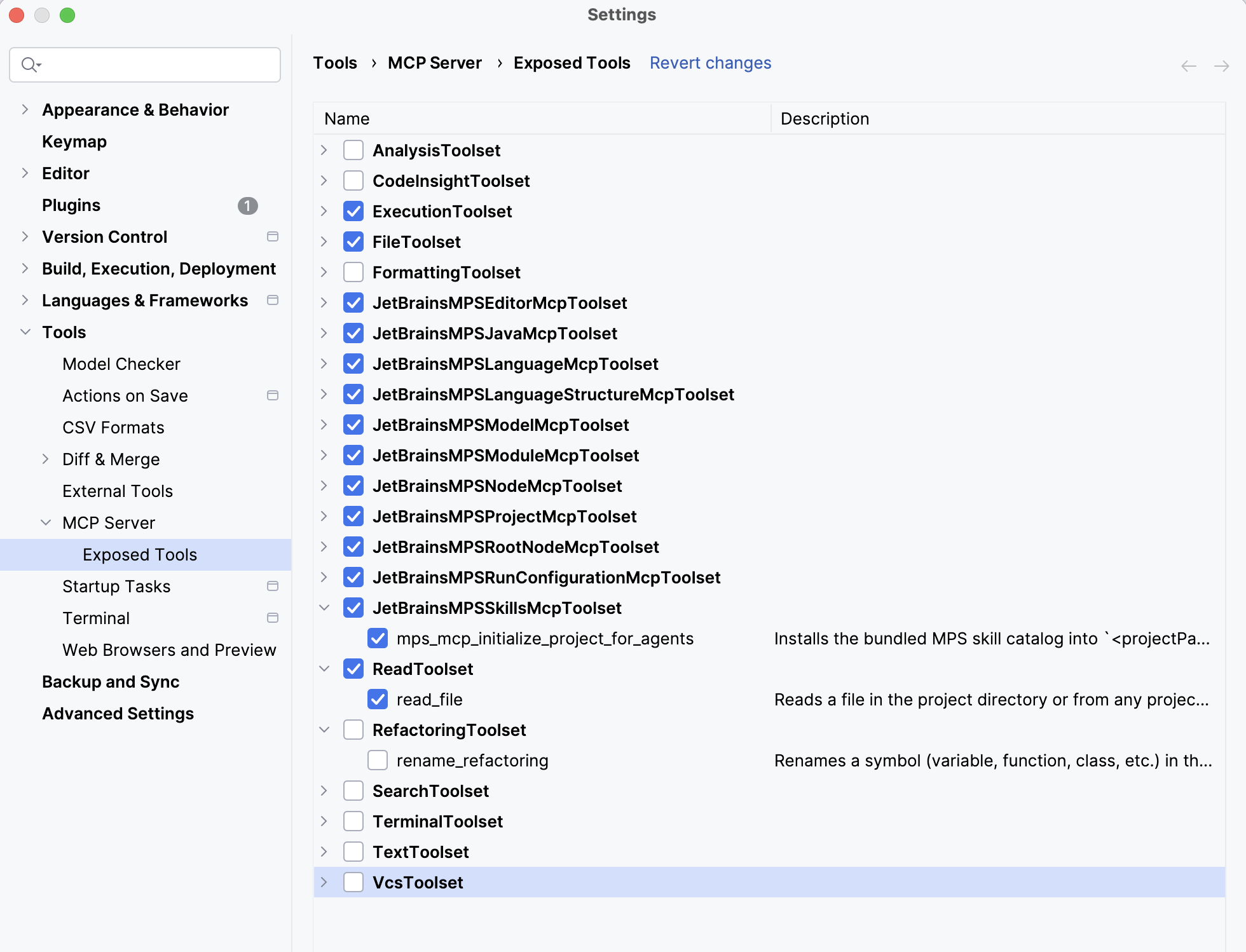
Configure your agent to talk to the MPS MCP server. The configuration steps — URL, port, and the JSON snippet to add to your agent — are described in the JetBrains help page for the IDE MCP server. See Configure the JetBrains MCP server; the same procedure applies to MPS.
From the agent, confirm the connection by asking it to list its available tools. You should see tools prefixed with
mps_mcp_…(for example,mps_mcp_get_project_structure,mps_mcp_print_node,mps_mcp_check_root_node_problems,mps_mcp_initialize_project_for_agents).
If you don't see the mps_mcp_… tools, recheck the agent's MCP configuration and make sure the MPS instance is running with the Projectional Agent Toolkit plugin enabled.
Initialize your project for agent use
Before doing real work, install the bundled MPS skill catalog into your project. This is a one-time step per project. It copies the skills into <projectPath>/.agents/skills/ and gives you a suggested AGENTS.md (or CLAUDE.md) entry point that points the agent at those skills.
The recommended way is to ask the agent to do it. The toolkit exposes a dedicated tool, mps_mcp_initialize_project_for_agents, that performs the copy and returns the recommended AGENTS.md content.
A short prompt is usually enough:
What happens next:
The agent calls
mps_mcp_initialize_project_for_agentsagainst your open project.The tool scans
<projectPath>/.agents/skills/. If any folder there has the same name as a skill that would be installed, the tool aborts without touching disk and reports the collisions. Resolve them (rename or delete the conflicting folders) and re-run.On success, the tool copies every bundled skill into
<projectPath>/.agents/skills/<skill-name>/and returns the recommendedAGENTS.mdbody in its response.The agent writes that content to
AGENTS.md(and, typically, a one-lineCLAUDE.mdthat references it).In a setup when the project root is a subfolder of the VCS root, start the agent and install the skills in the VCS root. The agent will find the MPS project itself through mcp, if the project is open in MPS.
Multiple project subfolders of a single VCS root age handled the same way. Just make sure to have the desired project open in MPS. If multiple projects are open, the agent will ask you to disambiguate, if the desired project is not clear from the context or your prompt.
The root of an MPS project after a successful agent initialization will look like this:
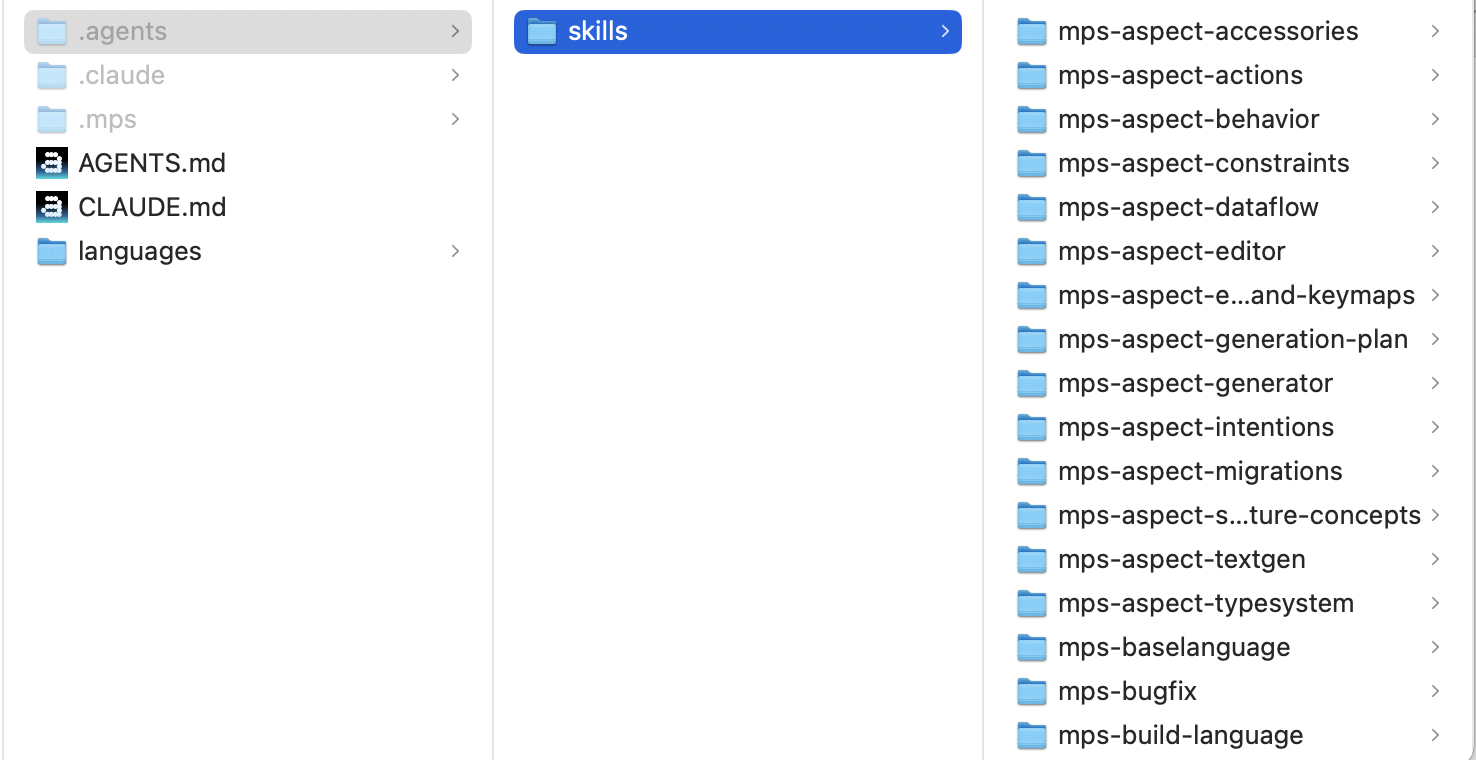
From this point on, any agent opened against the project will discover the skills automatically and follow the entry-point file.
Refreshing the agent's configuration and skills
Each MPS release may include new or updated skills and configuration. After upgrading MPS, refresh the project's agent files to pick up the latest versions. A short prompt is enough:
Agents working with outdated skills may make more mistakes and require more corrections, so refresh after every MPS upgrade.
Additional configuration tips
The Terminal tool window in MPS supports running CLI coding agents, so you can interact with the agent directly inside MPS.
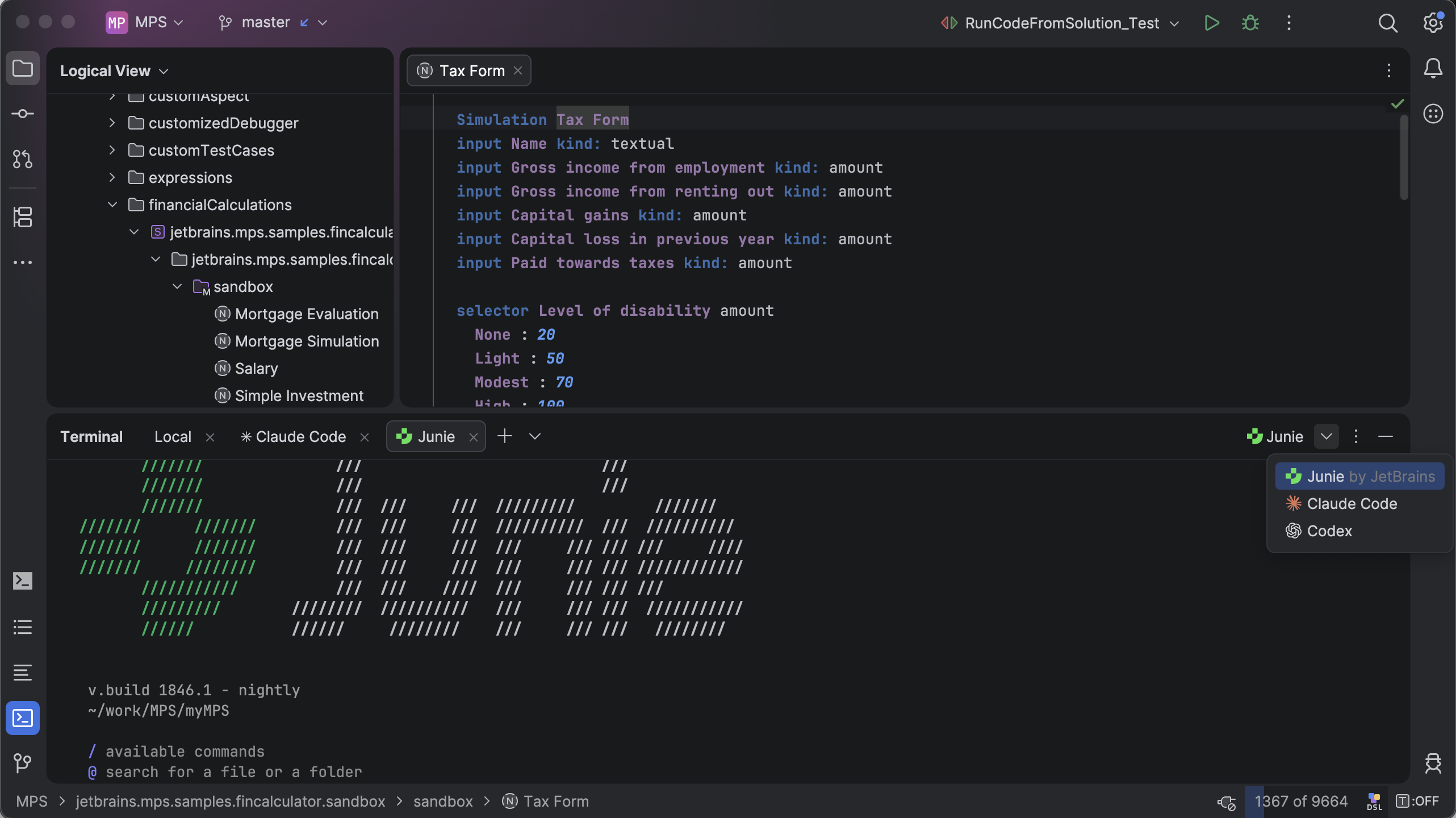
For Claude Code specifically, verify that ENABLE_TOOL_SEARCH is set to
true(it is the default, but some environments may have overridden it):"env": { "ENABLE_TOOL_SEARCH": "true" },This reduces the number of context tokens consumed by the numerous MPS tools.
Practical ideas on what agents can do with MCP-enabled MPS
When working with agents on MPS code, knowing these tips may come in handy:
Agents can see the current node open in the editor.
Agents can open nodes in the editor, just ask them.
Agents can see the problems (warnings and errors) reported by the model checker in code.
Agents can explain MPS code to you.
Agents can explain MPS principles to you if you're not familiar with them.
Agents can write code in the MPS Console, execute console commands, and browse the console history.
Agents can create run configurations and execute them.
Agents can see and trigger intentions as well as quick-fixes associated with nodes.
Multiple agents can work on a single project at the same time.
Once a language structure is set, you can have multiple agents working on different aspects of language definition concurrently.
Subagents may be conveniently utilized for parallel work on independent tasks of the same MPS model or language.
Make sure you initialize your project for agent use — without the skills installed and the AGENTS.md/CLAUDE.md entry point, agent performance will degrade significantly.
If you see an agent reading or writing MPS model files directly, stop it and redirect it to use the MPS MCP tools.
Prefer working in smaller steps to keep the context size manageable for the agent. Instead of having an agent design a complete language, ask it to do a single aspect at a time, or split the big task into multiple pieces of cross-aspect functionality.
/rewindin Claude Code can save you tokens when you let the agent forget the latest part of your conversation. For example, for a conversation like:You: "Define structure"
Agent: "Structure created"
You: "Create editor"
Agent: "Editor created"
You can use
/rewindto roll back the conversation and have the agent forget the editor creation part while keeping the code on disk. This frees up context before you ask the agent to create the generator or the constraints aspect. The structure part of the conversation is still needed, so keep it in context.If you want to use a less powerful model:
Split the goal into smaller tasks with clear boundaries, and free unnecessary context after each task if possible.
Provide more guidance and be specific. For example, say
Create a constraints root for concept X, define the 'can be child' function to enforce …instead ofEnforce … on X.Explicitly load required skills, such as
/mps-mcp-workflow,/mps-model-manipulation,/mps-baselanguage, and/mps-node-editing, do not leave the skill selection process to the agent's randomness.
Recommended agent configurations
Not every agent and model combination is a good fit for every kind of MPS work. In general, the most powerful models are best suited for defining the generator, constraints, and typesystem aspects, and for all code that mixes BaseLanguage with extensions such as smodel. Less powerful models can save you money on less demanding aspects — structure or editor definitions. Code or language introspection can also work well with less powerful models. When authoring code in a DSL, the required model capability depends largely on the complexity of the DSL and the task.
Documenting your DSLs with mps-dsl-memory
When you work with MPS languages and DSLs alongside AI agents, you can create project-local documentation that helps agents understand your custom languages and work more effectively with them.
The mps-dsl-memory skill enables you to bootstrap or refresh DSL documentation by systematically capturing:
Concept hierarchies — which concepts are rootable, their properties, child roles, and references
Sandbox examples — representative model instances and their structure
Workflows — recipes for creating and editing common DSL patterns
Gotchas — reference formats, ordering constraints, and validation rules specific to your language
Blueprint templates — reusable JSON skeletons and subtrees for common operations
When to use
Use mps-dsl-memory when:
You have a new MPS language or DSL, and you want AI agents to work with it effectively.
An existing DSL skill is outdated and needs a refresh after language changes.
You want to preserve your knowledge about a DSL in a persistent, reusable form for future sessions.
How it works
The skill analyzes your MPS project to discover language concepts and sandbox examples, then generates a structured documentation package under .agents/skills/<dsl-name>-dsl/. This includes reference files for concepts, sandbox models, common workflows, and known gotchas, designed to be consumed by AI agents in future sessions.
The generated skill stays in your project and requires no external tools or services. You can refine and maintain it alongside your language definitions, updating it as your DSL evolves.
What you get
Once documentation is generated, agents in future sessions will have detailed references for:
Which concepts can be roots and how they should be structured.
What properties and relationships each concept supports.
Where to find working examples in your sandbox models.
Common patterns and potential pitfalls specific to your language.
Ready-to-use JSON templates for creating new models.
This accelerates your work with AI agents because they can leverage this project-specific knowledge automatically, without requiring you to re-explain your DSL structure each time.
Working with the toolkit: prompting tips
The bundled skills are written so that an agent can follow them. To get the most out of them, your prompts should encourage the agent to load the relevant skill, use the MCP tools, and validate its work. This matters most for less capable LLMs — top-of-the-line models typically apply these tips on their own, guided by the instructions in AGENTS.md/CLAUDE.md.
Point the agent at the right skill
Skills are organized by topic. Naming the area you're working on helps the agent load the right SKILL.md instead of guessing. For example:
"I'm changing the editor for
ClassConcept. Loadmps-aspect-editor-menus-and-keymapsand the editor technical reference first.""This is a generator template issue — start with the
mps-aspect-generatorskill.""Before editing the typesystem rules, read
mps-aspect-typesystem.""You're writing tests in an MPS test model — read
mps-tests."
If you aren't sure which skill applies, ask the agent to consult mps-language-aspects-overview or mps-mcp-workflow first; these act as indexes into the rest of the catalog.
Prefer projectional MCP tools over file edits
State explicitly that you want changes made through MCP tools, not through text edits of .mps files. A useful framing:
"Use only the MPS MCP tools to make changes. Do not hand-edit
.mpsmodel files.""Resolve concepts and nodes by persistent reference before editing."
"After every structural change, run
mps_mcp_check_root_node_problemson the affected root."
Work in small, validated steps
Agents work best when they validate as they go. Ask for an explicit loop:
Explore the project with
mps_mcp_get_project_structureandmps_mcp_search_root_node_by_name.Print the relevant nodes with
mps_mcp_print_node.Propose a JSON blueprint or operation.
Apply it with the appropriate tool (
mps_mcp_update_node,mps_mcp_insert_root_node_from_json,mps_mcp_update_root_node_from_json, …).Validate with
mps_mcp_check_root_node_problems.Regenerate or rebuild as needed (
mps_mcp_alter_nodeswithMAKE).
A prompt template that captures this:
Use names, then references
When pointing the agent at something, start with names ("the Calculator root node in model calc.demo ") and let it resolve them to persistent references via the MCP tools. Avoid pasting MPS XML short IDs from .mps files — they are an internal encoding and aren't interchangeable with the persistent references the tools expect.
Keep the agent honest
If the agent claims a change has been made, ask it to:
print the affected node back with
mps_mcp_print_node,show the validation result, and
rebuild (or regenerate) if downstream Java or Kotlin code is involved.
This catches the common failure mode where an agent describes a change in prose without actually committing it through the tools.
Use /rewind
The /rewind command of Claude Code can save a considerable number of tokens if used wisely. For example, when defining a language, you typically first define the structure and then the editor. Before you move on to, say, the generator, use /rewind to roll the conversation back to the point where structure was complete, discarding the editor details and freeing up context space.
Bundled skills
mps_mcp_initialize_project_for_agents installs the following skill set into .agents/skills/. Each skill is a self-contained SKILL.md (with optional supporting files) that teaches the agent how to use the toolkit for a specific area.
Workflow and orientation:
mps-mcp-workflow,mps-language-aspects-overview,mps-language-analysis,mps-language-inheritance,mps-language-modularity,mps-dsl-memory.Structure and nodes:
mps-aspect-structure-concepts,mps-node-editing,mps-quotations,mps-model-manipulation.Language aspects:
mps-aspect-accessories,mps-aspect-actions,mps-aspect-behavior,mps-aspect-constraints,mps-aspect-dataflow,mps-aspect-editor,mps-aspect-editor-menus-and-keymaps,mps-aspect-generation-plan,mps-aspect-generator,mps-aspect-intentions,mps-aspect-migrations,mps-aspect-textgen,mps-aspect-typesystem.BaseLanguage and DSLs:
mps-baselanguage,mps-console,mps-lang-core-xml.Tests, build, and tooling:
mps-tests,mps-build-language,mps-distribution-build,mps-ide-plugin,mps-run-configurations.
Skill files are copied into your project, so you can inspect, customize, or extend them. Project-local edits aren't overwritten on subsequent runs of mps_mcp_initialize_project_for_agents; the tool refuses to overwrite an existing skill folder and instead reports the collision.
MCP tool reference
The following tools are exposed by the Projectional Agent Toolkit MCP server. Tool names are prefixed with mps_mcp_ and are visible to any connected agent.
Console
Tool | Description |
|---|---|
| Inserts a JSON-blueprint node into the MPS Console input editor as editable code. |
| Lists the Console's command history (oldest first). |
| Copies a past Console command back into the input field without running it. |
| Runs whatever is currently in the Console input editor against the live project. |
Editor
Tool | Description |
|---|---|
| Auto-generates a default |
Project, modules, and models
Tool | Description |
|---|---|
| Lists IDE projects currently open in this MPS MCP server. |
| Project discovery, name-based searching, and dependency analysis. |
| Reloads all modules in the MPS project. |
| Creates a new empty MPS module of the given type. |
| Updates or deletes an MPS module. |
| Returns the facets installed on a module. |
| Lists all available MPS module facet types. |
| Updates or deletes a module facet. |
| Adds or removes a module dependency with scope control. |
| Creates a new empty model in a given module. |
| Updates an MPS model (rename, re-stereotype, and so on). |
| Adds or removes model imports, and ensures the module has a matching Default dependency. |
| Adds or removes a used language or devkit from a model. |
Nodes
Tool | Description |
|---|---|
| Creates a new root node in the specified model. |
| Bulk-creates one or more root nodes from a JSON blueprint with atomic rollback. |
| Rewrites or deletes a root node from a JSON blueprint. |
| Surgical property, reference, and child updates on any node. |
| Structural mutations: move children, reparent nodes, make/rebuild, fix references. |
| Saves a JSON printout of the specified node to a temp file. |
| Read-only node queries: find instances and usages, get parent, root, model, and siblings. |
| Returns the node currently focused in the MPS editor. |
| Opens a node in the MPS editor. |
| Validates a root node (and its descendants) or a full model. |
| Finds root nodes whose name matches any of the given strings. |
| Parses Java source with MPS JavaParser and inserts the result as MPS nodes. |
Intentions & Quick-fixes
Tool | Description |
|---|---|
| Lists the intentions and quick-fixes available on a node (the headless equivalent of the editor's Alt+Enter menu). |
| Applies one intention or quick-fix from a listing or a check report, inside an undoable command. |
Language structure
Tool | Description |
|---|---|
| Creates, renames, and deletes concepts, enumerations, properties, children, and references. |
| Read-only structure queries: inheritance, aspects, references, enum literals, and smart-ref status. |
| Returns detailed metadata for listed concepts or all concepts in a language. |
| Free-text search for concepts and interface concepts (AND-combines multi-word queries). |
Miscellaneous
Tool | Description |
|---|---|
| Installs AI-agent skill catalogs and guide files into an MPS checkout. |
| Creates a run configuration for a root node ( |
Troubleshooting
Agent doesn't see
mps_mcp_…tools. Make sure MPS is running with the Projectional Agent Toolkit plugin enabled and the agent is connected to the MPS MCP server. See Configure the JetBrains MCP server.mps_mcp_initialize_project_for_agentsfails with a collision error. A folder under.agents/skills/already uses the name of a bundled skill. Move or rename it and run the tool again.Agent edits
.mpsfiles directly. Re-prompt with explicit instructions to use only MPS MCP tools, and referencemps-mcp-workflowand the entry-point file (AGENTS.mdorCLAUDE.md).Changes aren't reflected in generated Java or Kotlin. Ask the agent to run
mps_mcp_alter_nodeswithMAKEon the affected models or modules, and to check for compilation problems afterwards.A call to an MCP tool never returns. Check whether MPS has a modal dialog open. A modal dialog blocks the EDT and can prevent the server from acquiring the write lock needed for MCP processing. Another possibility is that the agent's request was rejected by the client-side implementation of the MCP protocol because it didn't have enough permissions to run a potentially harmful, state-mutating MCP tool. In both cases, asking the agent why the MCP call failed should clarify what happened.
References
Configure the JetBrains MCP server — connecting MCP-aware agents to JetBrains IDEs and MPS.
Model Context Protocol — the open protocol used by the toolkit.
MPS User's Guide — main entry point to MPS documentation.