General
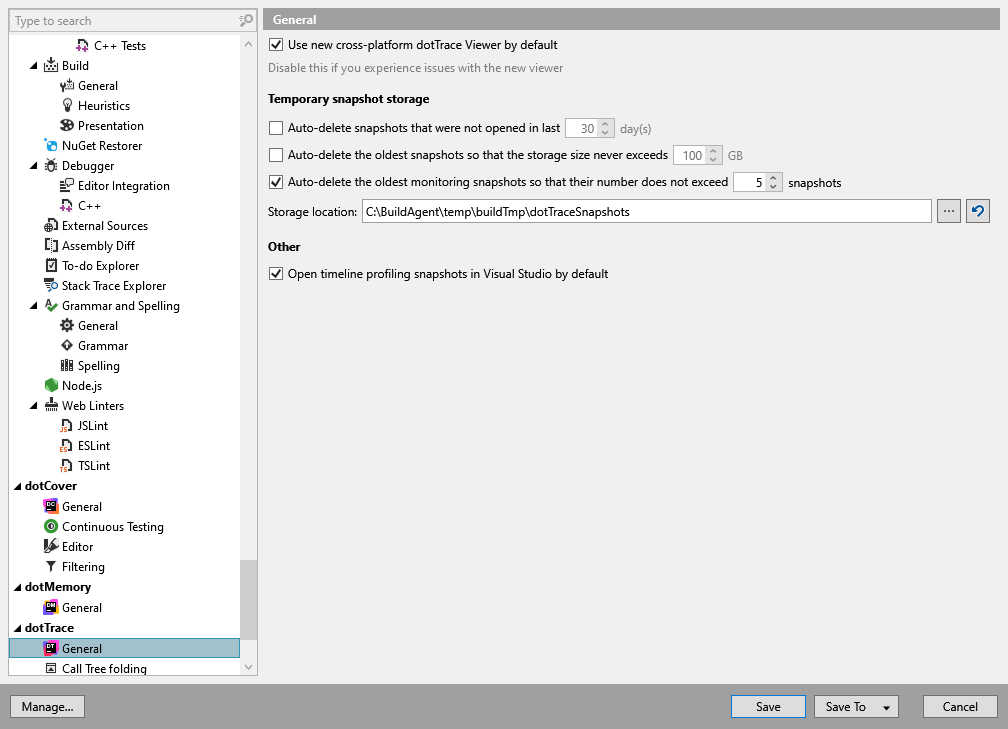
Temporary snapshot storage
Auto-delete snapshots that were not opened in last | Deletes temporary snapshots that you have not opened for the specified number of days. Snapshots marked as favorites are excluded when the value is greater than zero. Set the value to |
Auto-delete the oldest snapshots so that the storage size never exceeds | Limits temporary snapshot storage to the specified size in GB. When the limit is exceeded, cleanup deletes snapshots in order of last access, starting with those you have not opened for the longest time. Favorites are excluded when the limit is greater than zero, so they can prevent cleanup from reaching the limit. Set the value to |
Auto-delete the oldest monitoring snapshots so that their number does not exceed | Keeps the specified number of most recently accessed temporary monitoring snapshots and deletes older ones. Favorites are excluded from both deletion and the count. Set the value to |
Storage location | The folder where dotTrace stores temporary snapshots. Enter a path or use the browse button to select a folder. |
Other
Open timeline profiling snapshots in Visual Studio by default | When this option is enabled, double-clicking a timeline snapshot in the Performance Profiler window opens it in the viewer integrated into Visual Studio. Clear this checkbox to open timeline snapshots in the standalone dotTrace viewer. This option is enabled by default. |