Find vulnerable NuGet packages and APIs
ReSharper checks NuGet dependencies of your projects for known vulnerabilities. It highlights vulnerable package references and usages of methods that are known to be vulnerable. To determine vulnerabilities, ReSharper uses the list of advisories at Mend.io, each of which applies to a specific package and a specific version of that package.
The following code inspections report two types of problems:
Inspection | What it highlights | Where |
|---|---|---|
References to methods that are identified as vulnerable | C# code, normally in .cs files | |
Package references with known vulnerabilities, including vulnerabilities in transitive dependencies (packages that another package requires) | MSBuild files, such as .csproj files |
Find vulnerable package references in project files sources
The NuGet package is vulnerable inspection checks <PackageReference> declarations in MSBuild files. It reports vulnerabilities in the declared package and in its transitive dependencies. It also supports references whose versions come from central package management if ReSharper can resolve the installed version.
Review a vulnerable package reference
Open a project file, such as a .csproj file.
Hover over a highlighted package reference. The tooltip shows the affected package.
To read the advisory or update the package, place the caret at the highlighted reference and press Alt+Enter.
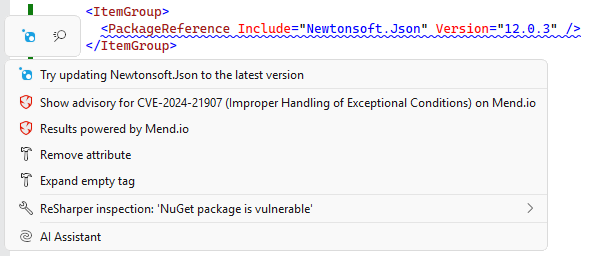
For a transitive vulnerability, the update action targets the declared package that brings in the vulnerable dependency.
Configure vulnerability inspections
You can change the severity level of the Vulnerable API usage and NuGet package is vulnerable inspections or disable them on the page of ReSharper options Alt+R, O. Use the search field on this page to find the inspections by name.
You can also configure the inspections in .editorconfig files. For example, the following lines change the severity of the Vulnerable API usage inspection to Error and disable the NuGet package is vulnerable inspection:
The available values are error, warning, suggestion, hint, and none.