Editor Basics
The editor has a lot of visual elements that help you read, write, and navigate the code. Let's take a look at some of them.
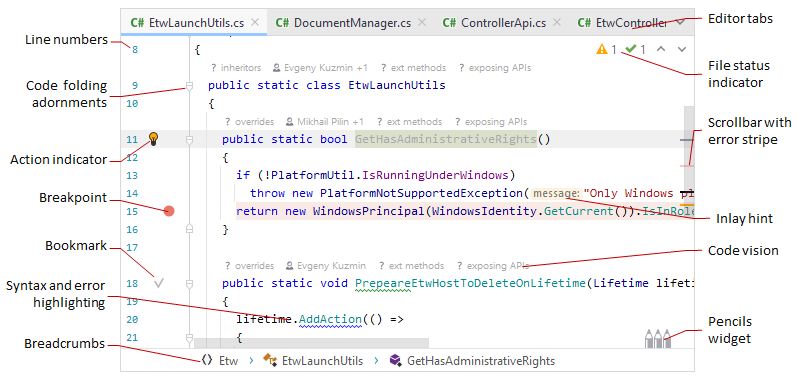
|
|
In this section:
- Handle Caret and Select Text
- Multiple carets and selection ranges
- Cut, Copy, Paste
- Add, Delete, and Move Lines
- Toggle Case
- Inlay Hints
- Code Vision
- Fold Code Elements
- Save and Revert Changes
- Editor Tabs
- Macros
- Zoom in the Editor
- Files with delimiter-separated values
You can use the following shortcuts for basic editing tasks:
Basic editing
| Cut | Ctrl+X |
| Copy | Ctrl+C |
| Paste | Ctrl+V |
| Paste as Plain Text | Ctrl+Alt+Shift+V |
| Paste from History... | Ctrl+Shift+V |
| Duplicate Line or Selection | Ctrl+D |
| Copy Paths | Ctrl+Shift+C |
| Copy Reference | Ctrl+Alt+Shift+C |
| Save All | Ctrl+S |
| Undo | Ctrl+Z |
| Redo | Ctrl+Shift+Z |
| Indent Selection | Tab |
| Unindent Line or Selection | Shift+Tab |
| Start New Line | Shift+Enter |
| Start New Line Before Current | Ctrl+Alt+Enter |
| Delete Line | Ctrl+Y |
| Toggle Case | Ctrl+Shift+U |
| Scratch File | Ctrl+Alt+Shift+Insert |
| Open source in new window | Shift+F4 |
| Show Whitespaces | Ctrl+R, W |
| Soft-Wrap | Ctrl+E, W |
For the full list of JetBrains Rider keyboard shortcuts, see Keyboard shortcuts in predefined keymaps.