Visual interface for EF Core commands
In Entity Framework Core projects — projects where Microsoft.EntityFrameworkCore.* 5.0.0 or later is installed — JetBrains Rider helps execute dotnet EF Core commands using a visual interface. Each command has a dedicated dialog that provides fields for most arguments that are allowed, autofills most of them, and ensures that all required arguments are specified and valid.
This functionality is a visual wrapper around the dotnet ef command; therefore, first you need to make sure that the corresponding dotnet tool is installed and available.
When you open a solution with at least one EF Core project, JetBrains Rider will check whether the dotnet ef is available as a local or as global tool (dotnet ef 5.0 or later is required). If not, it will prompt you to install the latest version as a global tool.
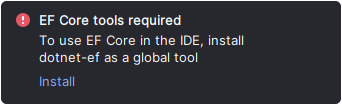
You can also install any other version using the corresponding command, for example:
Execute EF Core commands
Select from the main menu.
Right-click the desired project in the Solution Explorer and choose .
The details of specific EF Core commands are described in the dedicated topics:
- Entity Framework Core: Add Migration
- Entity Framework Core: Remove Last Migration
- Entity Framework Core: Update Database
- Entity Framework Core: Generate SQL Script
- Entity Framework Core: Drop Database
- Entity Framework Core: Scaffold DbContext
- Entity Framework Core: troubleshooting
Prerequisites
Target .NET frameworks:
netcoreapp3.1and later for the Startup project, andnetstandard2.1and later for the Migrations project.To install the .NET, follow the Microsoft documentation.
EF Core packages:
Microsoft.EntityFrameworkCore.*5.0.0 or later.Tools:
dotnet ef5.0 or later.To install the EF Core Global Tool, run the following command in the terminal:
dotnet tool install --global dotnet-ef