Code Analysis Tool Integration
If your CI server uses a code analysis tool that supports exporting SARIF formatted reports, you can integrate it with SpaceCode to display static code analysis results in SpaceCode merge request diffs.
SpaceCode HTTP API has a dedicated endpoint that can accept code analysis reports as a sarif formatted .json file generated by a code analysis tool for modified code fragments.
The way you set up the integration depends on your CI server and code analysis tool specifics, however the general principles remain the same:
An automated job or pipeline is set up on your CI server to run when a new merge request is created or a commit is pushed to an existing merge request.
The job is triggered by a webhook configured on the SpaceCode end or, as an alternative, by polling your SpaceCode repository for changes in branches using the regular expression
refs/merge/(.*?-MR-\\d+)/headwhich SpaceCode creates for each merge request.When triggered, the job receives the branch name, extracts the merge request id, and requests SpaceCode API for the source and target commit id's.
Finally, the job launches a code analysis tool which is instructed to only analyse new changes. The resulting report is generated as a SARIF formatted file and uploaded to SpaceCode.
Code analysis API
SpaceCode HTTP API has a dedicated endpoint that can be used to receive SARIF reports from a code analysis tool for a specific commit:
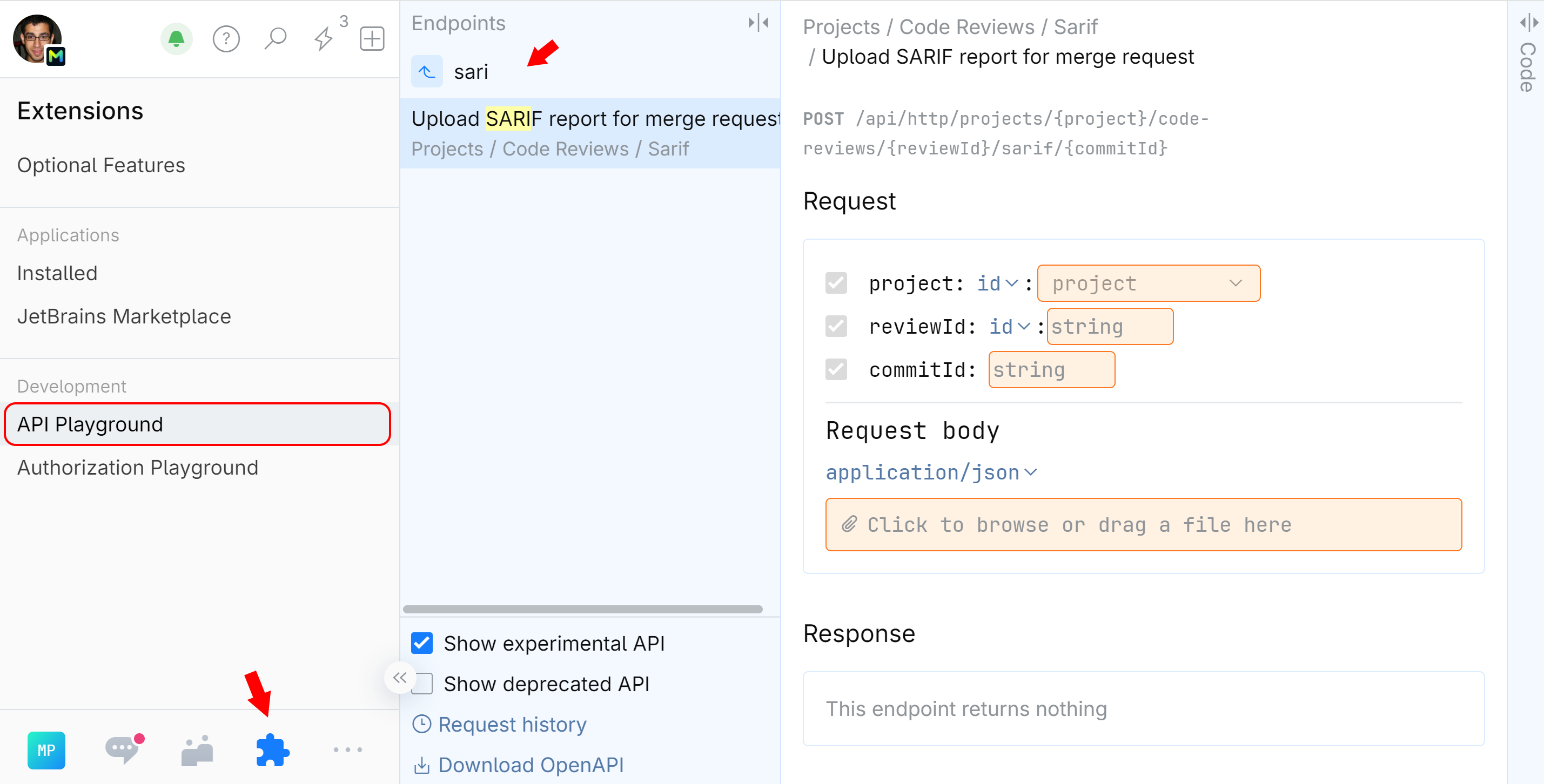
POST /api/http/projects/{project}/code-reviews/{reviewId}/sarif/{commitId}
where
{project}is an identifier of the SpaceCode project which should display code analysis. Either a project ID or project key can be used:key:MY-PROJECT-KEYorid:my-project-id{reviewId}is an identifier of the merge request. Either a merge request ID or number can be used:id:mr-idornumber:mr-number{commitId}is an identifier of the latest commit in the merge request:id:commit-id
A SARIF formatted report fetched from your code analysis tool is submitted in the request body as a .json file.
Authorization
This endpoint requires that the caller is granted the Report code issues for repository permission. Make sure to grant this permission to the SpaceCode application or user that will be uploading SARIF files to SpaceCode API.
To experiment with the endpoint and test your configuration, use SpaceCode HTTP API Playground:
On the main menu, click
 Extensions then choose API Playground.
Under the endpoints list, select Show experimental API.
In the endpoint search field, type
sarifand click Upload SARIF report for merge request. The SARIF endpoint will be displayed.