Snapshot Dependencies
By setting a snapshot dependency of a build (for example, build B) on another build's (build A) sources, you can ensure that build B will start only after build A is run and finished. We call build A a dependency build, whereas build B is a dependent build.
The Build Configuration Settings | Dependencies page displays the configured dependencies; the Snapshot Dependencies section of this page allows previewing the build chain and its configuration. The preview shows builds of the chain; the builds with configured automatic triggers are marked with  icon.
icon.
A snapshot dependency has the following options:
Option | Description |
|---|---|
Depend on | Specify the build configuration to depend on. In our example, select build A as a dependency of the current build B. |
Enforce revisions synchronization | Specifies whether TeamCity should ensure both objects linked by a dependency use the same revision of code sources.
See the Turned off Enforced Revisions Synchronization section for more information on effects this setting has on a build chain. |
Do not run new build if there is a suitable one | If this option is enabled, TeamCity will not run a new dependency build, if another running or finished dependency build with the appropriate sources' revision already exists. See Suitable builds for more information on criteria TeamCity uses to determine a reusable build. In this case, when a dependent (downstream) build is triggered, the dependency (upstream) build is also put into the queue. Then, when the changes for the build chain are collected, this dependency build is removed from the queue and the dependency is set to a suitable finished build. |
Only use successful builds from suitable ones | A new triggered build will only use successfully finished suitable builds as dependencies. If the latest finished suitable build fails, it will be rerun. |
Run build on the same agent | When enabled and B snapshot-depends on A, each build B is run on the same agent where build A from the same build chain was run. |
On failed dependency/ On failed to start/canceled dependency | These settings let you control whether a dependent (downstream) build should run if its dependency (upstream) build fails, and, if it should, whether the same build problem should appear in its results.
|
Suitable Builds
In terms of snapshot dependencies, a suitable build is a build which can be used instead a queued dependency build within a build chain. That is, a queued build which is a part of a build chain can be dropped — and the builds depending on it can be made dependent on another queued, running, or already finished "suitable" build. This behavior only works when the " Do not run new build if there is a suitable one " option of a corresponding snapshot dependency is enabled.
For a build to be considered "suitable", it should comply with all these conditions:
It must belong to the same or the default branch.
It must use the same sources' snapshot as the entire queued build chain being processed. If the build configurations have the same VCS settings, this means the same sources' revision. If the VCS settings are different (VCS roots or checkout rules), this means the revisions taken simultaneously at some moment in time.
It must be successful (if the " Only use successful builds from suitable ones " snapshot dependency option is enabled).
It must be a usual, not a personal build.
It must have no customized parameters, including those set via
reverse.dep.parameters (related feature request: TW-23700).The original build must not be triggered by the "Rebuild" action for the dependency build configuration.
It must have no VCS settings preventing effective revision calculation, see more details.
There is no other build configuration snapshot-depending on the current one with the disabled " Do not run new build if there is a suitable one " option.
The running build is not "hanging".
The settings of the build configuration have not changed since the build (that is, the build was run with the current build configuration settings). This also includes no changes to the parameters of all the parent projects of the build configuration. You can check if the settings were changed between several builds by comparing
.teamcity/settings/digest.txtfile in the hidden build's artifacts.If there is also an artifact dependency in addition to the snapshot one, the suitable build should have artifacts. Otherwise, a build with no published artifacts and a build whose artifacts were removed during a cleanup are both equally suitable.
All the dependency builds (the builds the current one depends on) are "suitable" and are appropriately merged.
VCS Settings Disabling Builds Reuse
Some settings in VCS roots can effectively disable builds reuse. These settings are:
Subversion: Checkout, but ignore changes mode
CVS: Checkout by tag mode
Perforce: Stream or Client connection settings, or label is specified as the Label/revision to checkout
Starteam: checkout mode option set to view label or promotion date
Parallel Tests in Upstream Chain Builds
The Always run new build behavior (snapshot dependency Do not run new build if there is a suitable one setting disabled) affects only the main configuration build. Virtual build configurations that spawn dynamically when the Parallel Tests feature is used might still reuse their previous results. If no new repository commits were detected, only previously failed test batches run new builds, while successful batches are reused.
In the figure below, the "Composite Conf" configuration depends on "Maven App" configuration. The latter runs its tests in two parallel batches. Note that the main "Maven app" build #18 is triggered anew, whereas the dynamically spawned "Maven app 1" configuration reuses its previous successful build (#12).
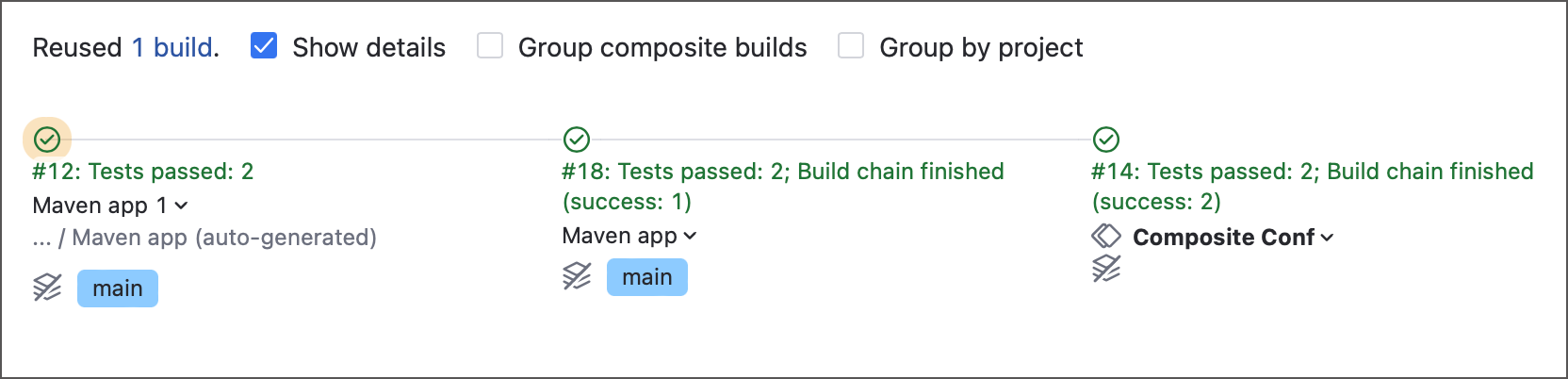
You can force TeamCity to re-run all virtual configuration builds. In this case, even if no new repository commits were found, every individual test batch will run anew.
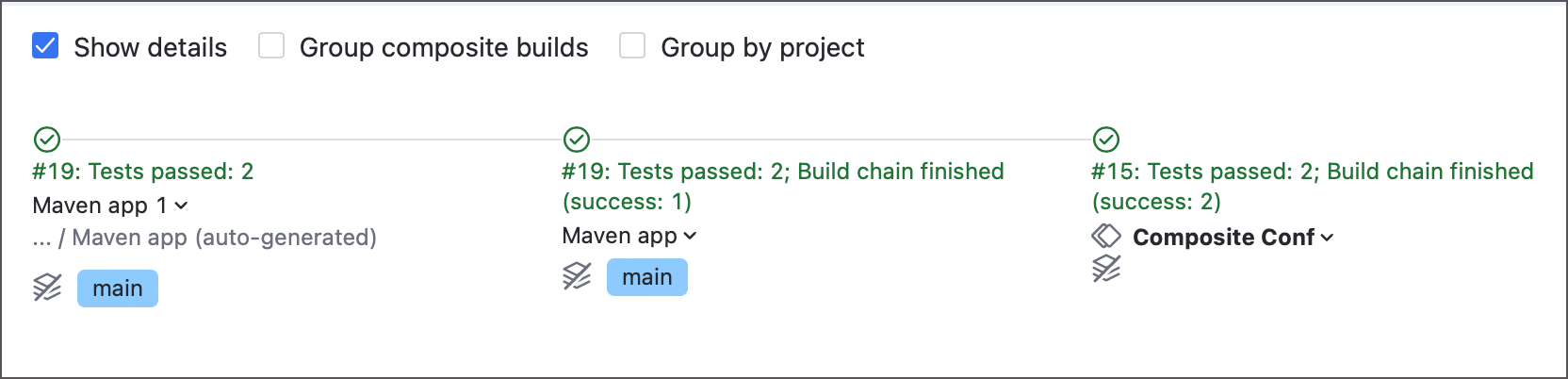
To do so, add the teamcity.internal.splitBuild.dependency.takeStartedBuildWithSameRevisions=false parameter to the configuration with parallel tests feature.
To apply this behavior to all configurations on the server, add this parameter to the internal properties list.