Dependencies Triggers
Administration > <project> > <build configuration> > Build triggering > Dependencies tab
Use this tab to create a list of build configurations which the current build configuration depends on. If such relationship exists, the build of dependent build configuration will start only after the successful completion of the dependency.
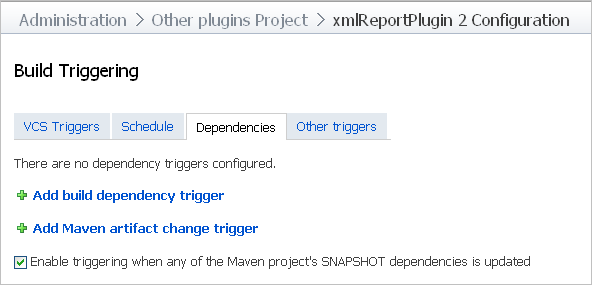
Option | Description |
|---|---|
Add build dependency trigger | Click to show a list of existing projects and their build configurations, from which you can select the dependencies. |
Add Maven artifact change trigger | Click to Configuring Maven Artifact Change Trigger to start a build if a Maven artifact has changed. For a Maven project you can also set trigger on a snapshot dependency by selecting the corresponding check box. |
Delete | Click to eliminate the selected dependency. |
Add Maven Artifact Trigger Dialog
This dialog allows to configure triggering of a build, if a specified Maven artifact has changed.
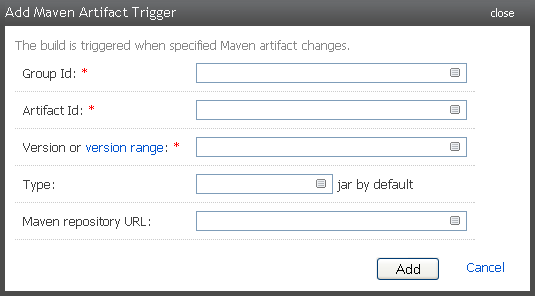
Parameter | Description |
|---|---|
Group Id | Specify identifier of a group the desired Maven artifact belongs to. |
Artifact Id | Specify the artifact's identifier. |
Version or Versions range | Specify version or versions rage of the artifact. For details about the version range syntax, please refer to the Configuring Maven Artifact Change Trigger page. |
Type | Define explicitly the type of the specified artifact. By default, the type is |
Maven repository URL | Specify URL to the Maven repository. Note, that this parameter is optional. If the URL is not specified, then:
|
Add | Click to create new trigger with specified parameters. |
Cancel | Close the dialog without saving. |