2026.10.0423
This release supports JetBrains IDEs up to version 2026.3.
New frontend look and feel
The frontend has a refreshed look, with clearer typography, spacing, colors, and layout. Controls are more consistent across themes and screen sizes.
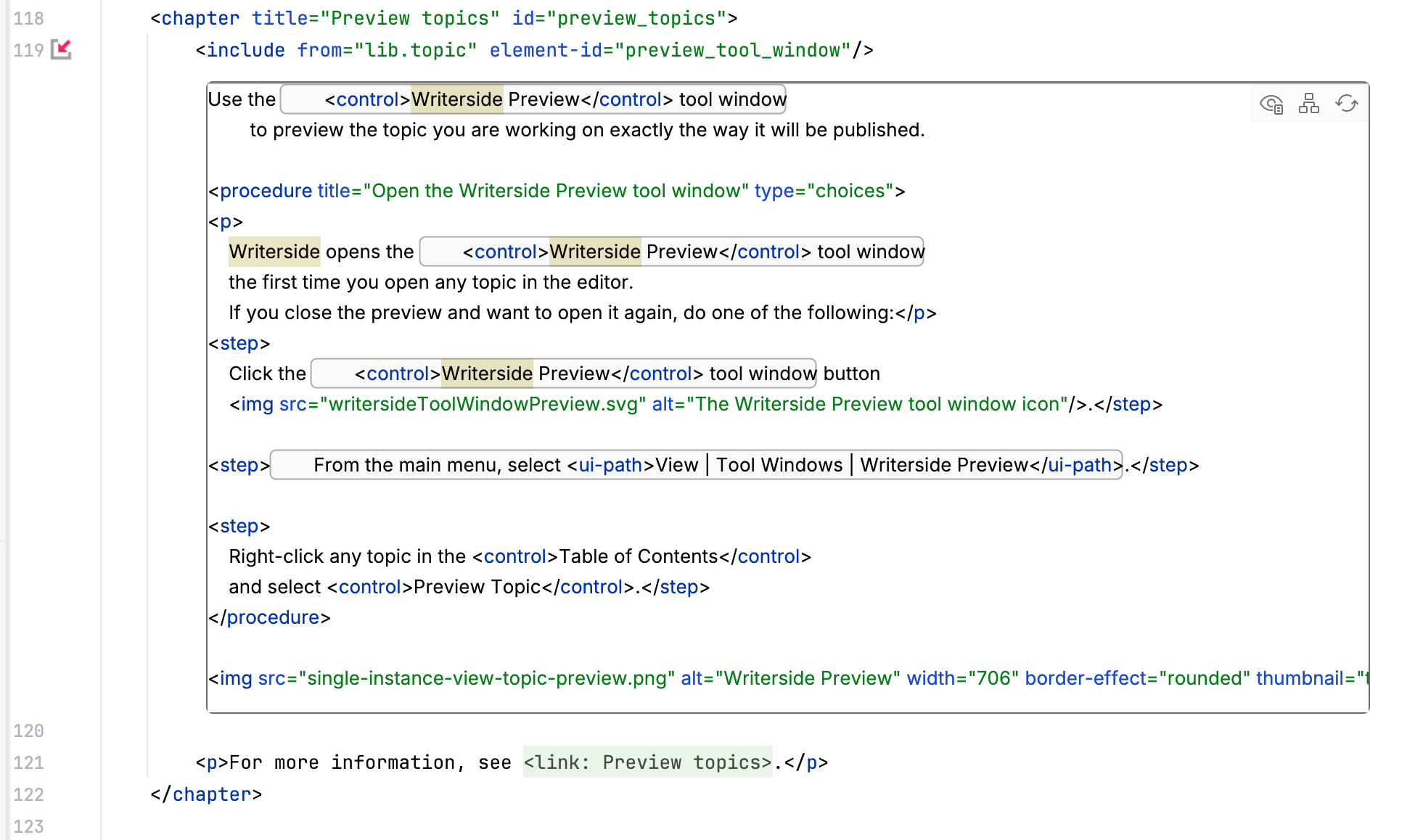
Better include preview in the editor
The editor now shows an icon in the gutter next to every <include> element. Click this icon to see what is included inline. You can switch between the raw content of the included element and how the markup will be included with all internal elements resolved: nested includes, filters, variables replaced by their actual values.
llms.txt improvements
There is now a proper directive pointing to llms.txt from the <head> of every HTML file. Also, Starting pages now have HTML content in them.
When you enable llms.txt, Writerside produces a Markdown version of every topic. If a Markdown version of a page is available, your readers will see a button at the top allowing them to open or copy the Markdown version.
For more information, see Generate llms.txt.
Timeline
The new <timeline> element adds a timeline block useful for documenting a changelog:
The previous example renders like this:
- 2026.3
Awesome future release
- 2026.2
The current release
- 2026.1
A list:
Nothing
Interesting
Here
- 2025.3
We all miss this one
Diff markup in code blocks
You can now use lang="diff" on a code block to add syntax highlighting for lines starting with + and -.
You can also highlight added and removed lines in code blocks of any language using the diff-lines attribute:
The previous example will render as:
Line numbers in code blocks
Use the show-line-numbers-from attribute in a code block to add line numbers to it:
Configurable predefined feedback answers
If you have the feedback widget enabled, you can add predefined answers to buildprofiles.xml under <variables>, for example:
Copy link to element with ID
For example, let's say you want to link to this chapter in some.topic:
Right-click the id attribute in the editor, select Copy / Paste Special and then click Copy as Link. This will add a link for this element to the clipboard. When you paste it, you get:
Jump from the Preview tool window to the source
You can now Ctrl+Click any content in the Writerside Preview tool window to jump to the corresponding line in the editor.
Other fixes and improvements
New folding region for
<icon>elements.Quotes are now supported in Markdown. For more information, see Quote.
Fixed the advanced search close button position.
Fixed rendering of link summary tooltips for cases when there is no link text.
Links to non-existent anchors will now fail the build.
Fixed announcement of shortcuts by screen readers.