YouTrack JavaScript Runtime Environment
YouTrack runs JavaScript in browser and backend environments. Apps, workflows, custom MCP tools, and import scripts build on common scripting infrastructure, while each component type has its own entry point, execution context, API surface, and invocation lifecycle.
With these environments, you can add user interface elements, automate work, expose HTTP endpoints, connect external services, make custom tools available to AI clients, and migrate data to YouTrack.
An app is the main unit for packaging and deploying custom YouTrack functionality. It can contain browser widgets, workflow rules, HTTP handlers, custom MCP tools, utility modules, settings declarations, and declarations for extension properties. A pure workflow uses the same underlying package model but contains workflow rules only. An import script package provides a client that retrieves and maps data from an external source.
JavaScript Package Model
Apps, pure workflows, and import scripts use the same underlying script package storage. The package manifest identifies the package and declares its widgets where applicable. YouTrack recognizes backend JavaScript files by their exported objects. Optional declaration files define app settings and app-owned extension properties.
Package component | Role | Execution environment |
|---|---|---|
Add user interface elements at supported widget locations. | Sandboxed iframe in the browser | |
React to entity changes, run on a schedule, or provide actions that users can apply. | Backend JavaScript runtime | |
Expose app-defined HTTP endpoints for widgets, integrations, and webhooks. | Backend JavaScript runtime | |
Add app-defined tools to the YouTrack MCP server. | Backend JavaScript runtime | |
Retrieve data from an external source and map it to entities that YouTrack imports. | Backend JavaScript runtime with an import-specific context | |
Utility modules | Provide reusable functions, constants, and adapters that other backend scripts import. | Backend JavaScript runtime, when imported by another module |
Declare administrator-provided configuration and app-owned persisted data. | Stored by YouTrack and exposed to supported backend contexts |
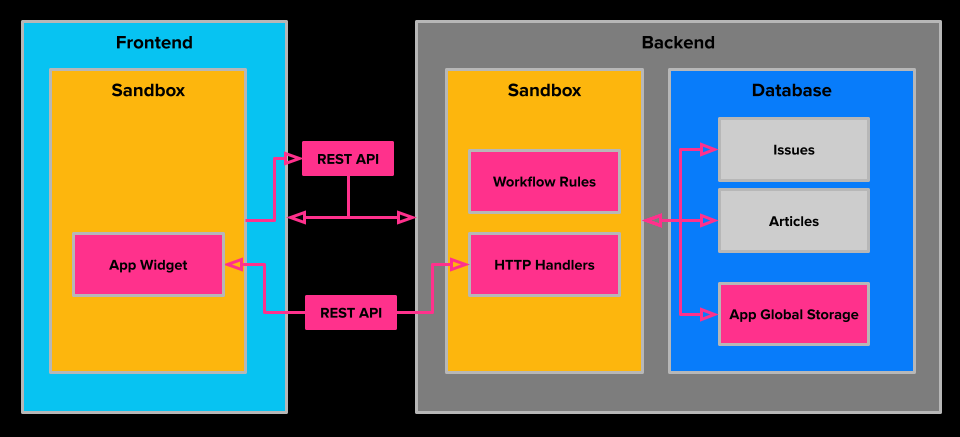
Execution Environments
JavaScript components run in one of two broad environments. Widgets run in sandboxed iframes in the browser. Workflow rules, HTTP handlers, custom MCP tools, import clients, and utility modules run on the common backend JavaScript infrastructure. The component type determines how YouTrack invokes the code, which context it receives, and where it is available.
Widget Frontend
YouTrack renders each widget in a sandboxed iframe at the widget location declared in the package manifest. The sandbox isolates the widget's HTML, CSS, and JavaScript from the YouTrack frontend. Widgets communicate with the host application through a message-based Host API instead of directly accessing YouTrack frontend internals.
The Host API includes methods for sending requests to YouTrack and app-defined endpoints, storing local widget data, displaying alerts, controlling supported widget presentation modes, and performing operations specific to individual widget locations.
Backend JavaScript Runtime
YouTrack runs backend JavaScript code with GraalJS in a restricted server-side environment. The common scripting infrastructure loads JavaScript files and turns recognized exports into typed components. The workflow, app, MCP, and import subsystems add their own invocation logic and contexts on top of this runtime.
When YouTrack loads a backend JavaScript file, its top-level export determines how the file participates in the package:
Export | Component | Invocation |
|---|---|---|
| Workflow rule | Invoked by the workflow engine for the corresponding event, schedule, or user action. |
| HTTP handler | Invoked when a request reaches one of its app-defined endpoints. |
| Custom MCP tool | Invoked through the YouTrack MCP server after the tool is selected by an MCP client. |
| Import client | Instantiated for an import configuration and called by the import pipeline to retrieve source data. |
No recognized component export | Utility module | Evaluated when another backend script imports it with |
Backend components can share API packages, but they don't all receive the same execution context. For example, a workflow rule receives rule-specific entities and event data, an HTTP handler receives request and response objects plus any scope entity, and a custom MCP tool receives the context for its tool invocation.
An import client receives an import-specific context with configuration parameters. The import pipeline calls client methods to retrieve projects, users, issues, articles, attachments, and updates, then maps the returned data to YouTrack entities using the YouTrack Import API.
Apps and workflow components use the supported YouTrack JavaScript API. Import clients use the dedicated Import API and supported shared modules. For example, supported backend components can use the @jetbrains/youtrack-scripting-api/http module to send outbound HTTP requests to external services.
Availability and Permissions
Installing a package doesn't make every component available in every context. Global components are available at the global level. Project-level components become available when the app or workflow is attached to the relevant project. Widget locations and HTTP handler scopes determine whether a component is global or project-related. For details, see Global and Project Scopes. Import clients are selected by import configurations instead of being attached to projects as app or workflow components.
YouTrack applies authorization at each communication boundary:
Widget declarations can restrict visibility using required permissions. These declarations control whether a user can view and interact with the widget; they don't grant the widget extra access to REST API data.
Requests sent with
host.fetchYouTrack()are checked by the target REST endpoint according to the current user's access.For an HTTP handler, YouTrack checks availability of the app, visibility of the scope entity, and any permissions declared for the endpoint before the handler runs.
Custom MCP tools run under a permission-based access policy and can access only data available to the MCP caller.
Import clients run only as part of a configured import and follow the access policy of the import subsystem.
Backend JavaScript executes in a restricted runtime with only the host functionality and JavaScript APIs that YouTrack exposes.
The execution identity, accessible entities, and writable data depend on the component and invocation context. Treat widget visibility, REST authorization, handler permissions, MCP caller permissions, workflow permissions, and import execution as separate access policies.
Choose a Component
Goal | Component |
|---|---|
Add a panel, page, menu item, or other interactive element to the YouTrack interface. | |
Validate or automate changes, provide a user-triggered action, or run a scheduled task. | |
Provide server-side logic to a widget or expose an endpoint for an integration or webhook. | |
Expose a YouTrack or app-specific operation to MCP clients. | |
Share backend functions between rules, handlers, or tools. | Utility module imported with |
Retrieve and map data from an external system for migration to YouTrack. |