What’s New in IntelliJ IDEA 2025.3
Welcome to the IntelliJ IDEA 2025.3 release overview. This version brings significant updates designed to streamline your productivity and help you confidently adopt the latest innovations across the Java ecosystem. The highlights of this release include:
- Productivity-enhancing features:
- Support for new technologies:
- AI upgrades:
New features are not the only changes for 2025.3. We've also made a lot of stability and quality improvements, which are described in a separate What's Fixed post.
Open and integrated AI experience
JetBrains AI is evolving to give you more choice, transparency, and flexibility in how you use AI inside your IDE.
You can now connect to AI providers using your own key, work with Junie and Claude Agent from a common chat interface, and track your AI Credits directly in IntelliJ IDEA.
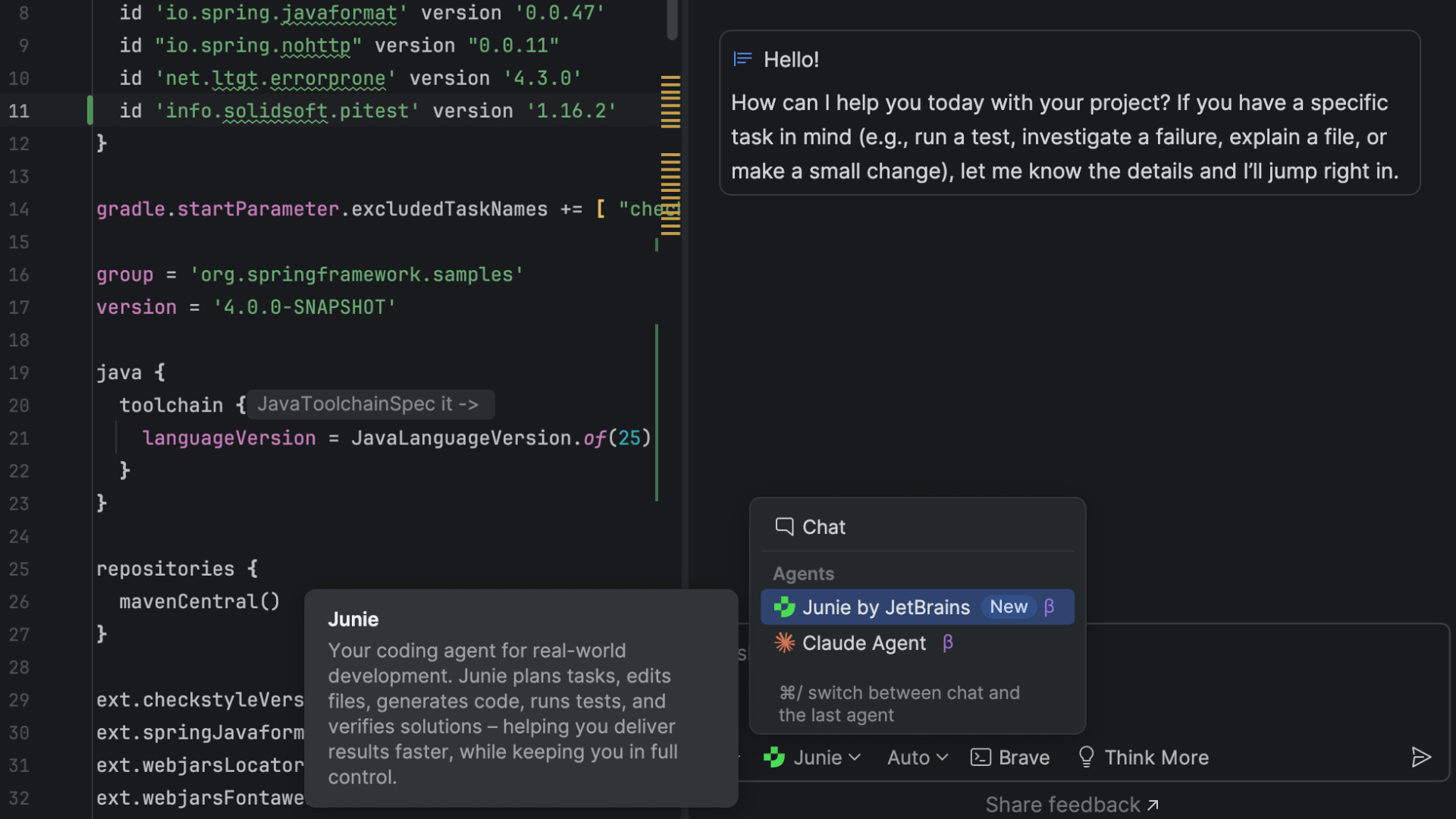
Multi-agent experience: Junie and Claude Agent
IntelliJ IDEA's new multi-agent experience adds even more flexibility and power to your development workflow. Now, multiple agents are available from the same chat interface, allowing you to switch between them seamlessly and get the right kind of assistance for every task. Alongside Junie, we have natively integrated the first third-party AI agent – Claude Agent.
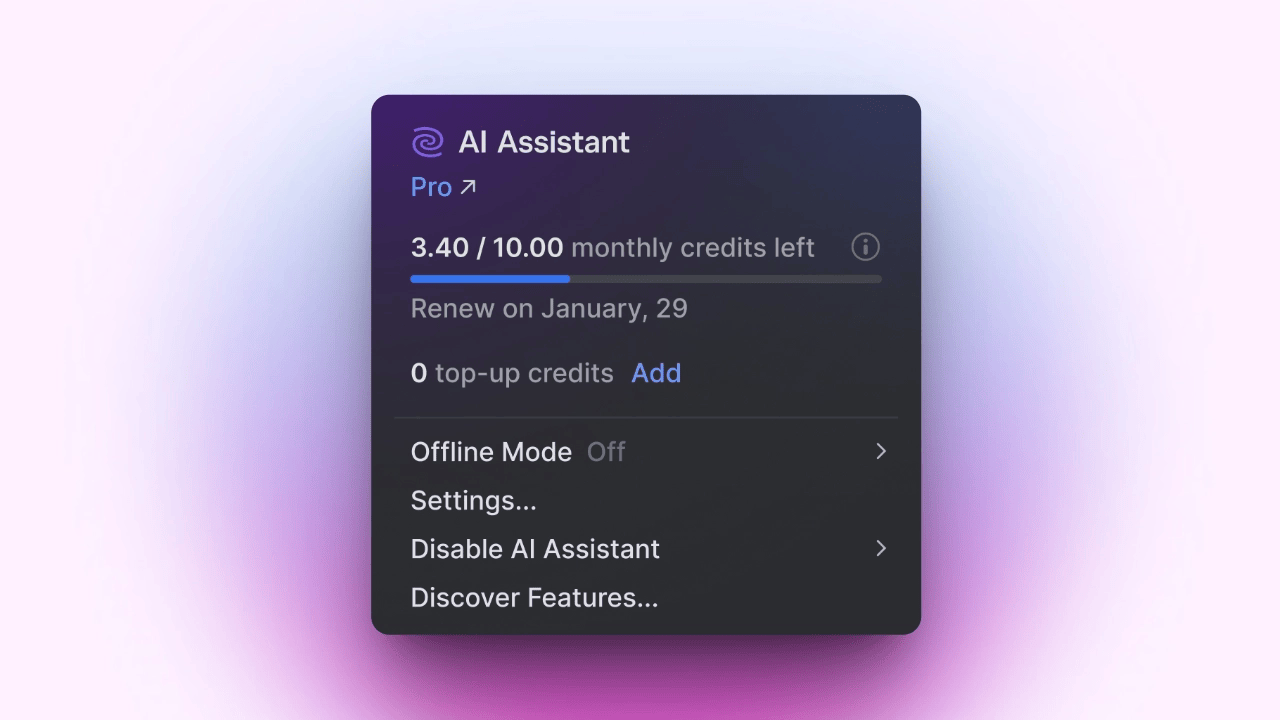
Transparent in-IDE AI quota tracking
Monitoring and managing your AI resources just got a lot easier, as you can now view your remaining AI Credits, renewal date, and top-up balance directly inside IntelliJ IDEA.
Bring Your Own Key: More freedom and control
Coming soon
With BYOK, you will be able to connect to OpenAI, Anthropic, or any OpenAI API-compatible local model using your own API key, without logging into JetBrains AI. This gives you more control over how you use AI in IntelliJ IDEA, and it's ideal if you prefer to work with a specific provider.
This setup is particularly powerful when paired with a JetBrains AI subscription (including the free tier), which provides enhanced completion, extra models, and bonus credits while still allowing you to use your own key for chat and agents.
Unified distribution
Starting with the 2025.3 release, IntelliJ IDEA Ultimate and Community Edition have become a single unified product – with one installer and one update stream.
In this new setup, an Ultimate subscription unlocks access to all the advanced professional features you are used to.
Even without an Ultimate subscription, the IDE remains fully functional and free to use for both commercial and non-commercial projects. Along with all the Community Edition features, it offers database integrations, a wizard for creating Spring projects, and basic highlighting for framework-specific code, all at no cost. On top of that, the unified distribution makes it easier than ever to explore IntelliJ IDEA's powerful support for professional development. You can activate an Ultimate trial with a single click and start enjoying everything it offers immediately.
Whether you use Ultimate or Community Edition, your IDE will automatically update to the unified distribution via the usual patch update process. Despite the unification, we managed to make the distribution 30% smaller than IntelliJ IDEA Ultimate was on its own, meaning you don't need to worry about this change slowing you down.
Our commitment to open source is as strong as ever, and we will keep the open-source parts of the IntelliJ IDEA codebase on GitHub up to date and open for everyone.
You can learn more about this change here.
Command completion
Forget about shortcuts and use code native patterns to harness the power of your favorite IDE!
To help keep you in the flow, IntelliJ IDEA 2025.3 introduces command completion – a new way to access context-aware actions directly from code completion.
- Type
.to see code completion and postfix completion suggestions, as well as actions. - Type
..to filter the results to actions only. - Select an action to see the exact context and preview what the action will do if applied.
This refinement makes development more comfortable and efficient, as you no longer need to decide between multiple ways to find and invoke actions in a given situation.
For details, check out the blog post.
Spring Boot 4 and Spring Framework 7
Ultimate
IntelliJ IDEA 2025.3 helps you stay at the cutting edge of development in the Spring ecosystem. First-class support for the latest improvements in Spring Framework 7 and Spring Boot 4 simplifies application development while also reducing friction in your developer experience. Improvements to REST API versioning, programmatic bean registration, and declarative HTTP service clients keep you in the flow and focused on your most important tasks, rather than stuck with setup.
API versioning: Ship multiple APIs safely without breaking clients
Don't lose time distracted with version configuration. Simply add a version to your request-mapping annotations and choose a strategy – path, header, or media type. That's it!
IntelliJ IDEA makes the versioning process even smoother by validating version formats, flagging ambiguous or misconfigured endpoints, and generating the necessary configuration. Additionally, HTTP request generation and navigation between client and server also respect versions, keeping everything in sync.
HTTP service client: Call external HTTP services easily
When your app needs to call another REST service – a daily task – you can now create the client with almost no setup.
Since Spring Framework 6, it's been possible to define a plain Java interface and mark its methods with HTTP annotations, but you still had to configure the underlying client implementation. In Spring Framework 7, the process is even simpler. Just add an interface and a few annotations, and you're good to go – no factories and no customizer beans.
IntelliJ IDEA builds on this streamlined process. It warns you if a client interface isn't configured properly, helps you use client interfaces in code, and supports navigation and HTTP request generation.
Bean registration API: When annotations aren't enough
Spring Framework 7 makes registering a bean as simple as implementing BeanRegistrar with a concise DSL. IntelliJ IDEA's advanced code analysis now understands even Spring 7's dynamically registered beans. Additionally, the IDE marks registered classes with the Spring bean gutter icon, lets you navigate to where the bean is registered, and runs inspections to catch registration issues early.
With the Kotlin DSL, you can group related beans together, register them conditionally, or reuse registration logic just like any other Kotlin function, keeping configuration modular and maintainable. Combined with the routing DSL's flexibility for defining APIs with conditions, loops, and nesting, Spring applications gain a unified, Kotlin-native style that is both expressive and efficient.
Spring Data
Ultimate
You shouldn't have to wait for your IDE to catch up to the tools you use. With IntelliJ IDEA, you can always take advantage of the latest Spring Data improvements as soon as they ship.
First-class Spring Data JDBC support
As Spring Data JDBC is gaining popularity, IntelliJ IDEA brings first-class support on par with its support for Spring Data JPA, enabling you to:
- Generate entity classes from existing database tables, including those with composite keys.
- Generate DDL from your
@Tableclasses and enjoy support for Liquibase and Flyway. - Compare your code model with the database and create scripts to align them.
- Create Spring Data repositories on the fly and wire them into your code instantly.
- Get smart completion for Spring Data repository-derived query methods.
- Add table columns directly into your entity classes via completion.
Spring Data repositories: Take advantage of Ahead-of-Time compilation
Recently, the Spring Data team announced AOT code generation for Spring Data repositories, which improves performance and makes debugging easier. This is particularly useful for debugging derived query methods, which used to be challenging because they were generated from method names on the fly. With AOT, you can see the queries that will run before execution, and execution itself is faster because code is already generated.
IntelliJ IDEA 2025.3 enhances this improvement by detecting generated implementations for Spring Data repositories and showing the queries right in your code. The IDE lets you navigate to the query execution code so you can set a breakpoint and trace the flow. You can also execute generated queries directly in the IDE without running the application.
Spring Debugger updates
Ultimate
Coming soon
The Spring Debugger plugin now has over 250,000 users, and your feedback has allowed us to continue improving it to help you better understand what's happening inside your Spring applications. Right after the plugin's release, the top question was "Can I debug remote applications?" We're now happy to say that the answer is: "Absolutely!"
Simply start your app with a debug port open, and then attach from the IDE. That's it – you're all set.
We've also added another highly anticipated feature: IntelliJ IDEA can now automatically connect to your database when the application starts.
Make sure to update your Spring Debugger plugin to the latest version to get these improvements and other fixes.
Kubernetes experience improvements
Ultimate
Deploying databases and services just got easier, as you can write, apply, and manage everything directly in your editor.
Stay in context with the cluster and namespace selector at the top, and spot issues fast with live resource status icons. Struggling with missing env variables or failed pods? Fix them instantly with one-click logs and redeploy without leaving your manifest.
Secure your service setup with in-editor secret management. View and copy database credentials directly from your YAML.
Need to connect? Use one-click port forwarding to forward container ports, autoload secrets, and set up an instant connection to your database or service in seconds.
From deployment to debugging to connecting, everything is seamless and in one place – helping you stay focused and work smarter!
Java 25
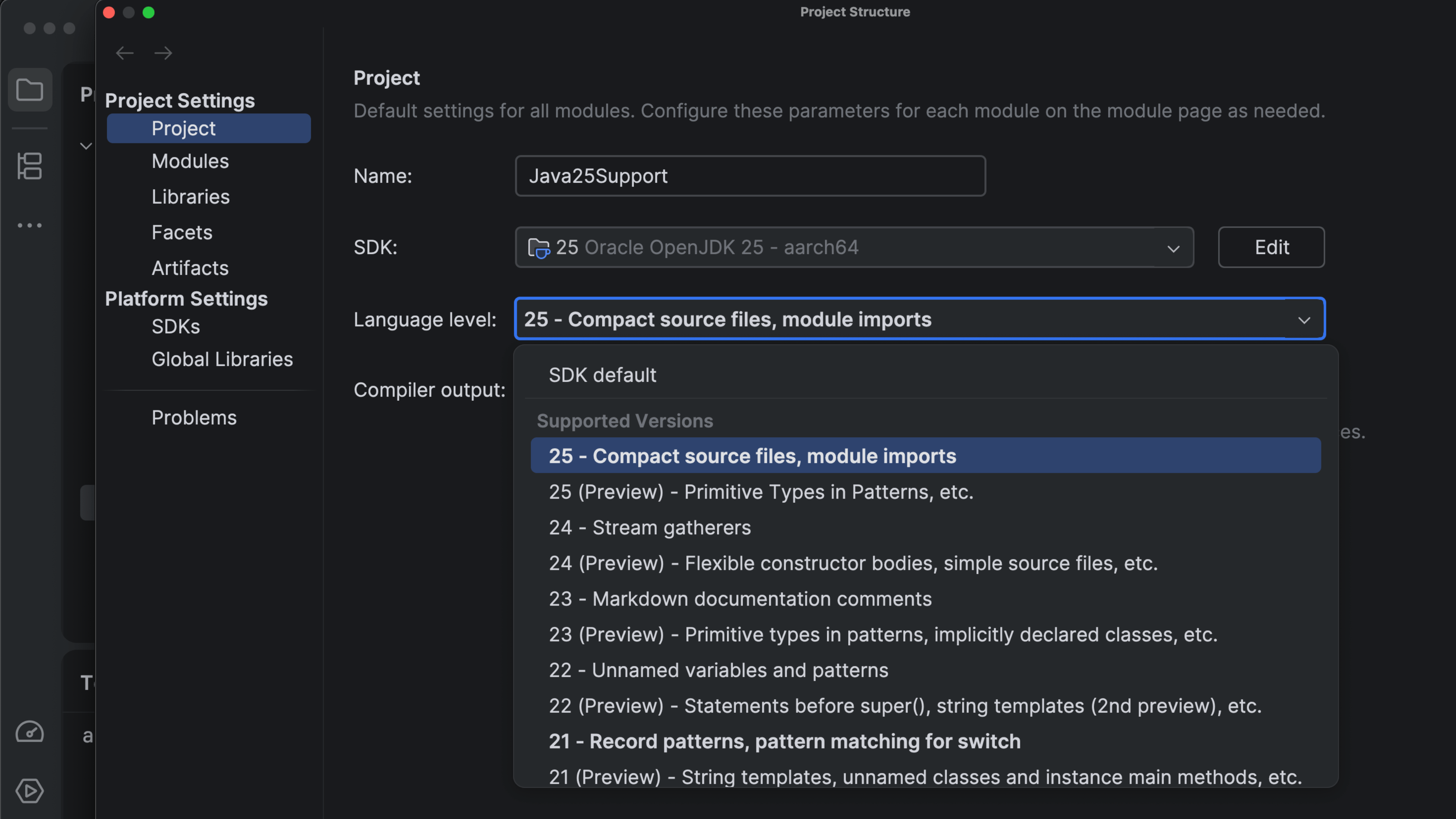
Released in September 2025, Java 25 is the next Long-Term Support (LTS) version of the Java platform. IntelliJ IDEA has supported Java 25 from day one of its release, ensuring developers could immediately benefit from the latest language, runtime, and tooling enhancements.
In this release, we are adding the finishing touches to this support – making sure all bundled tools and libraries, including Async Profiler 4.1 and JaCoCo, are compatible with Java 25 runtimes.
JDK 25 builds from all major vendors – Amazon Corretto, Azul Zulu, BellSoft Liberica JDK, GraalVM, IBM Semeru (OpenJ9), Microsoft Build of OpenJDK, Oracle OpenJDK, SAP SapMachine, and JetBrains Runtime with integrated DCEVM – are available for download directly from IntelliJ IDEA.
For details about the features and improvements introduced between Java 21 and Java 25, check out this detailed blog post.
Develocity IntelliJ plugin
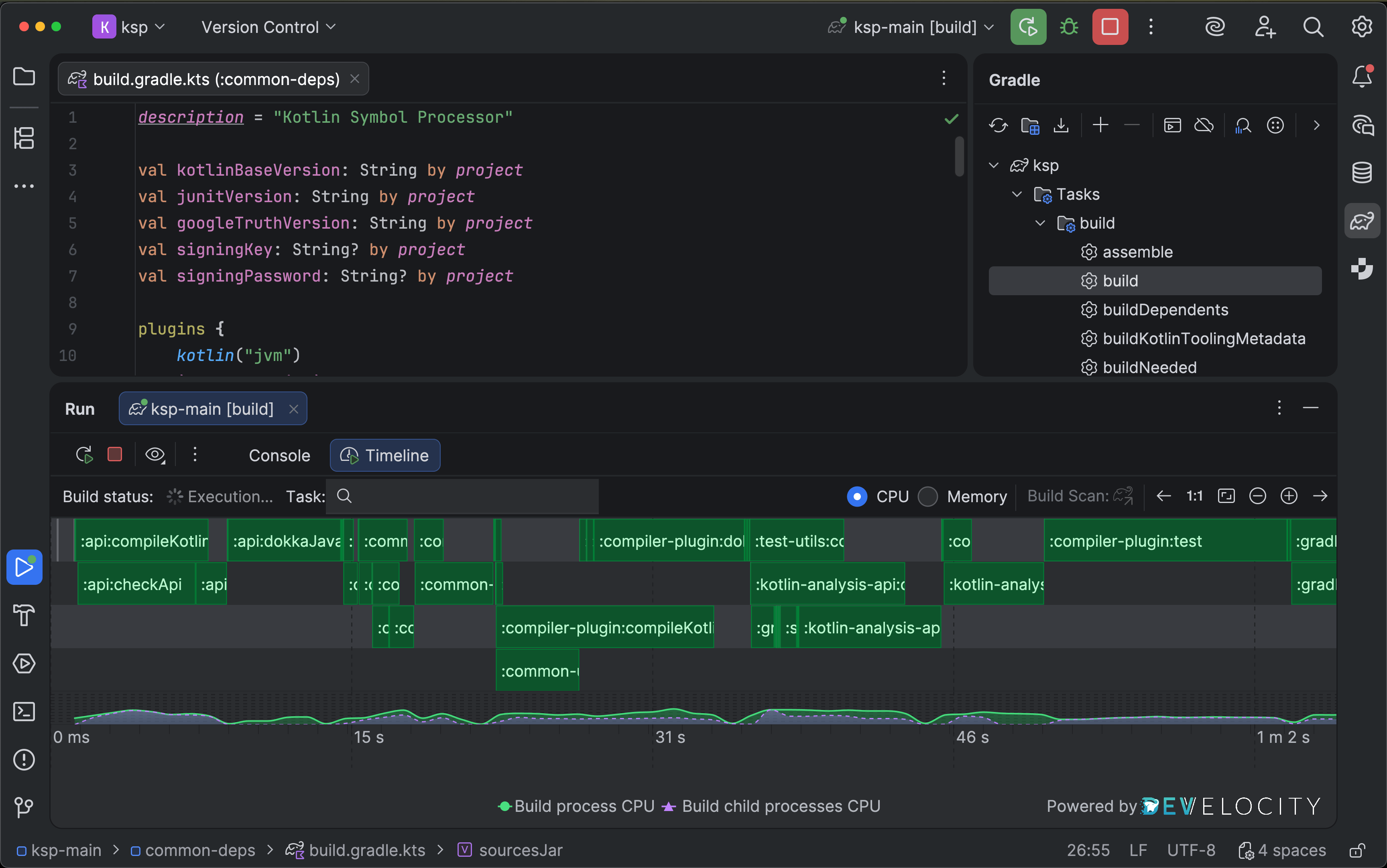
The Develocity IntelliJ plugin brings profiling into the build process. With it, you can view detailed build characteristics directly in IntelliJ IDEA, identify performance bottlenecks, and observe how build changes affect speed and resource utilization. No modifications to build scripts are required – simply enable the corresponding setting in the plugin.
For example, you can easily detect a task that isn't using the build cache and runs unnecessarily—something that might be hard to notice in logs but becomes immediately clear in visual charts.
The plugin was developed as a joint effort between JetBrains and Develocity engineers at Gradle, resulting in a seamless integration that fits naturally into the IntelliJ IDEA UI and doesn't require any change to your existing workflow.
Currently, the plugin supports both Gradle and Maven builds. You can find more details in this blog post.
Islands theme
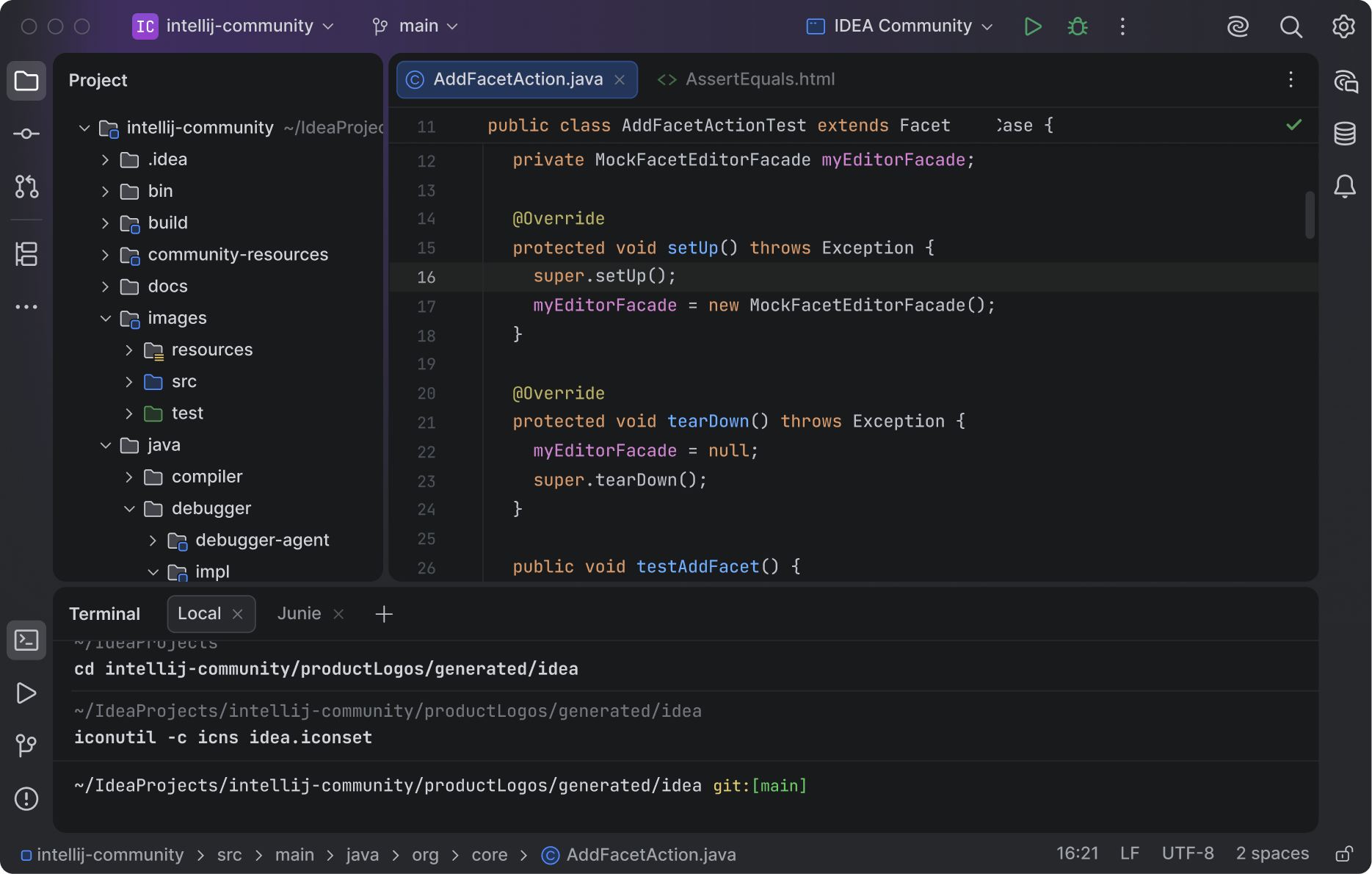
The Islands theme is now the default look in IntelliJ IDEA. More than just a visual refresh, it reflects our commitment to providing the ultimate comfort throughout your development experience.
Instantly recognizable tabs, improved in-editor contrast, clear separation between working areas, and rounded corners create a soft and balanced environment that was designed around one goal: helping you stay focused and code with ease.
Learn more in this blog post.
First-class Vitest 4 support
Ultimate
This release adds full support for Vitest 4, including its test discovery logic. Test files and individual test cases are now recognized in the editor, with gutter icons that let you run or debug them instantly. The integration also accommodates the latest Vitest configuration options and reporting changes, so you can upgrade without disrupting your workflow.
Databases
Starting from the 2025.3 release, IntelliJ IDEA replaces the term query console with query file – because consoles have essentially always been files, and it's time the UI reflected that. We've also simplified the workflow, making it more discoverable and consistent.
You can learn more about the change in this post. More information about database improvements can be found here.
Staying on the cutting edge of the development stack
You can always rely on IntelliJ IDEA to support the latest versions of the languages, tools, and frameworks you use every day. Alongside major updates such as Java 25 and Spring 7, IntelliJ IDEA 2025.3 introduces support for:
JUnit 6, bringing modernization and unification across the testing ecosystem. It standardizes artifact versioning for all JUnit modules and raises the baseline to Java 17. In Spring Boot 4 and Spring Framework 7, JUnit 6 is now the default testing library, helping you adopt the latest best practices more easily.
Gradle 9, introducing the Configuration Cache as the preferred execution mode for faster builds and a smoother developer experience. You’ll also benefit from many performance improvements and quality-of-life enhancements across the toolchain.
Groovy 5, now targeting JDK 11 and offering improved compatibility with Java 25 language features for a more cohesive experience when mixing Groovy and modern Java codebases.
Scala 3.8, adding the new into modifier, a standard library
compiled with Scala 3, and an updated minimum JDK requirement of 17. You can learn
more about the enhancements to Scala support in
this overview.
Stay tuned
You can learn more about IntelliJ IDEA 2025.3’s stability, performance, and user experience improvements in the dedicated What’s Fixed post.
Let us know what you think about the new features in this release, as your feedback helps us shape the product to work even better for you.
Update to IntelliJ IDEA 2025.3 now to try out these new features. Don't forget to join us on X, Bluesky, or LinkedIn, and be sure to share your favorite updates.
Thank you for using IntelliJ IDEA!