エージェントの管理 ビルドエージェントはビルドを実行するマシンです。 teamcity agent コマンドグループを使用すると、エージェントの一覧表示とインスペクション、有効化 / 無効化、認証の管理、リモートコマンドの実行、対話型シェルセッションの開始、再起動の要求を行うことができます。
エージェントの一覧表示 登録済みのすべてのビルドエージェントを表示します。
teamcity agent list
フィルター処理
# Only connected agents
teamcity agent list --connected
# Only enabled agents
teamcity agent list --enabled
# Only authorized agents
teamcity agent list --authorized
# Agents in a specific pool
teamcity agent list --pool Default
# Combine filters
teamcity agent list --connected --enabled --pool Default
結果を制限し、JSON として出力します。
teamcity agent list --limit 20
teamcity agent list --json
teamcity agent list --json=id,name,connected,enabled,pool.name
agent list のフラグ フラグ
説明
--connected
接続されたエージェントのみを表示
--enabled
有効なエージェントのみを表示
--authorized
認定エージェントのみ表示
-p, --pool
エージェントプール名でフィルタリング
-n, --limit
表示するエージェントの最大数
--json
JSON として出力します。 使用可能なフィールドを一覧表示するには --json= を使用し、特定のフィールドを表示するには --json=f1,f2 を使用します。
Viewing agent details 特定のエージェントの詳細を ID または名前で表示します。
teamcity agent view 1
teamcity agent view Agent-Linux-01
teamcity agent view Agent-Linux-01 --web
teamcity agent view 1 --json
エージェントの有効化と無効化 エージェントを無効にして、新しいビルドを取得しないようにします。
teamcity agent disable 1
teamcity agent disable Agent-Linux-01
エージェントを有効にして、ビルドを再度実行できるようにします。
teamcity agent enable 1
teamcity agent enable Agent-Linux-01
エージェントの承認と承認解除 新しく接続されたエージェントにビルドの実行を許可するように承認します。
teamcity agent authorize 1
teamcity agent authorize Agent-Linux-01
エージェントの認証を解除して接続権限を取り消します。
teamcity agent deauthorize 1
teamcity agent deauthorize Agent-Linux-01
プール間でのエージェントの移動 エージェントを別のエージェントプールに移動します。
teamcity agent move 1 0
teamcity agent move Agent-Linux-01 2
最初の引数はエージェント (ID または名前) であり、2 番目の引数はターゲットプール ID です。
互換性のあるジョブの表示 エージェントが実行できるビルド構成を一覧表示します。
teamcity agent jobs 1
teamcity agent jobs Agent-Linux-01
互換性のないジョブと、エージェントで実行できない理由を表示します。
teamcity agent jobs Agent-Linux-01 --incompatible
teamcity agent jobs 1 --json
リモートコマンドの実行 ビルドエージェントでコマンドを実行し、出力を返します。
teamcity agent exec 1 "ls -la"
teamcity agent exec Agent-Linux-01 "cat /etc/os-release"
長時間実行されるコマンドのタイムアウトを設定します。
teamcity agent exec Agent-Linux-01 --timeout 10m -- long-running-script.sh
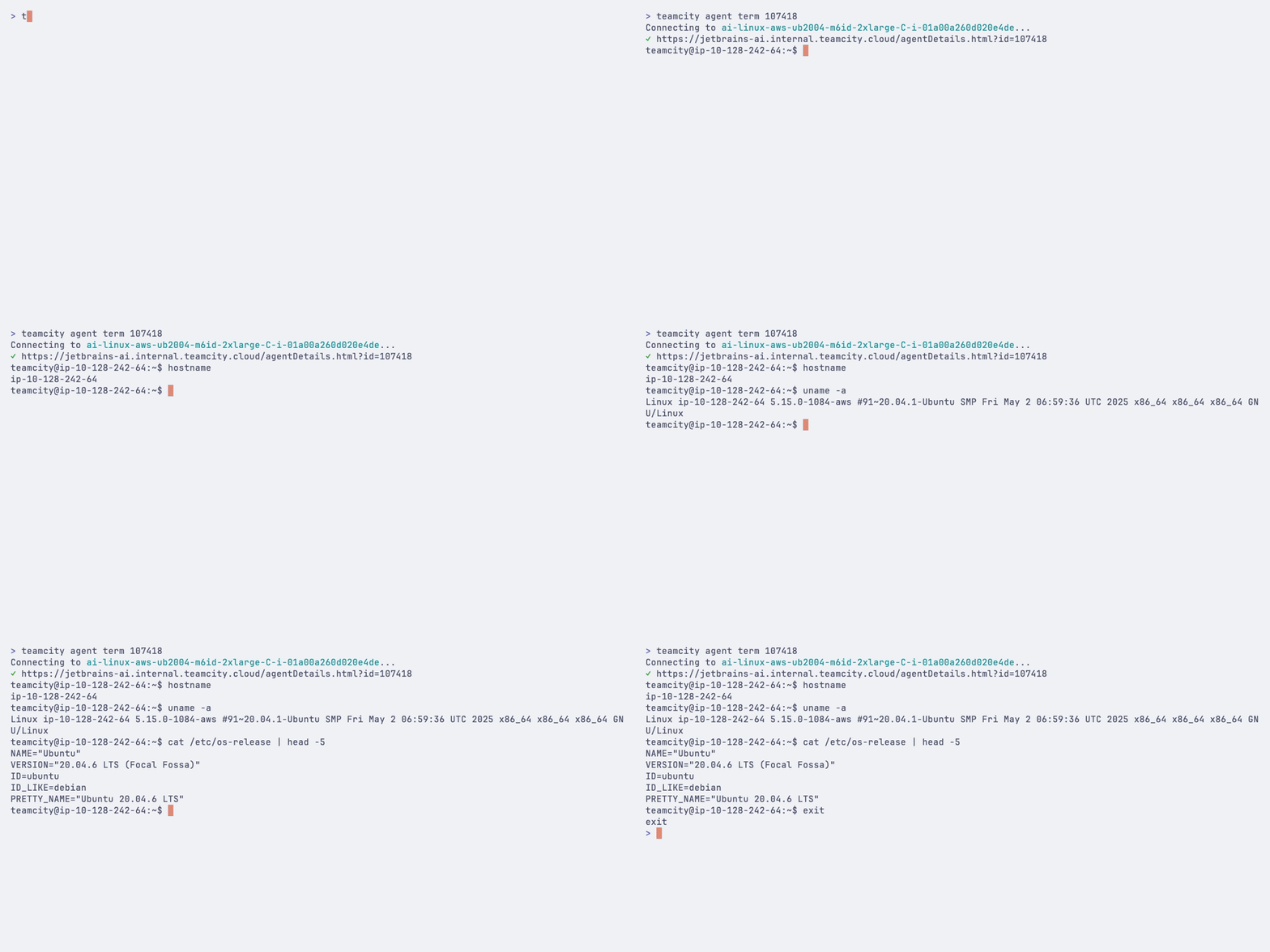
対話型シェルセッション ビルドエージェントへの対話型ターミナルセッションを開きます。
teamcity agent term 1
teamcity agent term Agent-Linux-01
これにより、エージェントへの WebSocket 接続が確立され、エージェントマシン上で直接コマンドを実行できるシェルが提供されます。 セッションは、 exit と入力するか、 Ctrl+D を押すと終了します。
エージェントの再起動 ビルドエージェントの再起動を要求します。
teamcity agent reboot 1
teamcity agent reboot Agent-Linux-01
再起動する前に、現在のビルドが完了するまで待ちます。
teamcity agent reboot Agent-Linux-01 --graceful
確認プロンプトをスキップします:
teamcity agent reboot Agent-Linux-01 --yes
2026 年 9 月 11 日