AI for Engineering Teams / How to Create an AI Usage Policy for Engineering Teams (with Template)
How to Create an AI Usage Policy for Engineering Teams (with Template)

An AI usage policy for software teams should cover five areas: approved tools, prohibited uses, data-handling rules, code review requirements, and incident reporting. Getting each of these right matters more now than ever. Vague policies get overlooked, and when AI governance policies are ignored, they become compliance liabilities.

So what should an AI usage policy actually cover? A complete policy does five things. It names the AI tools your organization has vetted and approved for use. It defines the specific activities where AI assistance is off-limits. It classifies which categories of data can (and cannot) be shared with AI models. It spells out that AI-generated code must be reviewed before it is merged into your codebase. It also establishes exactly what engineers should do when something goes wrong.

Why engineering teams need a policy

Without a clear AI usage policy, shadow AI fills the gap. Shadow AI refers to engineers using AI tools on their own, without approval or oversight from the organization. Engineers are pragmatic problem-solvers who will reach for whatever tool helps them ship faster, and that's a reasonable instinct. But without defined boundaries, it's easy for a developer to use an unapproved AI coding assistant to autocomplete a function that handles customer payment data, accidentally sending proprietary logic to a third-party API endpoint. That's a compliance and security incident waiting to happen, and it happens more often than most teams realize.

Shadow AI also leads to inconsistent code quality. When half your team uses one AI tool and the other half uses another, you end up with output shaped by different models, each with its own training biases, hallucination rates, and context windows. There's no shared review standard to catch the gaps between them. A single team's AI-generated authentication code might sail through review while another team's introduces a vulnerability that never triggers a single flag.

A good policy helps address both problems when teams support it with technical controls, shared review standards and clear responsibilities. It gives engineers boundaries for using AI and organizations a basis for managing its use.

What to include in your AI usage policy

A well-constructed AI usage policy for software teams doesn't need to be overly long – it needs to be specific. Here are the five sections every engineering team's policy should include.

Approved tools

Name the tools explicitly. For example, "AI coding assistants approved for use in development workflows include [Tool A] and [Tool B]. Any tool not on this list requires written approval from the security team before use in any engineering context." A named list gives engineers and administrators a clear reference for approvals and access controls. A vague category such as “approved AI coding assistants” leaves room for different interpretations.

Prohibited uses

Be concrete about what's off limits. Common prohibitions include sending customer data to external AI APIs, using AI to generate security-critical code (such as authentication logic or cryptographic functions) without additional review, and running unapproved AI tools in production CI/CD pipelines. Write this section in plain language. If it reads like a legal contract, engineers will skip it.

Data handling

Clearly define what can and cannot be sent to an AI model. At a minimum, classify the tiers.

  • Public information (marketing copy, open-source documentation) is generally safe.
  • Internal information (internal design docs, non-sensitive code) is permitted only with approved tools.
  • Restricted data includes customer PII, payment data, authentication credentials, API keys and proprietary algorithms. Do not submit restricted data to any AI tool.

This section helps engineers decide what they can share. Support those rules with training and appropriate security controls.

Code review requirements

AI-generated code needs a review pass, just like human-written code, and a more careful one for anything touching security. Your policy should require that all AI-generated code passes the same review gates as human-authored code, be labeled [AI-assisted] in the PR description, and receive an explicit security check for anything touching authentication, payments, or data access. The label tells reviewers to look more carefully at the provenance of specific code blocks.

Incident reporting

Engineers need a clear, low-friction path to report suspected AI-related incidents, including accidental data disclosure, unexpected model behavior in production, or security concerns. Define who to contact (typically the security team or engineering lead), what counts as a reportable incident, and the response window (24 to 48 hours is a reasonable baseline). Clarify explicitly that good-faith reporting has no negative consequences. If engineers fear the reporting process, they'll stay quiet, and small incidents become large ones.

How to roll out without alienating engineers

The fastest way to make a policy irrelevant from day one is to hand it to the team without context. Engineers who feel that AI governance is being done to them rather than with them will circumvent it. Here are a few things that will help smooth out the process.

Involve your tech leads early. Don't finalize the approved list of tools without input from the people who will use them every day. A tech lead who helped shape the policy will defend it to their team, while one who learned of it from a formal Slack announcement will not.

Frame it as enabling. The goal is to give engineers a clear "yes" list that shows them the tools they can use and how to use them safely. Policies should be clearly worded and, wherever possible, focused on enablement ("you're approved to use…").

Set a review cadence and make it visible. AI governance is more useful when it ships fast and stays current than when it arrives six months late. Commit to reviewing it at least quarterly, assign a named owner (usually an engineering manager or a security lead), and build the next review date directly into the document so it doesn't quietly expire unnoticed.

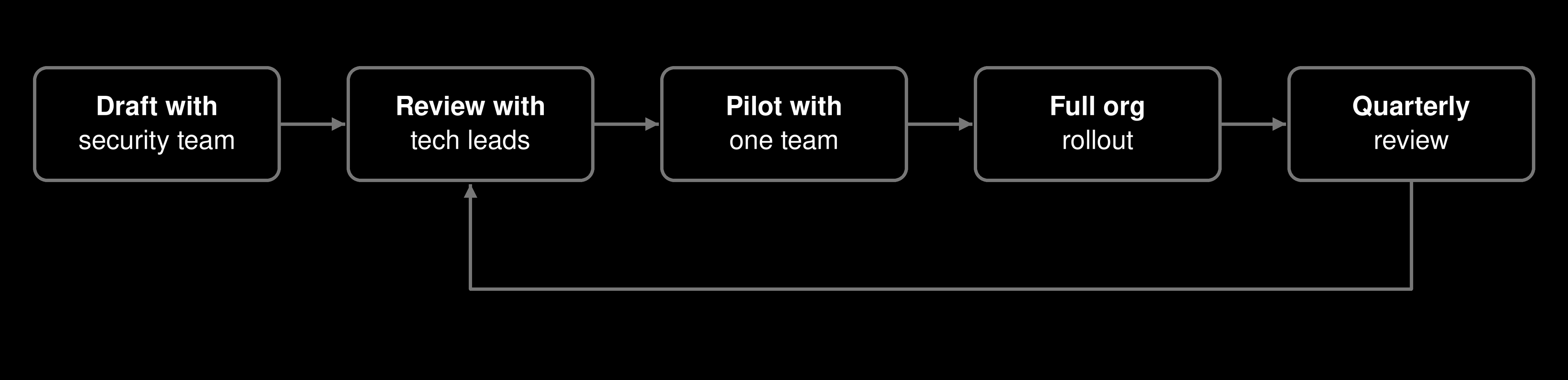
The rollout itself moves through a series of stages. It starts as a draft from the security team, goes through the tech lead's review, then goes through a pilot with a single team, and finally rolls out across the whole organization. Quarterly reviews then feed back into the tech lead review stage, keeping the cycle going.

Piloting with one team first gives you real feedback before you scale. A policy that works for your backend team might need a different approved tools list for your data science team.

How to enforce the policy

An AI usage policy combines technical controls with responsibilities that people, processes and other tools must support. Be clear about which requirements your tooling enforces and which depend on your engineering and security workflows.

JetBrains Air Governance supports specific controls: defining allowed models, agents, tools and MCP servers; limiting how many AI credits a user can spend; and controlling whether users can run remote tasks. These controls help put access and spending rules into practice within the scope Air Governance manages.

Other requirements need separate arrangements. Air Governance does not prohibit specific uses of an approved tool, filter the types of data users submit, enforce code reviews or provide a reporting channel for policy violations. Support these parts of your policy through developer guidance, appropriate security tooling, repository review requirements and an established incident-reporting process.

Give engineers a clear escalation path, including who to contact and what information to provide when something goes wrong. Keep that process accessible alongside the policy.

Scaling AI governance across your organization

As AI adoption spreads across teams, your written policy provides a shared baseline for approved tools, permitted uses, data handling, code review and incident reporting.

Air Governance supports that baseline through centrally managed access and spending controls. Teams still need to assign owners and establish processes for requirements beyond those controls. Approving an AI tool, for example, does not mean every use of that tool complies with your policy.

To help you put these principles into practice, here’s a starting template you can adapt for your team.

Template

The template below is ready to paste into Confluence, Notion, or a Google Doc. Replace the bracketed fields with your organization's specifics.

[YOUR COMPANY NAME] AI Usage Policy, Engineering Teams

Version 1.0 | Effective [DATE] | Next review [DATE + 90 DAYS] | Owner [NAME, TITLE]

1. Purpose

This policy defines how engineers at [YOUR COMPANY NAME] may use AI-assisted coding tools and large language models in their work. It exists to protect customer data, maintain code quality, and give every engineer a clear framework for using AI safely and confidently.

2. Approved tools

The following AI tools are approved for use in engineering workflows at [COMPANY NAME]:

  • [Tool A], approved for code completion, documentation drafting, and unit test generation.
  • [Tool B], approved for code review assistance and documentation only.

Any tool not listed here requires written approval from [SECURITY LEAD / CISO] before use in any engineering context. To request approval, contact [EMAIL ADDRESS or SLACK CHANNEL]. Requests are reviewed within five business days.

AI credit limits: Each user has an allowance of [NUMBER] AI credits per [PERIOD]. Requests to increase this allowance go to [OWNER / PROCESS].

Remote tasks: Running remote AI agent tasks is [ALLOWED / NOT ALLOWED]. Requests for permission go to [OWNER / PROCESS]. Permission to run remote tasks does not override this policy’s data-handling or code review requirements.

Where our organization uses Air Governance, administrators configure these AI credit limits and remote-task permissions through its controls.

3. Prohibited uses

Engineers may not:

  • Submit restricted data, including customer PII, payment data, authentication credentials, API keys or proprietary algorithms, to any AI tool.
  • Use unapproved AI tools in production CI/CD pipelines.
  • Use AI to generate cryptographic code, authentication logic, or access-control functions without additional review by [SECURITY TEAM].
  • Present AI-generated code or content as entirely human-authored in code review.

4. Data handling

Before sending any information to an AI tool, classify it using this table:

Classification

Examples

Permitted AI use

Public

Internal

Restricted

Marketing copy, open-source docs

Internal design docs, non-sensitive code

Customer PII, payment data, authentication credentials, API keys, proprietary algorithms

Any approved tool

Limited approved tools only

Do not submit restricted data to any AI tool

5. Code review requirements

All AI-generated or AI-assisted code must:

  • Pass the same review gates applied to human-authored code.
  • Be labeled [AI-assisted] in the PR description.
  • Receive an explicit security review for any code touching authentication, payments, or data access layers.

6. Incident reporting

If you suspect an AI-related incident, including accidental data disclosure, unexpected model output in a production system, or a potential security exposure, report it immediately to [SECURITY TEAM EMAIL] or [SLACK CHANNEL]. Include the tool used, the data involved, and the approximate time of the incident.

All reports are triaged within [24/48] hours. No engineer faces negative consequences for good-faith reporting.

7. Policy questions

Questions about this policy? Contact [POLICY OWNER] at [EMAIL ADDRESS]. For requests to add tools to the approved list, use [PROCESS / LINK].

Take the next step

Put access and spending controls into practice with JetBrains Air Governance. Define allowed models, agents, tools and MCP servers, set per-user AI credit limits, and control permission to run remote tasks.

FAQ

How do I write an AI usage policy for developers?

Start with five sections covering approved tools, prohibited uses, data handling, code review requirements, and incident reporting. Copy the template above, fill in your specific tools and data classifications, review it with your tech leads, and publish it somewhere your developers actually check (Confluence or Notion work well). Ship a working draft quickly rather than waiting for a perfect policy, because AI governance is an ongoing practice, and plan to revisit it every quarter.

How do I get engineers to follow an AI usage policy?

Make the right path the easy path. Publish the approved tools list before engineers go looking for alternatives on their own, and frame the policy around what engineers can do as opposed to what they can’t. Involve tech leads in the design process so they become advocates rather than skeptics, because an engineer who helped write the policy will explain it to their team, while one who wasn't consulted will ignore it. Keep the policy short enough to read in five minutes, and pair it with a clear approval process for adding new tools so engineers aren't stuck on a list that doesn't reflect how they actually work.

What counts as a reportable AI incident for engineering teams?

A reportable AI incident includes any accidental disclosure of restricted data to an AI service, unexpected or harmful model output in a production system, use of an unapproved AI tool in a live environment, and any suspected security exposure linked to AI-generated code. When in doubt, report it. Most AI policy incidents are accidental, and early reporting prevents small problems from compounding into larger ones.

Can engineers use personal AI accounts for work tasks?

Personal AI accounts fall outside your organization's approved tools list and data-handling controls, meaning any work-related data sent through them is untracked and potentially unprotected. Your policy should require that engineers use only organization-approved tools and accounts for all engineering work. If an engineer wants to use a specific tool, the approval process (typically a written request to the security team) is the right path.

What should an AI tool policy for engineering teams include?

A solid AI tool policy for engineering teams covers multiple things. First, approved tools are a named, explicit list of AI tools the organization has vetted. Second, prohibited uses cover concrete activities where AI assistance is off limits. Third, data handling with clear classification rules for what can and cannot be sent to AI models. Fourth, code review requirements that define how AI-generated code is flagged and reviewed before merging. Fifth, incident reporting is the process for surfacing AI-related security or quality issues quickly.

How often should we update our AI usage policy?

At a minimum, quarterly. The AI tooling field moves fast enough that a policy accurate in January can be out of date by April, as new models emerge, new tools become available, and new attack surfaces appear. Assign a named owner, embed the next review date in the policy document itself, and treat each review as a 30-minute working session rather than a full committee process. The goal is a living document that stays current and relevant, not a compliance artifact that gathers dust.

How should AI-generated code be labeled in pull requests?

Add [AI-assisted] to the PR description, as this template requires. The label helps reviewers identify AI involvement. Require an explicit security review for changes touching authentication, payments or data access, and implement that requirement through your repository settings and review process.

Use AI agents in your development workflow

Explore JetBrains AI solutions that help you build, use, and scale AI agents across the software development lifecycle.

Air Gateway

Run terminal agents through one JetBrains account, with access, models, and usage governed centrally.

Junie

Plan, code, debug, and automate tasks with a coding agent that works across your terminal, IDE, GitHub, and GitLab.

Air in IDEs

Orchestrate AI agents and verify their output directly in JetBrains IDEs, with full control over how changes are reviewed.

Air Teams

Automate software delivery workflows, coordinate agentic work across teams, identify bottlenecks affecting delivery.

Air Governance

Govern AI usage, models, policies, and costs across your organization, including JetBrains and third-party tools.

Air Context

Give agents shared organizational memory and context that carries across tools, workflows, and execution environments.

JetBrains Air

An open system of AI products for developers, teams, and organizations – from coding with agents to automating workflows and governing AI at scale.