AI for Engineering Teams / AI Agent Sandboxing: How to Isolate Agent Tasks and Limit Blast Radius
AI Agent Sandboxing: How to Isolate Agent Tasks and Limit Blast Radius

AI coding agents can read files, call APIs and consume resources as they work. As they take on more execution, teams must decide where each task runs and what it can reach. Sandboxing helps reduce the risks by running agents inside constrained environments that limit what each agent can read, write, call and consume.

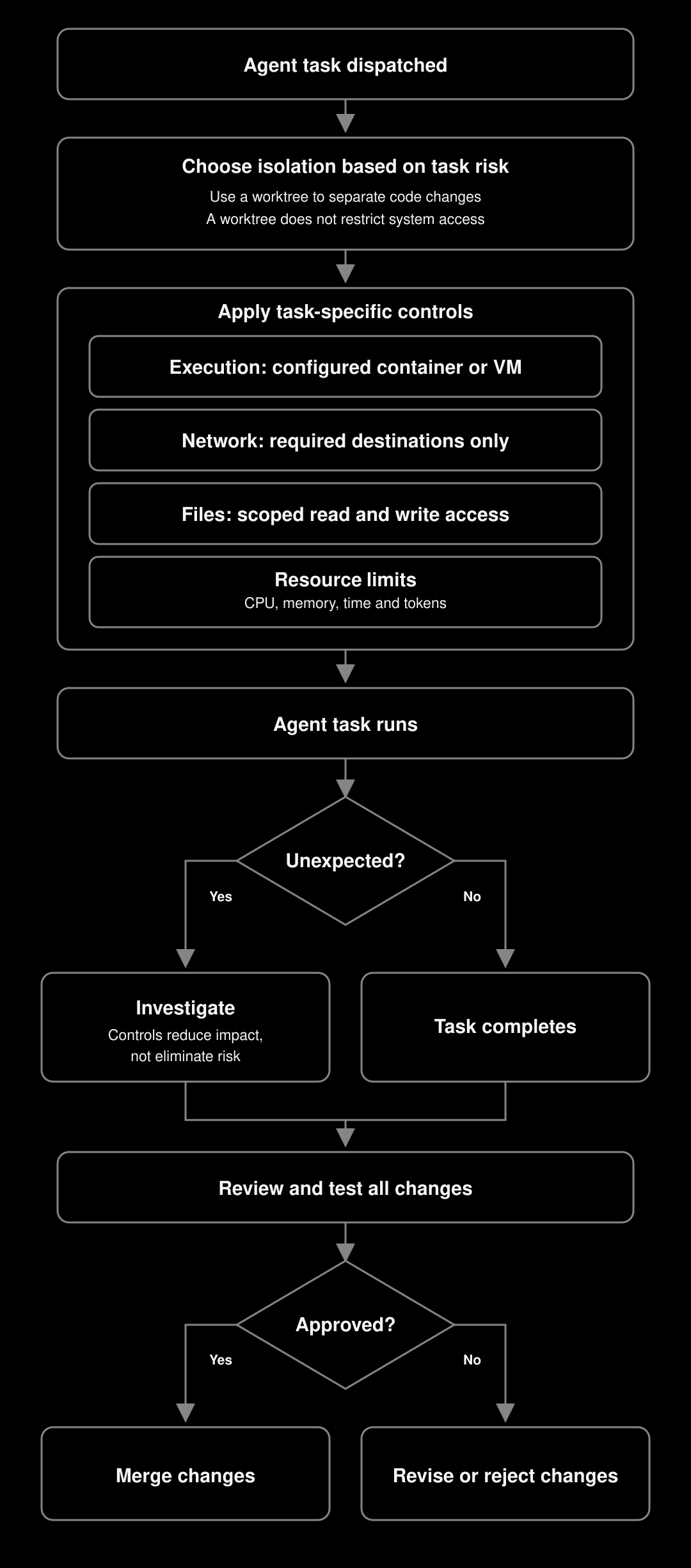
A working approach rests on four methods. Together, they cover isolated execution environments, network access controls, file system and repo boundaries, and resource limits.

Even when agents work in your own repository, they may execute newly generated code, dependencies or build scripts. Choose isolation based on what the task can execute and access. Docker containers share the host kernel. For workloads that need additional isolation, evaluate a microVM-based environment such as Firecracker or an application-kernel sandbox such as gVisor.

Four methods for AI agent sandboxing

  • Isolated execution environments. Run agents inside appropriately configured containers or virtual machines to restrict access to the host. Use Git worktrees alongside these controls to keep task changes separate.
  • Network access controls. Allowlist the specific APIs your agent needs and block all other outbound traffic.
  • File system and repo boundaries. Restrict write permissions to the directories each agent task legitimately needs.
  • Resource limits. Cap CPU, memory, and token consumption per agent session to prevent runaway tasks.

What is AI agent sandboxing?

More formally, AI agent sandboxing is the practice of running each AI coding agent in a controlled, isolated environment that restricts its access to the broader system. The agent gets exactly what it needs for a given task: specific files, approved APIs, a defined compute budget, and nothing more.

A sandbox defines three classes of boundary. Process isolation controls where the agent can execute. Network isolation controls what it can reach over the network. File system isolation controls where it can read or write on disk. Together, these boundaries contain any unintended behavior before it spreads.

A sandboxed agent keeps its permissions scoped to the task. It can call approved internal APIs, push to its feature branch, and trigger its designated CI pipeline, all within the boundaries you've defined. Without sandboxing, a coding agent inherits the full permissions of whatever user or service account launched it. That often means production secrets, cross-team repositories, and shared infrastructure are all within reach. For teams running multiple agents in parallel, sandboxing each task is the mechanism that keeps one agent's mistake from becoming a shared incident.

What happens without sandboxing

Blast radius is the engineering term for how much of a system a single failure can damage. With AI agents, blast radius is determined by what the agent can access, not merely what you asked it to do, and the two can diverge significantly.

Consider a refactoring agent that drifts off task and starts modifying configuration files outside its working directory. Running with broad file system permissions, that agent might overwrite a shared Terraform state file, delete a config that 12 services depend on, or accidentally leak credentials from a .env file into a commit. Each of those outcomes is contained by a different sandboxing layer.

A more subtle risk involves network access. An agent with unrestricted network access can exfiltrate code, queries, or environment variables to an unintended endpoint through a prompt injection attack. That's a data-loss incident, which goes well beyond a bad diff.

The blast radius for any given agent failure equals the intersection of what went wrong and what the agent could reach. Shrinking that access shrinks blast radius. Even when something goes wrong, the damage stays localized.

Method 1: Isolated execution environments

Execution environments provide different kinds of separation. Workspace isolation keeps files and changes for different tasks separate. Security isolation restricts what an agent can access outside its environment. These approaches can work together.

Local workspace. The agent runs in an ordinary working directory. This adds no security isolation by itself, so access depends on the permissions and controls already in place.

Git worktree. A worktree gives a task a separate working directory while sharing repository data. It provides workspace isolation, but does not prevent the agent from accessing other files, processes or network destinations. Worktrees are a Git capability: you can create them with git worktree add and use them locally, inside Docker containers or in cloud environments. Combine them with a sandbox when you need security restrictions.

Docker container. A container can provide both workspace and security isolation when you configure it appropriately. Mount only the directories the task needs, make mounts read-only where possible, avoid privileged mode and keep the Docker socket outside the container. Configure network restrictions separately. Containers share the host kernel, so these controls reduce exposure without guaranteeing containment.

Cloud environment. A task-specific cloud environment can provide both workspace and security isolation, with access restrictions determined by its configuration. In JetBrains Air, each cloud-agent task starts its own VM, with the agent running in a Docker container inside it. The VM is treated as untrusted, is not reused between tasks and can access only limited internal resources. MicroVMs are planned. A proxy in the VM routes all connections from the agent container. Secrets are encrypted and exposed to the task as environment variables; teammates can use shared secrets without seeing their values, while personal secrets remain private. Each task uses the developer’s own repository permissions. Organisational users can start cloud-agent tasks through Air in JetBrains IDEs or JetBrains Air Teams in the browser.

Method 2: Network access controls

An agent with unrestricted external access can accidentally send your codebase to an unintended endpoint, whether through a drift in task behavior or a prompt injection attack. An allowlist at the network layer addresses this directly.

For most coding agents, the legitimate outbound destinations are predictable, covering your internal package registry, a specific external API the task requires, and your version control host. Block everything else by default with an egress policy on the container or VM, using iptables, a sidecar proxy, or the network policy rules in your container orchestrator. Network policy also covers inbound connections to the environment. For cloud agents in JetBrains Air, the proxy allows connections by default only to a preset list of trusted source control and package registry domains, such as npm. Teams can add domains for their toolchains, package managers or internal services, allow all domains, or turn internet access off.

Concretely, if you're running an agent in a Docker container tasked with updating a Node.js dependency, the only outbound connection it needs is to your npm registry (internal or registry.npmjs.org). A transparent proxy with an allowlist stops the agent from calling any other host, regardless of what instructions it receives.

Method 3: File system and repo boundaries

File system access is where most accidental damage happens. An agent working on a microservices repo has no business writing to every service directory, and it doesn't need access to your secrets store or infrastructure configuration either.

Set write permissions scoped to the task at hand:

  • Mount only the relevant subdirectory as read-write and mount everything else read-only, or leave it out of the mount entirely.
  • If the agent is working on services/payments, it should have no write path to services/auth or infrastructure/terraform.
  • Keep .env files and credential stores outside the container mount entirely, and pass required secrets as environment variables with narrow scope.

Method 4: Resource limits

Unconstrained agents can stall pipelines and monopolise compute when they hit unexpected complexity or loop on a failing approach. Builds, test suites and background processes can consume resources long after they stop producing useful results.

Set CPU and memory limits for each task’s container or VM, and use execution timeouts to stop tasks that run too long. Size these limits around the workload: a full integration test suite may need more capacity than a documentation update. Limit concurrent tasks where they share infrastructure, and ensure cancellation also stops any child processes the agent started.

These controls help prevent one task from exhausting resources that other tasks need. Review tasks that repeatedly hit their limits to determine whether they need more capacity or whether the agent’s approach needs correcting.

How to implement sandboxing without slowing agents down

The overhead of Git worktree isolation is negligible. You're copying index metadata, not the full working tree. Docker container startup adds a few seconds per agent session, which becomes less consequential with modern image layer caching.

Choose the lightest isolation boundary that covers the actual risk of each task type. Use local workspace for read-only analysis tasks, Git worktrees for implementation tasks that stay within a single repo, and Docker for tasks that touch external systems or span multiple directories. Running a Docker container for every agent session adds unnecessary overhead.

Network and file system policies are one-time setup work per environment type. Once your Docker base image has the right egress rules and volume mounts baked in, spinning up a sandboxed agent session costs only the container start time. That's a fixed overhead paid once per session rather than once per operation.

An underdefined task scope is the real performance drain. An agent with vague instructions explores more of the codebase, burning more tokens and time regardless of whether sandboxing is in place. Precise task definitions reduce exploration overhead and make every aspect of the agent's run faster.

Sandboxing as standard practice for agent-based development

Sandboxing an AI coding agent goes beyond a precaution reserved for high-risk tasks. It's the baseline configuration that makes running agents in parallel predictable and safe. The four methods covered here, isolated execution environments, network access controls, file system boundaries, and resource limits, each address a distinct failure mode. They compound when applied together.

Reusable environment templates can reduce setup effort. Configure mounts, network restrictions and resource limits for each task type, and review them as requirements change. Measure startup and execution overhead in your own environment.

Use Git worktrees to keep parallel code changes separate, and use appropriately configured containers or virtual machines to restrict access. Choose those restrictions based on what the agent can execute, read, modify and reach over the network. Isolation limits an agent’s reach. Teams must still review and test its changes before merging them.

FAQ

What is AI agent sandboxing?

AI agent sandboxing means running AI coding agents inside constrained environments that restrict process execution, network access and filesystem access. Resource limits can also constrain compute use. These controls reduce the potential impact of mistakes or prompt injection, but they do not guarantee that every harmful action stays inside the sandbox. An agent can still misuse resources it has permission to access.

Does sandboxing slow down AI agent performance?

Sandboxing can add startup and execution overhead. The amount depends on the isolation technology, image availability, dependency setup and workload. Reuse environment templates and cached images where appropriate, then measure performance with representative tasks. Choose controls based on the access and execution risks of each task, rather than assuming that work within one repository needs no sandbox.

What's the difference between a Git worktree and a Docker container for agent isolation?

A Git worktree provides a separate working directory and branch while sharing repository data. It helps keep parallel changes separate, but it does not restrict the agent’s filesystem, process or network permissions. A Docker container can enforce access restrictions through its runtime configuration, including mounts, permissions and networking. You can use a worktree inside a container to combine separate code changes with access controls.

How do token limits fit into an agent sandboxing strategy?

A task-level token budget limits model usage when the agent runtime supports it. It does not directly limit CPU, memory or the duration of tool operations, and token costs vary by model. Combine token budgets with compute limits, timeouts and iteration limits. Per-user spending limits provide a separate way to manage AI costs; they do not replace per-task execution limits.

How do I sandbox AI coding agents so they can't access things they shouldn't?

Run the agent in an appropriately configured container or virtual machine. Mount only the files it needs, restrict outbound connections to required destinations, and provide narrowly scoped credentials. Set CPU and memory limits, plus task budgets and timeouts where the runtime supports them. Use Git worktrees to separate code changes, but do not rely on them to restrict access to the host. Test the configured boundaries before allowing unattended execution.

What is blast radius in the context of AI agents?

Blast radius is the engineering term for the total scope of damage a single failure can cause. For AI agents, blast radius is determined by what the agent can access during a task, which often extends well beyond what you explicitly asked it to do. An agent running with broad file system permissions and unrestricted network access carries a large blast radius, meaning a single bad action could overwrite shared configuration, push credentials to an unintended destination, or corrupt files across multiple services. Sandboxing reduces potential blast radius by restricting the resources an agent can access. The remaining risk depends on those permissions, the strength of the isolation boundary and the external systems the agent can still reach.

Can a sandboxed agent still be vulnerable to prompt injection?

Yes. Sandboxing restricts what an agent can access, but it does not prevent the agent from following malicious instructions. An injected agent may still misuse permitted files, credentials, APIs or network destinations. Combine sandboxing with narrowly scoped permissions, review requirements and monitoring appropriate to the task.

Use AI agents in your development workflow

Explore JetBrains AI solutions that help you build, use, and scale AI agents across the software development lifecycle.

Air Gateway

Run terminal agents through one JetBrains account, with access, models, and usage governed centrally.

Junie

Plan, code, debug, and automate tasks with a coding agent that works across your terminal, IDE, GitHub, and GitLab.

Air in IDEs

Orchestrate AI agents and verify their output directly in JetBrains IDEs, with full control over how changes are reviewed.

Air Teams

Automate software delivery workflows, coordinate agentic work across teams, identify bottlenecks affecting delivery.

Air Governance

Govern AI usage, models, policies, and costs across your organization, including JetBrains and third-party tools.

Air Context

Give agents shared organizational memory and context that carries across tools, workflows, and execution environments.

JetBrains Air

An open system of AI products for developers, teams, and organizations – from coding with agents to automating workflows and governing AI at scale.