AI for Engineering Teams / AI Cost Attribution for Engineering Teams: Track Spend by Agent and Team
AI Cost Attribution for Engineering Teams: Track Spend by Agent and Team

AI cost attribution involves tracking AI spending and assigning it to the teams, agents, projects, or workflows that generated it.

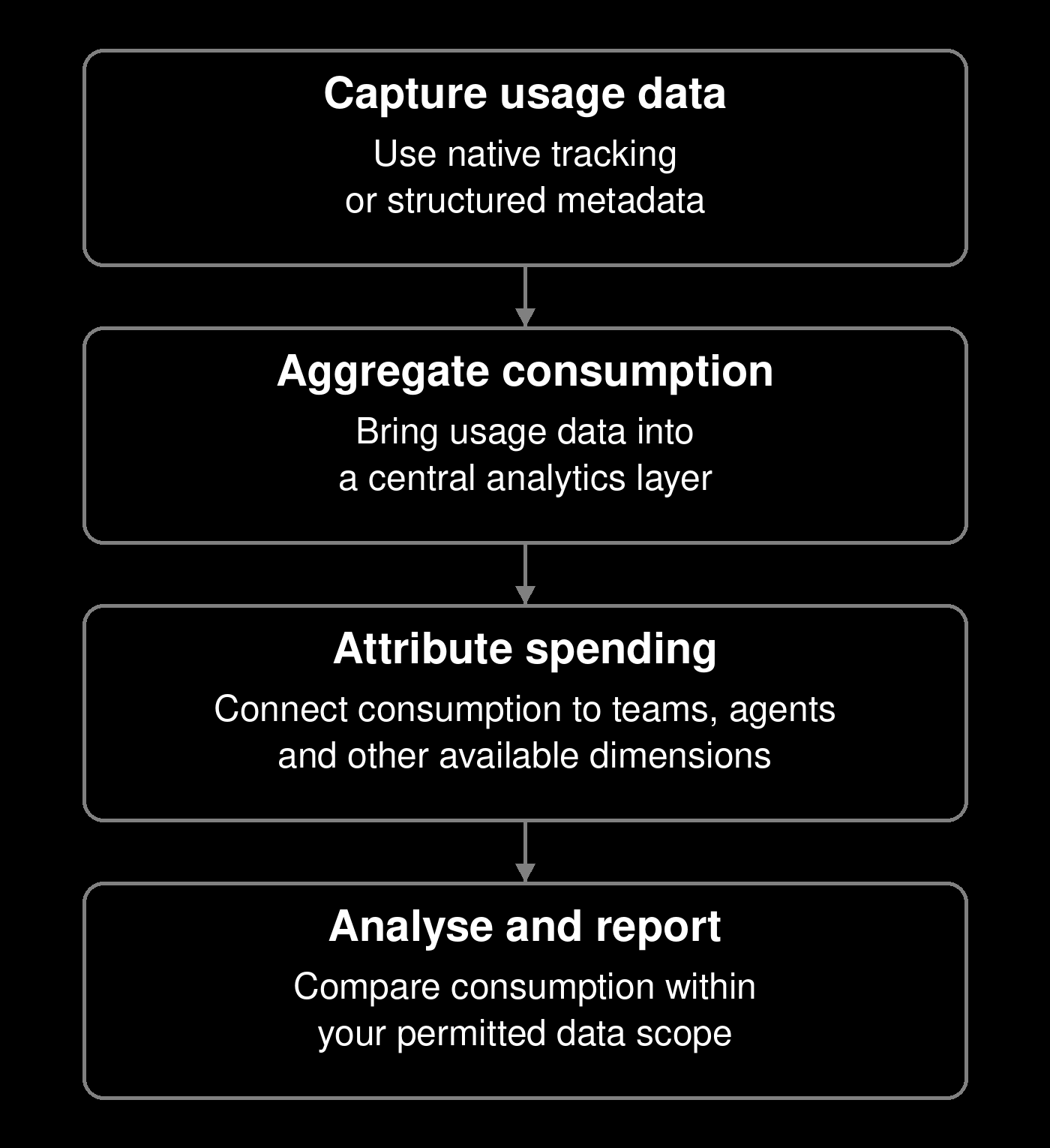
Putting this into practice starts with tagging consumption at the source. Track model calls, agent runs, and workflow triggers as they happen. Then pull that data into one shared analytics layer and map it back to your org chart. The payoff is the spend data that you can actually act on. That supports realistic per-team budgets, more informed ROI calculations, and optimisation decisions grounded in usage, quality and delivery outcomes.

AI spend has become a line item that finance teams ask about, and most engineering leaders can't answer it cleanly. You approved the tooling, usage was spread across five teams, and then the bill arrived. Now someone asks which team consumed the most AI tokens last month, or which agent workflow drove the spike, and you don't have a clean answer ready. AI cost attribution closes that gap. It brings the accountability that's been missing between adopting AI and actually managing its costs.

What AI cost attribution is and how it drives accountability

AI cost attribution connects AI credit consumption to the organizational unit or system that caused it. Your team runs agents to automate code review. Another uses AI for test generation. A third has a long-running refactoring workflow. Without attribution, all of that rolls up into one undifferentiated spend number. With it, you have a per-team, per-agent, per-project breakdown you can manage.

When spending is invisible, teams have no incentive to optimize. When it's visible and tied to their budget, behavior changes. Attribution also makes a real conversation about ROI possible by showing what each team spent. Pair that with evidence of delivery improvements, quality and review effort to assess what the spending achieved. AI cost attribution treats AI spend the same way mature engineering organizations treat cloud spend, as something to measure, own, and optimize.

What to attribute costs to

Before you can track anything, you need to decide on your attribution dimensions. Most engineering organizations find five dimensions worth tracking, and you don't have to implement all of them on day one.

A team is the most natural starting point. Each team (platform, backend, mobile, and data) gets its own cost view, enabling budget conversations and giving team leads visibility into what their engineers are actually consuming.

Agent or tool is the second dimension. Different agents have different cost profiles. A code review agent running on every pull request behaves quite differently from an on-demand refactoring agent. Tracking by agent lets you compare costs against output. If a specific agent consumes a large share of tokens but sees low adoption, that's worth investigating.

Project-level attribution allows you to see whether an expensive feature build is driving spend or whether it's spread evenly across maintenance work. This dimension becomes especially useful when you're building ROI cases for specific initiatives.

Cost attribution by workflow type covers code generation, test generation, documentation, CI failure analysis, and issue triage. Each of these carries a different credit intensity. Knowing which workflow types are heaviest helps you prioritize optimization efforts. It also helps you cut expensive workflows, but only when the output doesn't justify the cost.

Model and provider attribution shows you which models are chosen and at what cost when your teams have access to multiple models. A team might default to a heavyweight frontier model for simple completions. A cheaper model might deliver the same quality, and you can only spot that pattern if model-level data exists.

Team and agent are usually the highest-value dimensions to start with, because they map directly to the people and systems you can influence.

How to implement AI cost attribution

Attribution doesn't happen automatically. It requires numerous steps done in sequence.

Capture attribution data for every agent run, model call, or workflow trigger at the time of execution. At a minimum, record the team and agent. Ideally, include the project and workflow type too. If your tooling supports structured metadata on requests, use it to capture any details it does not already track.

Within the JetBrains Air ecosystem, users, groups, actions and consumption require no manual tagging. AI analytics in JetBrains Air Governance surfaces much of this data natively.

Centralize the tagged data into one analytics layer. A fragmented setup produces an incomplete picture. Some consumption gets tracked in one tool, some in another, and some not at all. That creates a false sense of accountability.

Map tags to your organizational hierarchy. If your tag structure doesn't align with your org chart, do the translation at this step. The output should be a consumption view that shows who spent what, on which agents, and on which projects.

Build reporting for each audience. Engineering managers need a cross-team comparison. Finance or FinOps stakeholders need rollup numbers they can tie to the budget.

With Air Governance, administrators can monitor AI credit consumption on the Users and Licensing page, set default monthly credit limits for all users, and override those limits for individual users or groups.

It also brings usage data from Air Teams and other tools into its AI analytics section, helping you compare consumption across users and groups and identify opportunities to optimize spending.

How to use attribution data

Attribution data is only useful once you act on it. That payoff shows up in four areas.

Budget planning becomes grounded once you have a few months of per-team consumption data. Base allocations on observed spend, not on spreading AI spend evenly across teams regardless of how they actually use them. Teams with high-value, high-consumption workflows get more. Teams exploring early use cases get a smaller initial allocation with room to request more.

Optimization surfaces inefficiency that a total spend number hides. A specific agent consuming a disproportionate share of tokens becomes a candidate for prompt optimization, model selection review, or workflow restructuring. A team with low AI credit consumption relative to headcount might benefit from more tooling guidance. You can't have either conversation without the underlying data.

ROI calculation starts with the cost side of the equation. Pair consumption data with delivery and quality measures, such as time to resolve issues, defects and review effort. Activity counts, such as pull requests reviewed or issues triaged, can help explain usage, but they do not establish value on their own. Include human review and rework costs when assessing the return.

Benchmarking becomes possible once you have per-team data across multiple cycles. Is a team's AI credit usage growing faster than their output? Did a new agent deployment change their cost profile? Trend data answers questions that a single-period snapshot can't.

Start with team and agent attribution

The two dimensions that move the needle fastest are team and agent. Once you can define which team spent the most last month and which agent drove that spend, you have enough to run a real budget conversation and identify the first optimization target. Add project and workflow type as your tagging infrastructure matures and your teams start asking more specific questions.

Air Governance supports cost visibility through per-user and per-group consumption tracking. It includes credit limits, per-user and per-group consumption tracking, and centralized analytics out of the box. Customers on the Business plan can also use the Analytics API to integrate analytics data into their own dashboards or reporting workflows.

FAQ

How do I track which teams and agents are spending the most on AI?

Capture team and agent identifiers for each AI agent run and model call, using native usage tracking or structured metadata. Aggregate consumption in a centralized analytics layer to compare spending by team and agent.

Within the JetBrains Air ecosystem, users, groups, actions and consumption require no manual tagging. Air Governance aggregates and displays usage data in its AI analytics section, with Air Teams as one of the data sources. Administrators can monitor consumption by user and group and set credit limits through Air Governance. Those limits apply across AI usage, including Air Teams and AI Assistant in IDEs.

What is the difference between AI cost attribution and AI cost reduction?

Attribution is measurement, and cost reduction is action, which means attribution comes first because without it, you don't know where to act. Attribution answers who is spending what on which agents and workflows. Cost reduction answers the question of what to change to spend less for the same or better output. Common reduction levers include choosing a cheaper model for lower-complexity tasks, optimizing prompts to reduce token consumption per interaction, or consolidating redundant agent workflows. None of those decisions is well-grounded without attribution data telling you which agents and workflows carry the highest cost and the lowest output-per-credit ratio. Attribution tells you where to cut the bill, but it doesn't cut it for you.

What happens if my AI tooling doesn't support metadata tagging on requests?

Tooling that can't attach structured metadata to model calls makes attribution significantly harder. You end up inferring team and agent ownership from indirect signals like API keys, user accounts, or log patterns. That approach is fragile and incomplete. If your current tooling lacks native tagging support, treat it as a selection criterion when evaluating alternatives. Check whether your tooling’s native usage tracking captures the attribution dimensions you need before adding custom metadata.

What's the right cadence for reviewing AI cost attribution data?

Team leads benefit from weekly visibility into their team's credit consumption, especially during periods of active agent deployment. Engineering managers and FinOps stakeholders typically review cross-team rollups monthly, aligned with budget cycles. The most useful trigger for an unscheduled review is a consumption spike, which a well-configured attribution system should surface as an alert rather than a surprise at the end of the month.

How do I attribute AI token costs to specific projects?

Project-level attribution requires a project tag on every AI interaction that is part of that project's work. This means either tagging at the agent configuration level (if an agent is dedicated to a specific project) or at the request level via metadata that your tooling supports. Some teams use a combination, with a shared agent pool tagged by project at trigger time, using context from the ticketing system (Jira issue keys, for example) to assign project membership. Decide where in your execution chain the project context is known and ensure the tag is written there. Once project tags are flowing consistently, aggregate them in your analytics layer the same way you'd aggregate team or agent tags.

How do I build a chargeback or showback model for AI tokens?

Showback and chargeback serve different purposes. Showback means each team receives a report of their AI credit consumption and the notional cost, without any budget transfer, creating visibility and encouraging accountability without requiring a financial mechanism. Chargeback means the actual cost is transferred to the team's budget, creating a direct financial incentive to optimize. Most engineering organizations start with showback because it's lower friction and still changes behavior. If your organization already runs cloud FinOps with showback or chargeback for infrastructure spend, the same process applies to AI spend, except that AI consumption is tied to agent and workflow behavior rather than to infrastructure provisioning.

Can I run attribution across multiple AI providers at once?

Yes, but it requires a centralized aggregation layer that ingests data from each provider's usage API. Each provider reports consumption in its own format and unit, so you'll need a normalization step to convert everything to a common unit before you can compare across providers. Some AI governance platforms handle this aggregation natively. If you're building it yourself, start by pulling per-provider usage data on a daily cadence and mapping it to your tag schema before attempting cross-provider rollups.

Use AI agents in your development workflow

Explore JetBrains AI solutions that help you build, use, and scale AI agents across the software development lifecycle.

Air Gateway

Run terminal agents through one JetBrains account, with access, models, and usage governed centrally.

Junie

Plan, code, debug, and automate tasks with a coding agent that works across your terminal, IDE, GitHub, and GitLab.

Air in IDEs

Orchestrate AI agents and verify their output directly in JetBrains IDEs, with full control over how changes are reviewed.

Air Teams

Automate software delivery workflows, coordinate agentic work across teams, identify bottlenecks affecting delivery.

Air Governance

Govern AI usage, models, policies, and costs across your organization, including JetBrains and third-party tools.

Air Context

Give agents shared organizational memory and context that carries across tools, workflows, and execution environments.

JetBrains Air

An open system of AI products for developers, teams, and organizations – from coding with agents to automating workflows and governing AI at scale.