ReSharper Plugins
Looking at the big picture, there's more to ReSharper than its own extensive set of features: ReSharper API offers a rich platform for developing intelligent plugins.
ReSharper plugins can provide new code inspections and quick-fixes, support additional unit testing frameworks, implement special-purpose refactorings, validate naming conventions, and perform many more tasks which any .NET developer will find useful.
How to Create ReSharper Plugins
Se você está desenvolvendo um plug-in do ReSharper ou se deseja começar do zero, baixe o SDK do ReSharper e confira a documentação de desenvolvimento de plug-ins do ReSharper. Quando seu plug-in estiver pronto, carregue-o na JetBrains Marketplace para disponibilizá-lo a todos os usuários das versões do ReSharper compatíveis.
How to Install ReSharper Plugins
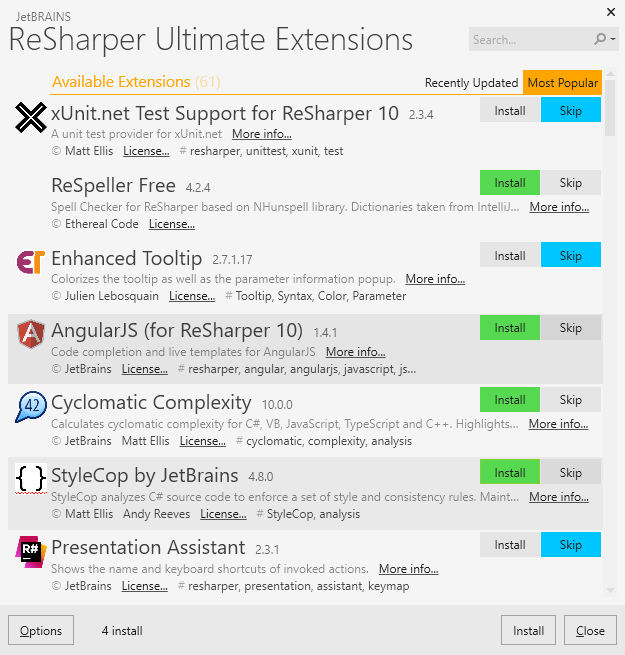
Since version 8.0, ReSharper contains Extension Manager ( in Visual Studio) that helps discover and get additional information on plugins, install and uninstall them.
Users of ReSharper 8.0 and above working with Visual Studio 2010, 2012, 2013, 2015, 2017 or 2019 should use the Extension Manager to select and install plugins.
If you're using ReSharper 7 or earlier, or if you work in Visual Studio 2005 or 2008, you should find, install and uninstall plugins manually. Acesse o diretório antigo de plug-ins do ReSharper e escolha plug-ins aplicáveis de lá.