更改签名
更改签名重构结合了几种可以应用于函数签名的不同修改。 您可以使用此重构来:
更改函数名称和返回类型
添加、移除和重新排序参数
在更改函数签名时,CLion 会搜索该函数的所有用法,并更新所有可以安全修改的调用、实现和覆盖替换,以反映更改。
添加参数
点击
return值,该值已用红色高亮显示。按 Alt+Enter 并选择 创建参数 ‘<parameter_name>'。
在 更改签名 对话框中,调整参数设置或接受建议的设置。
点击 重构。
更改函数签名
将插入符号放置在您想要重构的函数上。
按 Ctrl+F6 或从主菜单或上下文菜单中选择 。
在 更改签名 对话框中,对函数签名进行必要的更改。
在 名称 字段中更改函数名称。
在 返回类型 字段中更改函数返回类型。
使用表格和
 /
/ /
/ /
/ 按钮管理函数参数。
添加参数时,在相应的行中指定新参数的属性: Type、 名称 和 默认值。
默认值 字段设置用作用法参数的类型值。 如果您将此字段留空,CLion 将使用默认类型值(例如,数字使用
0,指针使用nullptr)。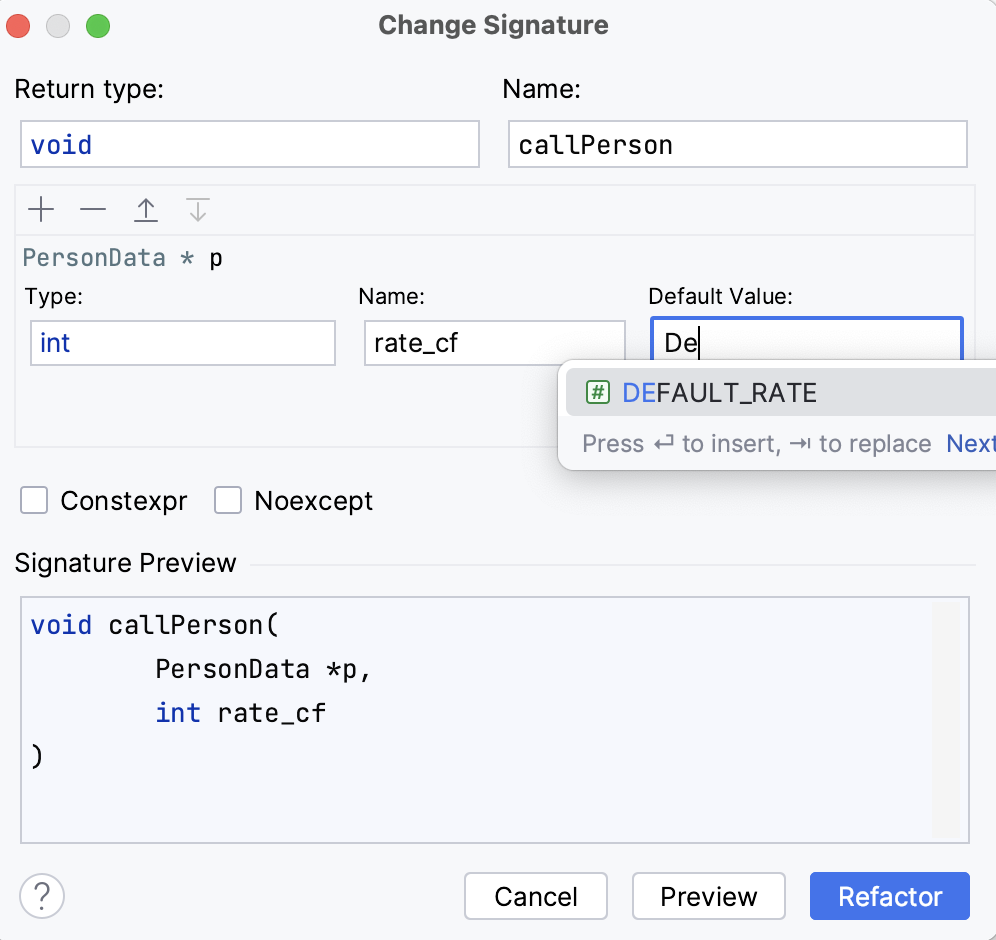
您还可以使用相应的复选框使函数成为
const、constexpr或noexcept。
示例
调整前 | 调整后 |
|---|---|
//Initial function signature
int exFunction2(int a, int b) {
int x = a+b;
return x;
};
int main() {
int a = 0, b = 1;
int x = exFunction2(a, b);
return 0;
}
|
//Name changed, the third parameter introduced
int exFunction3(int a, int b, int c) {
int x = a+b;
return x;
};
int main() {
int a = 0, b = 1;
int x = exFunction3(a, b, 0); //default value '0' added
return 0;
}
|
调整前 | 调整后 |
|---|---|
# This function will be renamed
def fibonacci( n ):
a, b = 0, 1
while b < n:
print( b )
a, b = b, a+b
n = int(input("n = "))
fibonacci( n )
|
# Function with the new name
def fibonacci_numbers( n ):
a, b = 0, 1
while b < n:
print( b )
a, b = b, a+b
n = int(input("n = "))
fibonacci_numbers( n )
|
调整前 | 调整后 |
|---|---|
//This function will be renamed
//and a default parameter will be added
function result() {
}
function show_result() {
alert('Result: ' + result());
}
|
//Function with a new name and default parameter
function generate_result(input = 100) {
}
function show_result() {
alert('Result: ' + generate_result());
}
|
2026年 7月 15日