ReSharper 2026.1 最新变化
Welcome to the ReSharper 2026.1 release overview. This version is designed to make everyday .NET development more comfortable and efficient, with:
- Enhanced performance monitoring – All runtime behavior insights can now be displayed in a single tool window.
- Expansion beyond Visual Studio – Use ReSharper in VS Code–compatible editors like Cursor and Google Antigravity.
- Improved C# support – Better handling of extension members, new inspections, and early support for upcoming features.
- More stable Out-of-Process mode – Over 70 fixes for improved reliability.
- Modernized editor UI – Updated completion, tooltips, and popups with better scaling.
性能监测升级
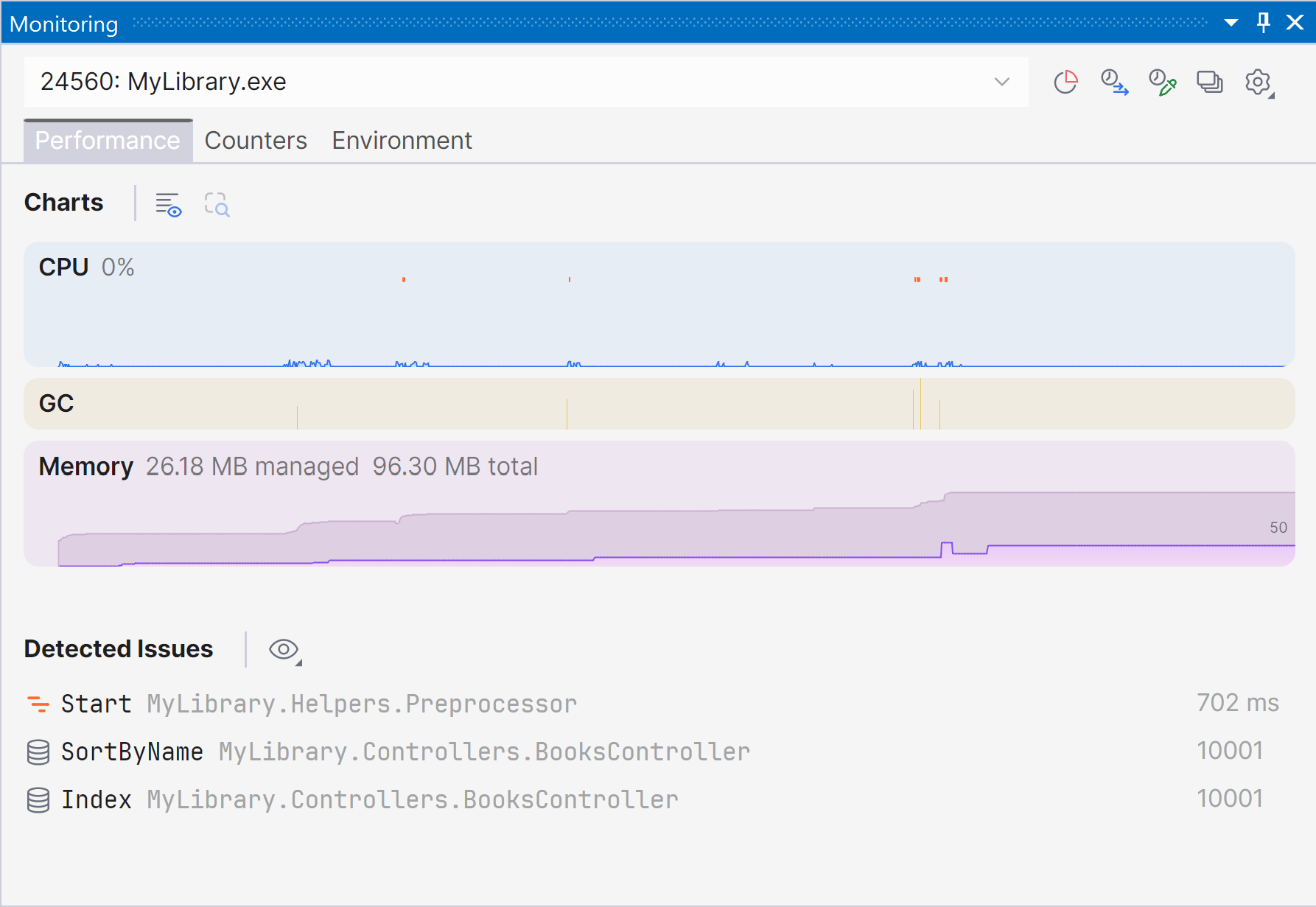
Marking a new step in the evolution of performance monitoring, ReSharper 2026.1 introduces the Monitoring tool window. 这个全新的专用工具窗口能提供更清晰、更全面的运行时性能概览,并自动检测问题,帮助您发现优化机会。
The Monitoring tool window lets you observe key runtime metrics of your application as it runs or during debugging. It builds on the capabilities already previously available through our .NET profiling tools and Dynamic Program Analysis (DPA), but brings them together in a single view that makes it easier to evaluate runtime behavior at a glance.
Starting with ReSharper 2026.1, the Monitoring tool window is available when using ReSharper as part of the dotUltimate subscription.
The Dynamic Program Analysis (DPA) feature will be retired in the 2026.2 release, while its core capabilities will continue to be provided through the new monitoring experience.
Current limitations:
The Monitoring tool window is not currently supported in Out-of-Process mode. We are working to remove this limitation in ReSharper 2026.2.
For more details on how monitoring works and how to use it, see our documentation.
扩展到与 VS Code 兼容的编辑器
ReSharper 现已支持 Visual Studio Code 以及 Cursor 和 Google Antigravity 等兼容编辑器,将 JetBrains 的 C# 工具引入您选择的编辑器中。
The extension provides real-time code analysis, refactorings, and navigation for C#, XAML, Razor, and Blazor. 它还包含一个用于管理项目和源代码生成器的 Solution Explorer,并支持对 NUnit、xUnit.net 和 MSTest 进行内置单元测试。
ReSharper for VS Code and compatible editors is available under the ReSharper, dotUltimate, and All Products Pack subscriptions. 非商业用途还可享受免费订阅。
Learn more in this dedicated blog post.
语言支持
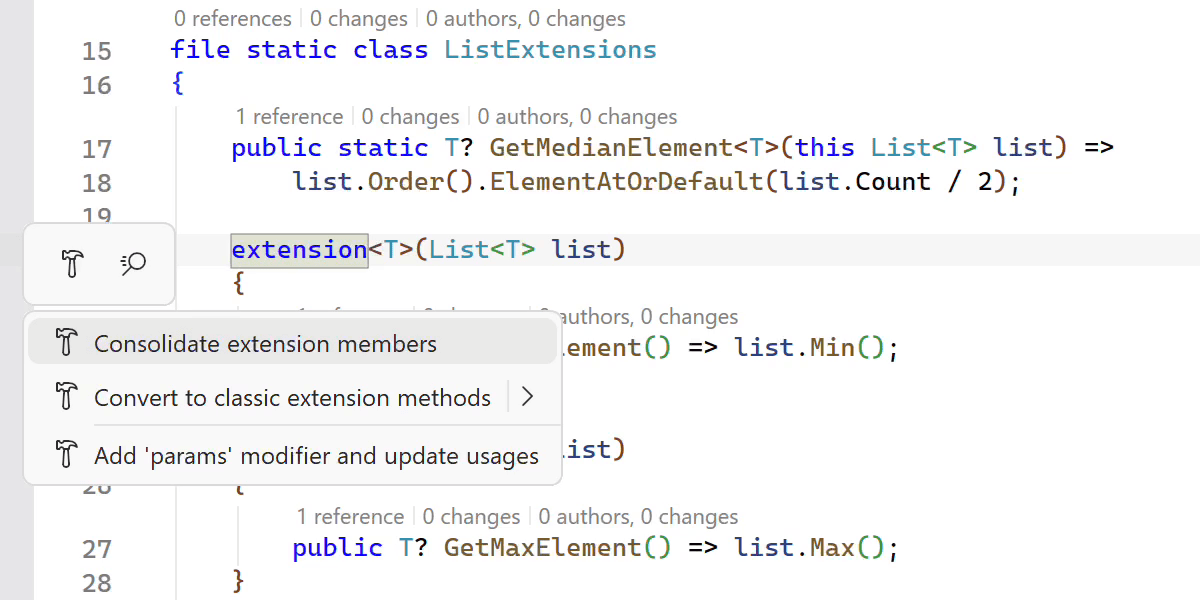
改进了对 C# 扩展的支持
ReSharper 2026.1 expands its support for C# extension members, helping you work more efficiently with the evolving language features.
A new Consolidate extension members context action merges compatible extension declarations and classic extension methods into a single block. The Import extension member quick-fix has also been improved and now supports all kinds of extension members, automatically adding missing using directives when needed.
We’ve also improved navigation and refactoring for extension members. ReSharper can now decompile extension blocks and navigate to generated sources, and the Extension Method to Plain Static refactoring now works with methods declared inside extension blocks.
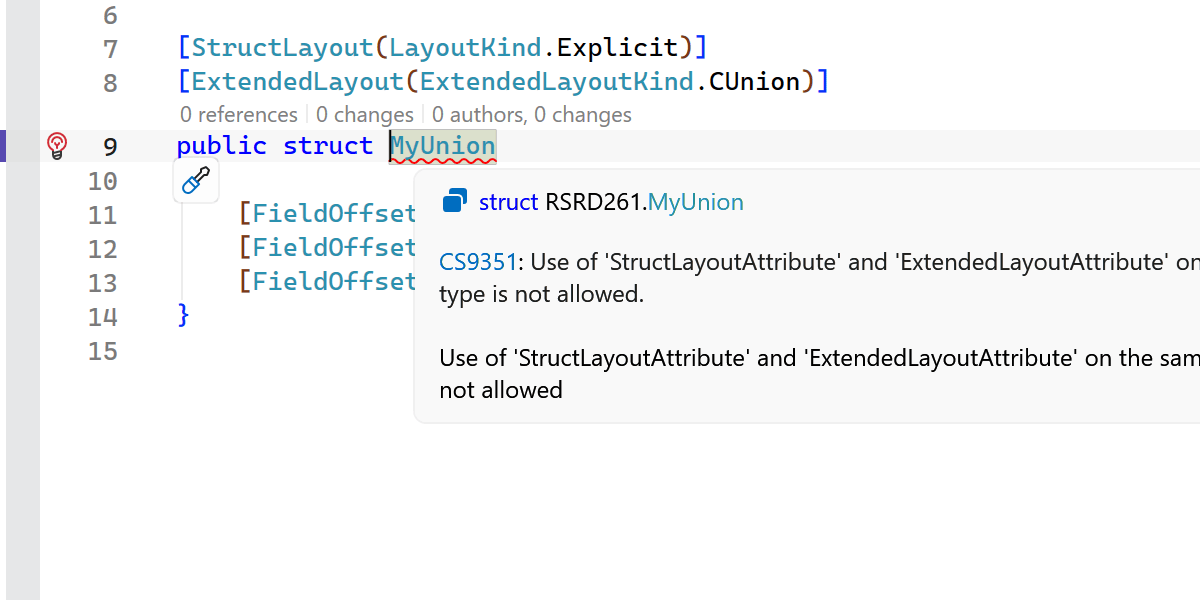
Early support for upcoming C# language features
ReSharper 2026.1 introduces early support for upcoming C# language updates, helping you experiment with new syntax as the language evolves.
This release includes initial support for collection expression arguments and support for the [ExtendedLayout] attribute, ensuring ReSharper continues to work smoothly with the latest compiler innovations.
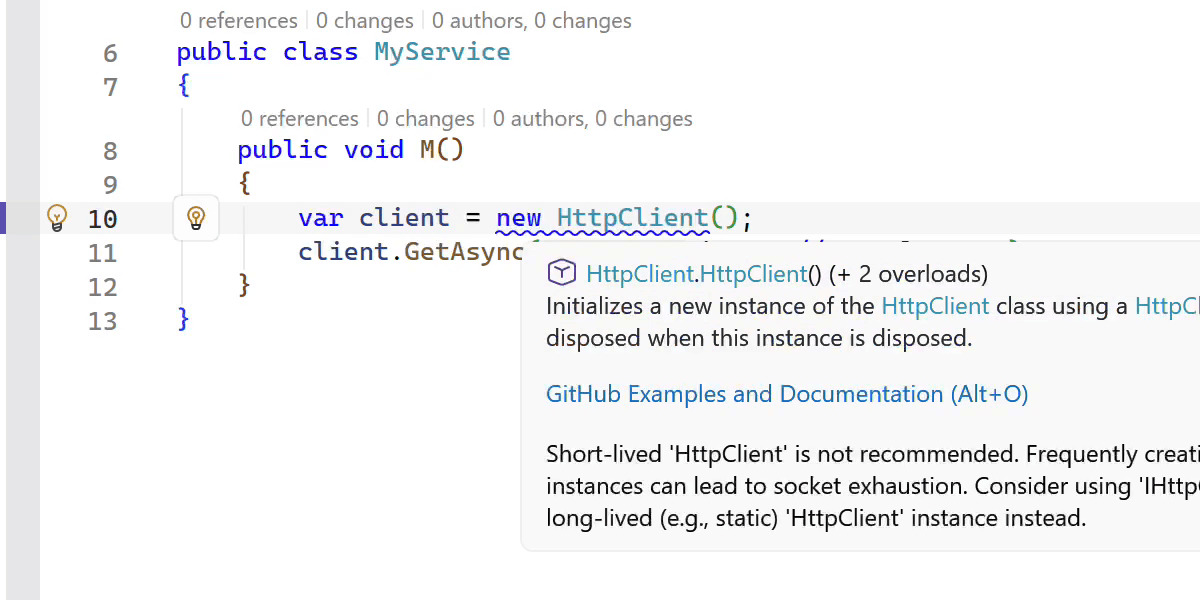
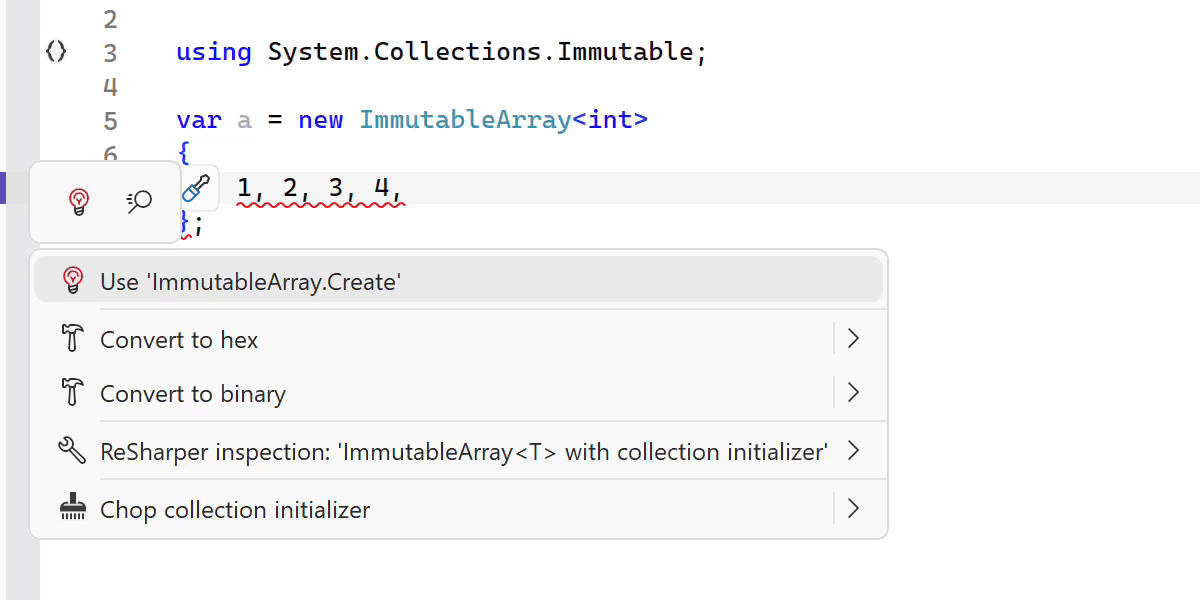
New inspections and code style options
This release adds several new inspections and style options to help you write safer and more consistent code.
ReSharper now detects short-lived HttpClient instances and suggests safer reuse patterns. It also warns you when ImmutableArray<T> is used with collection initializers, which can lead to a runtime NullReferenceException.
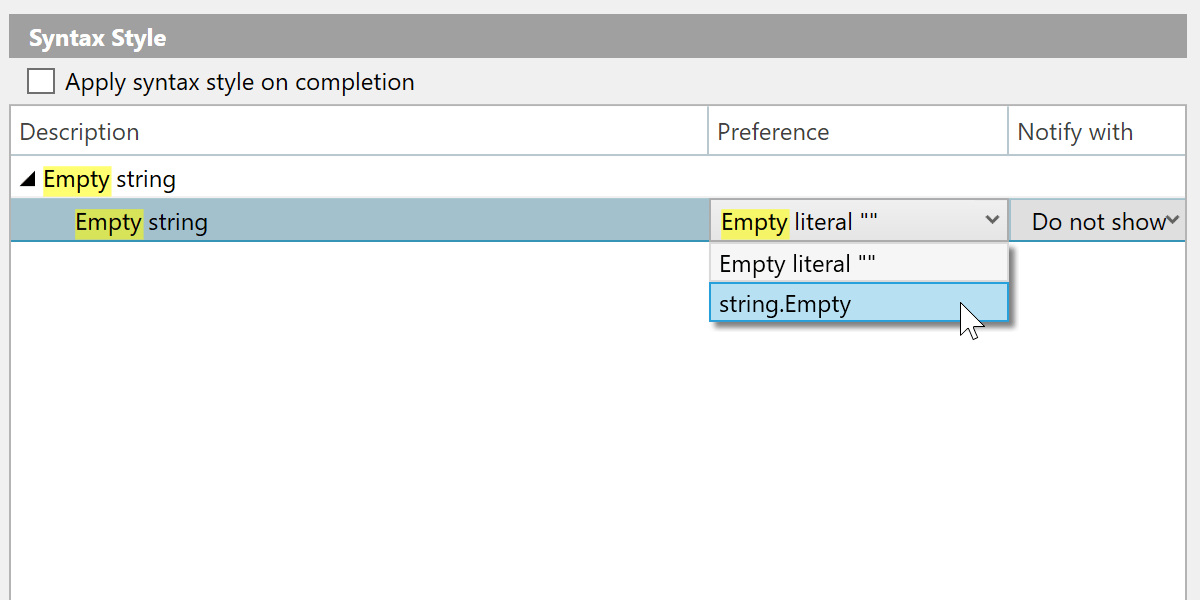
其他改进包括:
- A new inspection for enforcing the order of accessor methods in properties and events.
- A syntax style option for empty strings, allowing you to choose between
string.Emptyand"". - Improved nullable reference type migration, with an option to insert
#nullable enableautomatically in new files. - Enhanced code completion that can generate method definitions based on
[LoggerMessage]attributes.
索引、代码补全和分析速度更快
This release brings several performance improvements across indexing, code completion, and code analysis.
我们重新设计了程序集内定义的注解类型成员的索引过程,使其更加高效且更节省内存。
通过消除某些高耗时计算,导入补全的响应速度现在更快。
We also optimized several performance-critical code paths by reducing costly interface type checks, resulting in faster code analysis and lower overall overhead.
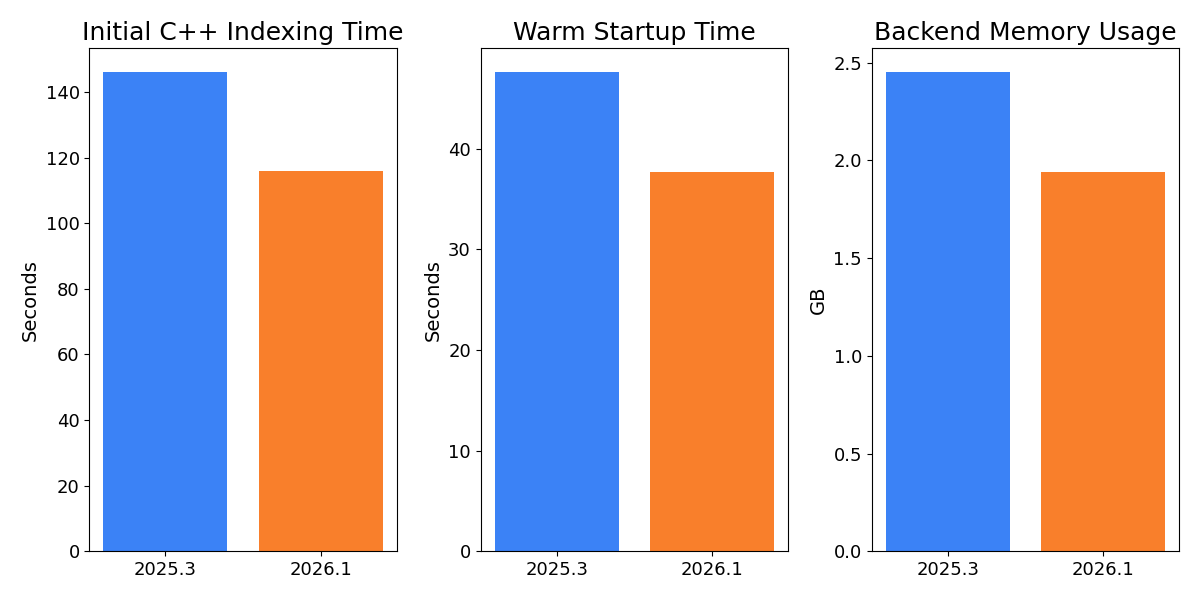
C++ improvements
ReSharper 2026.1 improvements to C++ support include:
- Performance: Faster startup times and lower memory usage in Unreal Engine projects.
- Language support: Support for the C23/C++26
#embeddirective, C++23 extended floating-point types, the C2Y_Countofoperator, and other features. - Coding assistance: Auto-import for C++20 modules and postfix completion for primitive types, literals, and user-defined literal suffixes.
- Code analysis: New inspections for out-of-order designated initializers and override visibility mismatches, update of bundled Clang-Tidy to LLVM 22.
- Unreal Engine: Richer Blueprint integration in Code Vision and Find Usages, compatibility fixes for the upcoming Unreal Engine 5.8.
从 ReSharper C++ 2026.1 最新变化页面详细了解 C++ 更新。
Improved stability in Out-of-Process mode
We continue to improve the stability of ReSharper’s Out-of-Process (OOP) mode, which improves responsiveness and resilience by separating ReSharper’s backend from Visual Studio.
In this release, we resolved over 70 issues and made improvements related to the Out-of-Process architecture. 这些修正解决了各种场景中的问题,包括导航(特别是 Peek(速览)操作)、UI 交互、单元测试会话和解决方案状态同步。
The .NET runtime used by ReSharper in Out-of-Process (OOP) mode has also been updated to .NET 10.
现代化补全和弹出窗口 UI
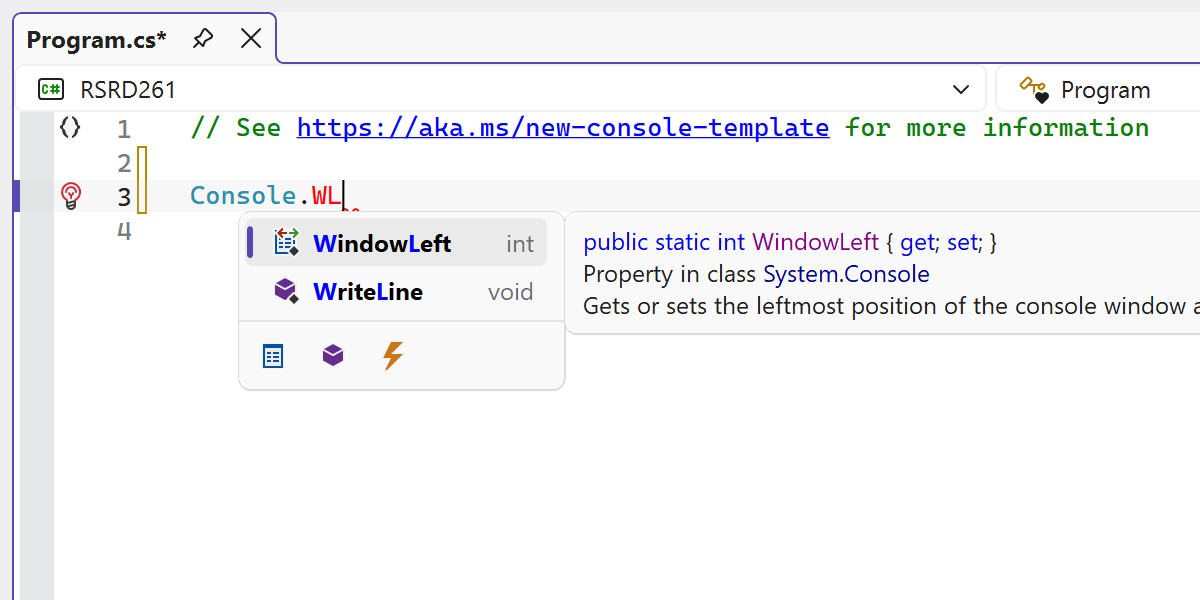
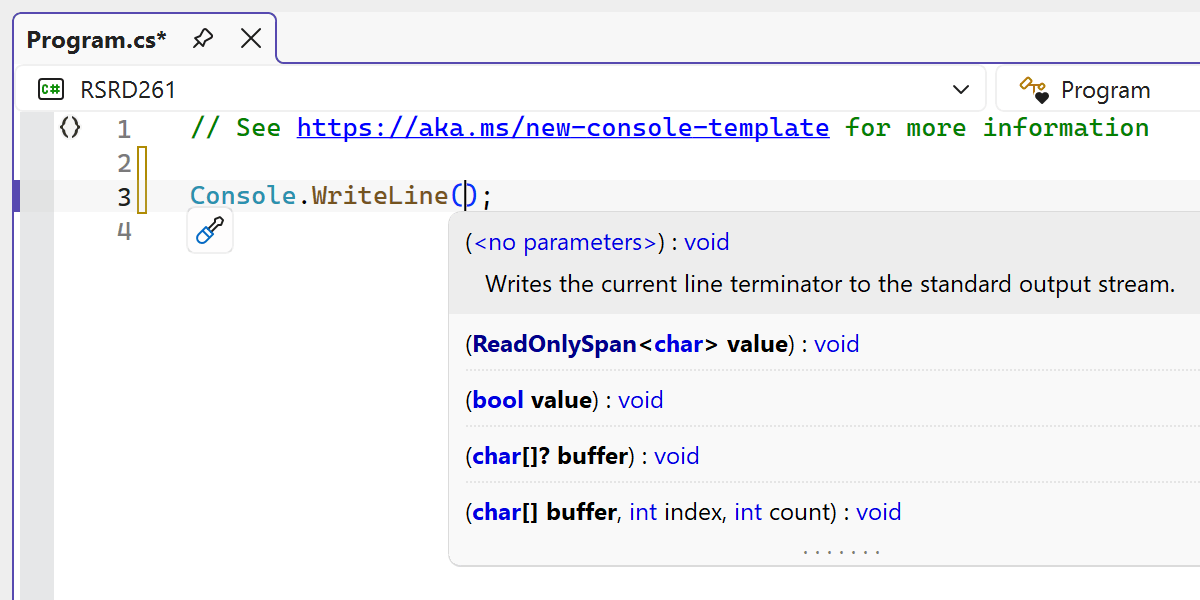
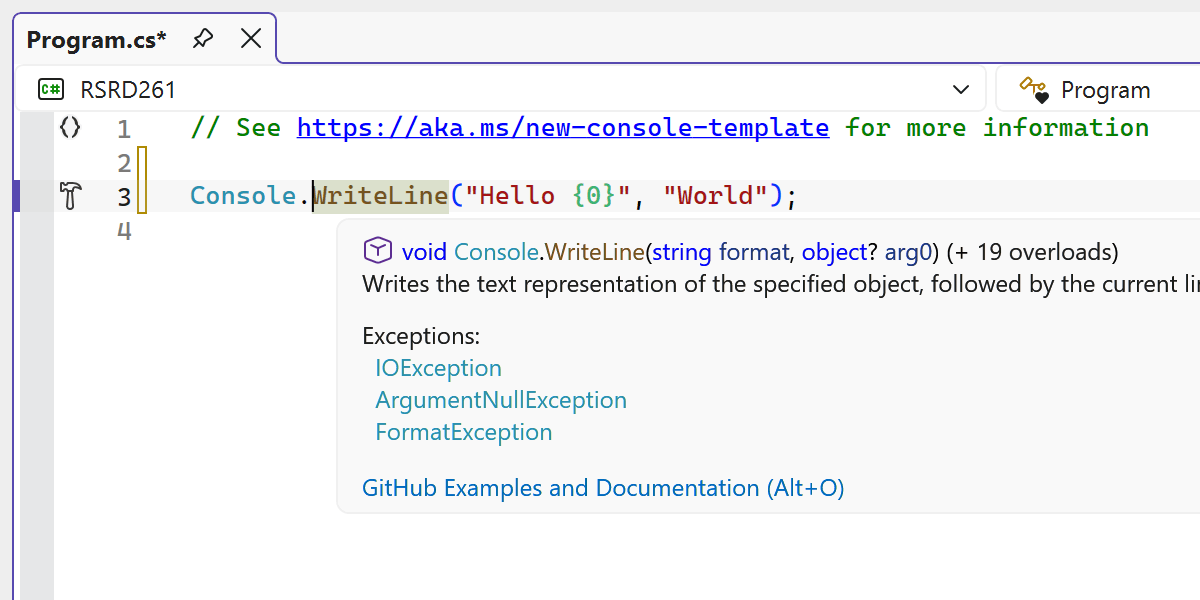
ReSharper 中的多个编辑器 UI 元素已更新,以更好地与 Visual Studio 的现代外观保持一致。
重新设计后,代码补全 UI 现在可以在编辑器内呈现更简洁且更一致的外观。
我们还对部分相关的 UI 组件进行了现代化升级,包括参数信息弹出窗口、工具提示和其他编辑器弹出窗口,以替换过时的视觉效果,并改进它们在不同主题和 DPI 设置下的外观。
更新后的 UI 现在支持 Visual Studio 的编辑器缩放功能,从而确保在缩放级别改变时,补全列表和参数信息能够正确缩放显示。