JavaScript example
| Before | After |
|---|---|
Parenizor.method('toString', function () {
return '(' + this.getValue() + ')';
}
)
|
Parenizor.method('toString', function () {
const string = '(' + this.getValue() + ')';
return string;
}
)
|
PHP examples
Extracting a class constant
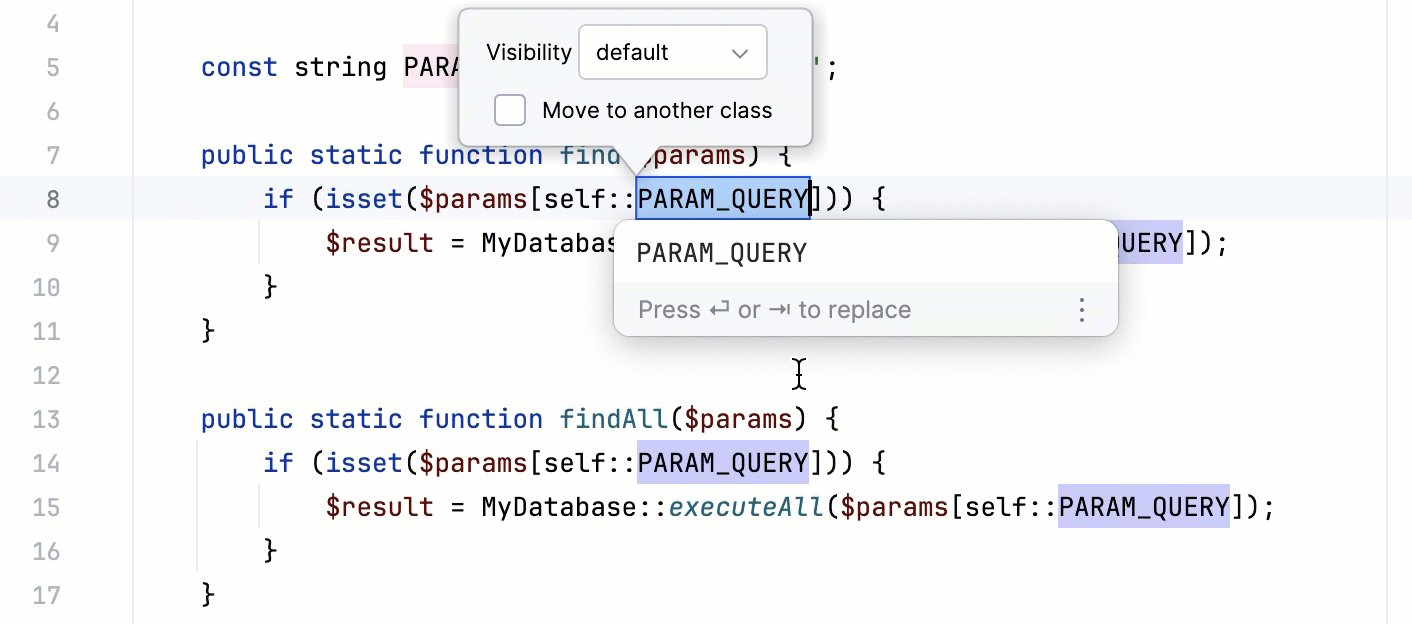
When a constant is extracted within a class definition, the new constant is defined through the const keyword and referenced through the self keyword.
| Before | After |
|---|---|
class const_extraction { public static function find($params){ if (isset($params['param_query'])) { $result = MyDatabase::execute($params['param_query']); } } public static function findAll($params){ if (isset($params['param_query'])) { $result = MyDatabase::executeAll($params['param_query']); } } } |
class const_extraction { const PARAM_QUERY = 'param_query'; public static function find($params){ if (isset($params[self::PARAM_QUERY])) { $result = MyDatabase::execute($params[self::PARAM_QUERY]); } } public static function findAll($params){ if(isset($params[self::PARAM_QUERY])){ $result = MyDatabase::executeAll($params[self::PARAM_QUERY]); } } } |
Extracting a constant outside a class
When a constant is extracted outside a class definition, you can choose whether it will be defined through the const keyword or through the define() function.
| Before | After |
|---|---|
<?php function find($params){ if (isset($params['param_query'])) { $result = MyDatabase::execute($params['param_query']); } } function findAll($params){ if (isset($params['param_query'])) { $result = MyDatabase::executeAll($params['param_query']); } } |
Const definition<?php const PARAM_QUERY = 'param_query'; function find($params){ if (isset($params[PARAM_QUERY])) { $result = MyDatabase::execute($params[PARAM_QUERY]); } } function findAll($params){ if (isset($params[PARAM_QUERY])) { $result = MyDatabase::executeAll($params[PARAM_QUERY]); } } Define() definition
<?php
define('PARAM_QUERY', 'param_query');
function find($params){
if(isset($params[PARAM_QUERY])) {
$result = MyDatabase::execute($params[PARAM_QUERY]);
}
}
function findAll($params){
if(isset($params[PARAM_QUERY])) {
$result = MyDatabase::executeAll($params[PARAM_QUERY]);
}
}
|
- In the editor, position the cursor inside the expression to be replaced with a constant.
- Choose on the main menu or on the context menu of the selection. Alternatively press Ctrl+Alt+CCtrl+Alt+CCtrl+Alt+CCtrl+Alt+CCtrl+Alt+CCtrl+Alt+CAlt+Shift+CCtrl+Alt+CMeta Alt CMeta Alt CMeta Alt C.
- If a constant can be extracted from several expressions in the current context, PhpStorm shows all the relevant expressions in a pop-up list. Select the expression to apply the refactoring to.
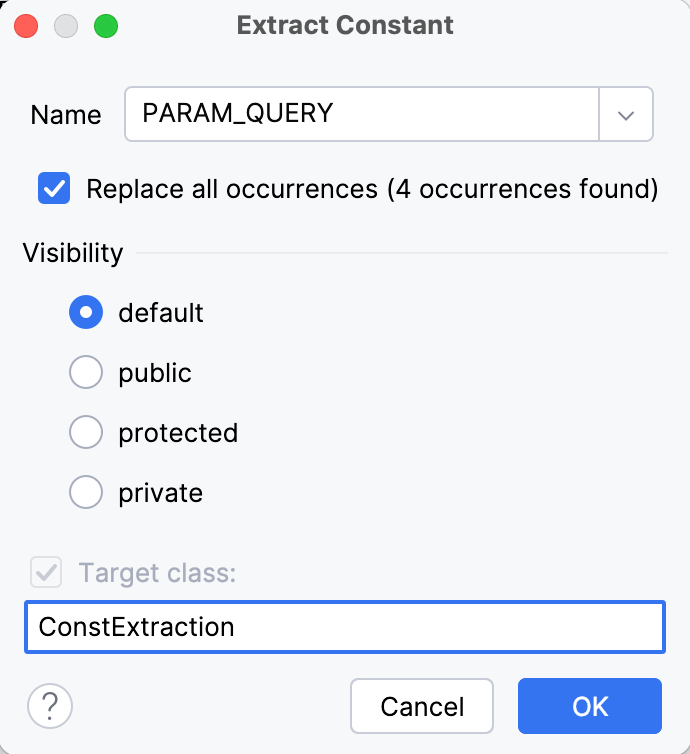
- In the ExtractConstant dialog box, type the name of the new constant in the Name text box.
-
Specify the scope to apply refactoring in:
- To have only the selected expression replaced, clear the Replace all occurrences check box.
- To have PhpStorm replace the selected expression wherever it is used, select the Replace all occurrences check box.
-
If the refactoring is invoked outside a PHP class definition, choose the method to define the PHP constant
in the Constant syntax area.
-
To have PhpStorm define the constant through the define() function
, choose define.
-
To have PhpStorm define the constant through the const keyword outside a class definition, choose const.
This method preserves the approach accepted in PHP version 5.3.0. Note that such constants are defined during compilation therefore they should be declared at the top-level scope but not inside functions, loops or if statements.
Note
If the refactoring is applied inside a class definition, it will result in extracting a class constant which is always defined through the const keyword by default, therefore the choice is irrelevant.
-
To have PhpStorm define the constant through the define() function
- Click OK to start the refactoring.