Scopes and file colors
A scope  is a named set of files and folders in a project. Scopes help you visually distinguish project items in different IDE views and limit the range of certain operations.
Scopes let you logically organize files. For example, you can put test sources into a test scope and keep production code in a production scope. This makes it easier to work with large projects. Running inspections only on tests is faster than running them across the entire codebase.
PhpStorm comes with a set of predefined scopes, but you can also create your own. A custom scope can contain any set of files, for example, only the parts of the project you are responsible for.
In PhpStorm, scopes are used in various features: code inspections, some refactorings, search, in copyright settings, in various features for code analysis, and so on.
In PhpStorm, there are two types of scopes: local and shared.
Local scopes are stored in the IDE configuration directory, that is why they are not shared through VCS and are not available to other members of your team.
Using shared scopes makes sense if your project is under version control. If you don't use a VCS, local scopes will be enough to cover your needs.
Define a new scope
In PhpStorm, there's a set of predefined scopes, but you can also define your own scopes.
Press Ctrl+Alt+S to open settings and then select .
Click the Add Scope button (
 ) and select what kind of scope you want to define: local or shared.
You can change the state of the selected scope (local or shared) later using the Share through VCS checkbox.
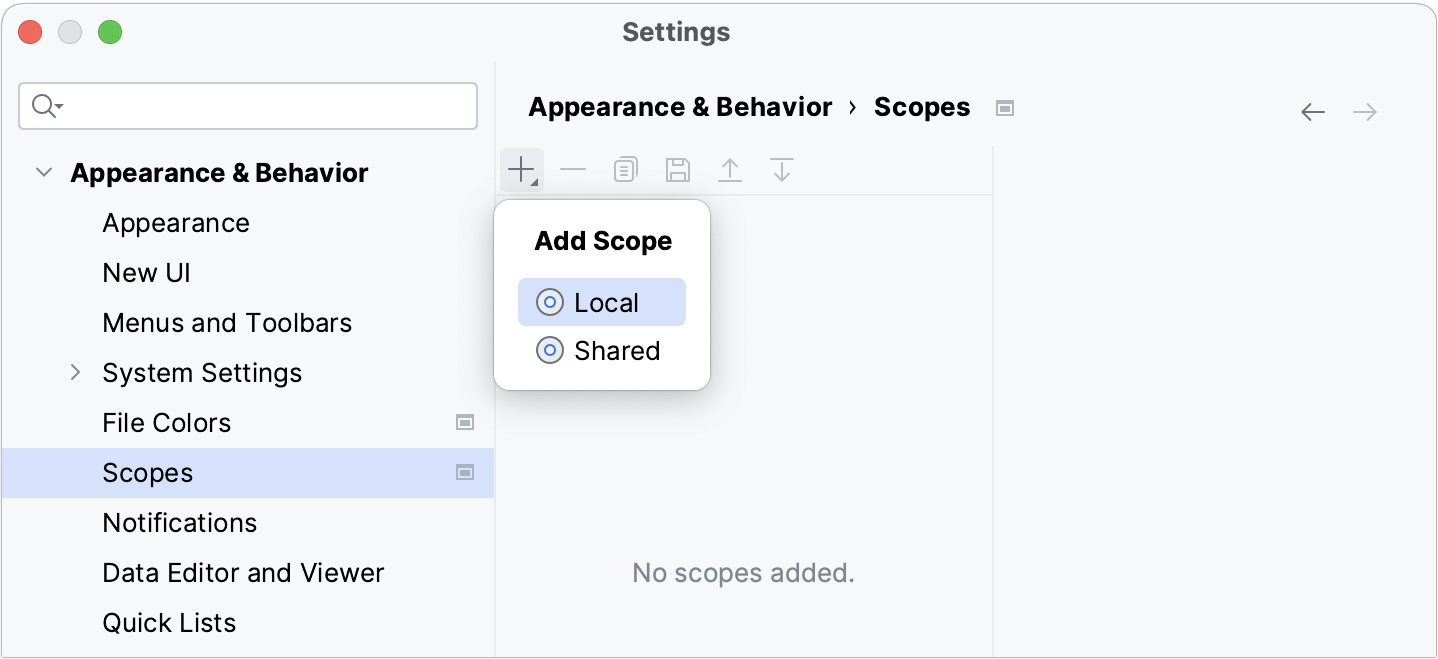
In the dialog that opens, name the new scope and click OK.
Add files to the new scope. Select the necessary items in the project tree and click one of the options located on the right from the tree:
Include: include the selected items. If you are including a folder, this action adds only the files located inside this folder. All nested subfolders and their contents will not be included.
Include Recursively: include the selected folder together with the nested subfolders and their contents.
Exclude: exclude the selected items from the scope. If you are excluding a folder, this action removes only the files located inside this folder. All nested subfolders and their contents will remain in the scope.
Exclude Recursively: exclude the selected folder together with the nested subfolders and their contents.
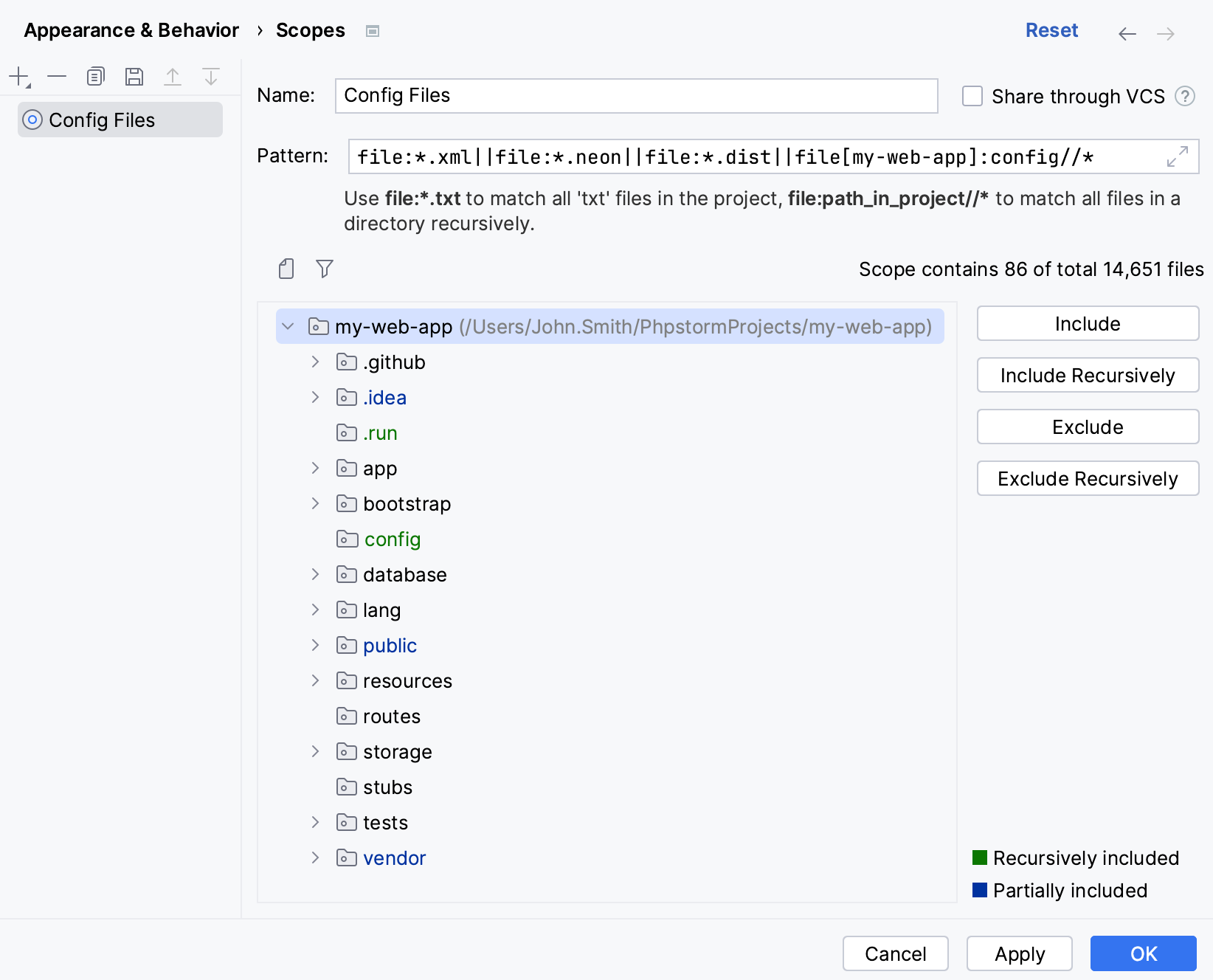
As you add files to the scope, PhpStorm creates an expression and displays it in the Pattern field.
Instead of using the buttons, you can also type a pattern in the Pattern field manually using the scope language syntax reference.
Apply the changes and close the dialog.
Files and folders displayed for the selected scope are shown in different colors to help you understand what is included and what is not:
 Files and folders included in the scope.
 Folders that contain both excluded and included files and folders.
 Files and folders that are excluded from the selected scope.
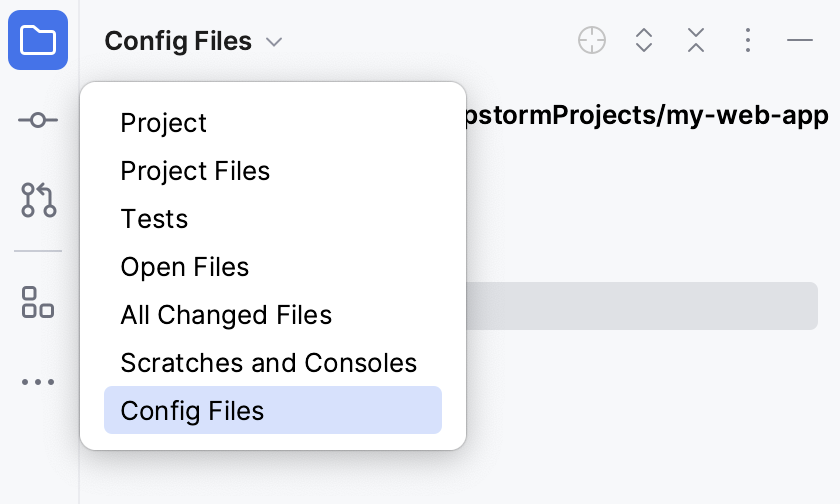
After you create a custom scope, you can find it in the Project tool window and in all dialogs that allow you to limit the number of files to which you want to apply an action.
Predefined scopes
PhpStorm provides a set of predefined scopes. The IDE adds files to these scopes automatically based on the information about them. Note that these scopes cannot be modified.
List of predefined scopes
Project Files: includes all files within the project content roots. For more information, refer to Directory structure. Libraries and frameworks are not included in this scope.
Problems: includes files within the project content roots with syntax errors.
All Changed Files: includes all the recently changed files.
All Changed Files: includes the last 50 files that you have opened or modified in the editor. To change the number of recent files, press Ctrl+Alt+S to open settings and select Advanced settings, search for the Maximum number of recent files field, and specify the preferred number.
Project Files Tracked by Git: includes all project files that are under version control in Git.
Project Files Excluding Git-Ignored: includes all project files, both under version control in Git and unversioned, excluding the files specified in
.gitignore.Tests: this scope is limited to the project test source roots.
Open Files: includes the files that are currently open in the editor.
Local Changes (These scopes appear if VCS integration is enabled)
All Changed Files: includes the modified files with changes that are not yet added to VCS from all changelists.
Default Changelist: includes the modified files with changes that are not yet added to VCS from the Default changelist.
'Changelist name': includes the modified files with changes that are not yet added to VCS from a specific custom changelist.
Associate scopes with colors
Files that belong to different scopes can be highlighted in different colors in search results, in editor tabs, and in the Project tool window (Alt+1) .
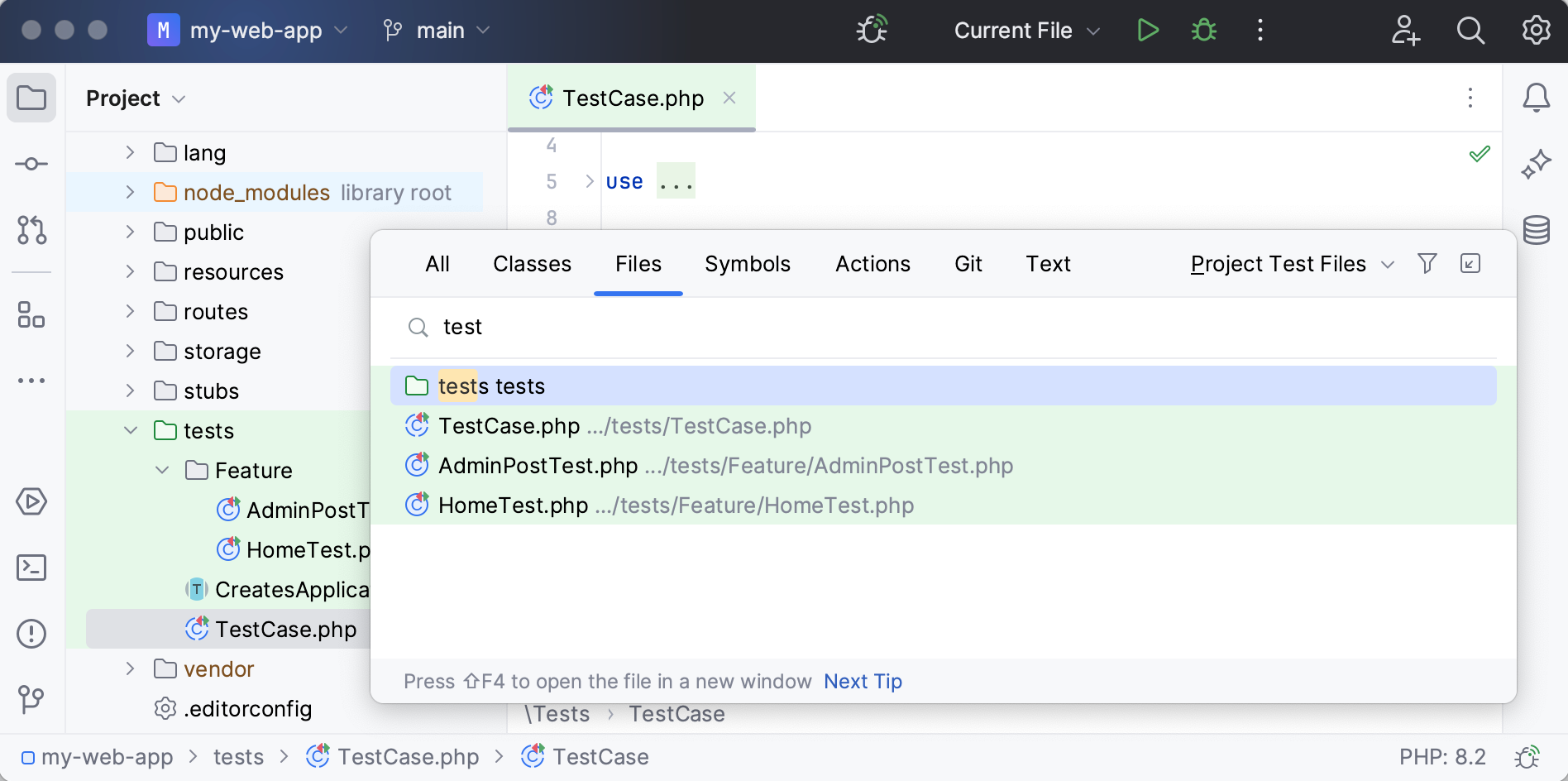
To each scope, you can assign its own color. For example, you can assign a color to the Open Files scope and configure the IDE to show this color in the Project tool window. In this case, the files that you are currently working with in the editor will be colored in the project tree. This makes project navigation faster and simpler. Note that file colors work only in association with scopes.
Similarly to scopes, color associations can be local and shared.
Local colors are only visible to you and are not shared through VCS.
Create a new color association
Press Ctrl+Alt+S to open settings and then select .
Make sure that the Enable file colors checkbox is selected, and then choose where you want to use the colors: select Use in editor tabs or Use in project view.
If you select the Use in project view checkbox, you will see colors in the Project tool window (Alt+1) and in search results (for example, in the Find in Files dialog Ctrl+Shift+F).
Click the Add button (
) and select the scope for which you want to configure a color.You can select one of the pre-defined scopes or use a custom scope.
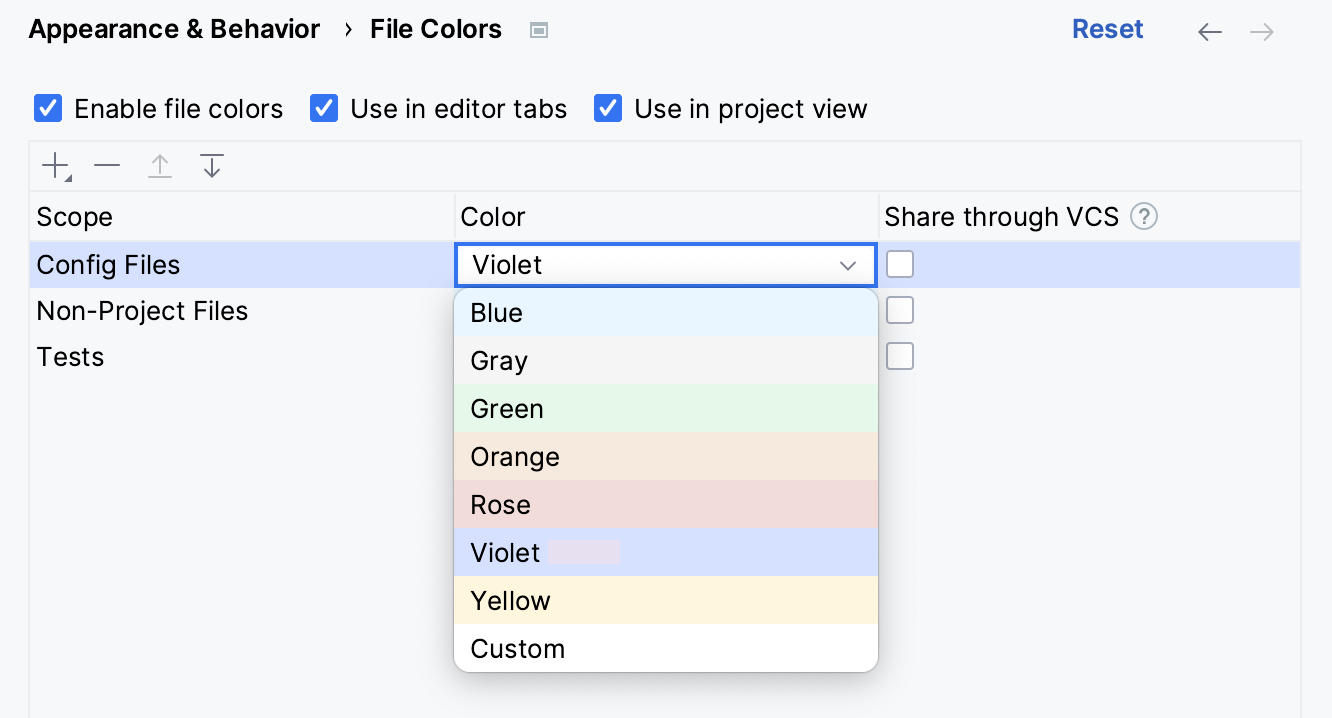
Click the arrow
 next to the necessary scope and select a color from the list that opens.
To configure your own color, click Custom.
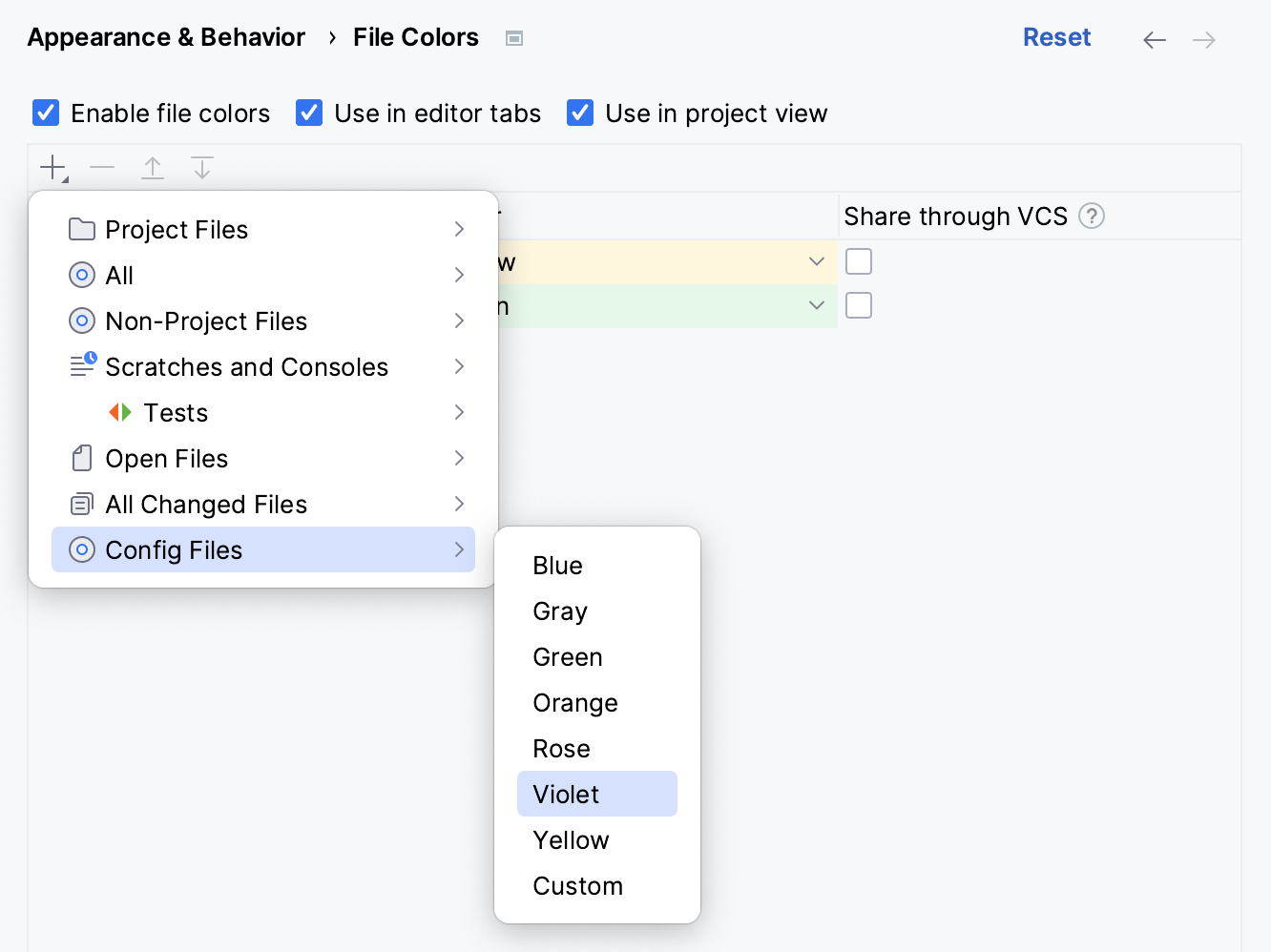
To edit a color, click the cell that corresponds to the necessary scope in the Color column and select a new color from the list.
To share a color through a VCS, select the checkbox on the corresponding line in the Share through VCS column. If the checkbox is cleared, the color will be used locally.
Apply the changes and close the dialog.
If a file is included in several scopes, the order of the scopes becomes important: PhpStorm processes the scopes from the top to the bottom starting from local scopes. It means that the IDE will apply the color of the last scope in the list to such a file.
You can change the order of the scopes if you want PhpStorm to process color associations in a different order.
Change the order of scopes
Press Ctrl+Alt+S to open settings and then select .
Select the scope that you want to move and click the Move Up (
 ) or Move Down (
 ) button. Alternatively, press Alt+Up or Alt+Down.
Apply the changes and close the dialog.
Scope language syntax reference
Description | Pattern | Example |
|---|---|---|
Include a single file by its name |
|
|
Include a set of all files in a directory, without subdirectories |
|
|
Include a set of all files in a directory with subdirectories |
|
|
Include a file by its name from the certain project |
|
|
Possible logical operators &&·(AND), ||·(OR), !·(NOT). |
|
|
Examples
file:*.php||file:*.twig: include all PHP and Twig files.file:*php&&!file:*test*.php: include all PHP files except those that contain the character stringtestin their names.file:www/wp-content/themes/my-site-child//*.php||file:www/wp-content/themes/my-site-child//*.css||file:www/wp-content/themes/my-site-child//*.js||file:www/wp-content/plugins/my-site//*.php||file:www/wp-content/plugins/my-site//*.css||file:www/wp-content/plugins/my-site//*.js: include all .PHP, .CSS, and .JS files from the theme and plugin of the WordPress website.file:*.js||file:*.coffee: include all JavaScript and CoffeeScript files.file:*js&&!file:*.min.*: include all JavaScript files except those that were generated through minification, which is indicated by theminextension.
Scopes use cases
The following examples show how you can use scopes in your daily work:
Inspect only a specific group of files.
With scopes, you can inspect specific parts of your code base. For example, you can inspect production code separately from your test code. Moreover, you can apply a different set of inspections to recently modified files to make sure new changes go through a stricter check.
Learn more from Run inspections.
Limit search and replace results.
You can use scopes with the Find in Files and Replace in Files features to reduce the number of irrelevant results and speed up refactoring.
Learn more from Search for a target within a project.
Use scopes for navigation.
In the Project tool window, scopes can also simplify navigation. You can select the scope you need to create a simplified tree only with the items you currently need.
Learn more from Project tool window.
Reformat only certain files.
With scopes, you can reformat specific files instead of reformatting only your current file or the entire codebase. For example, you can reformat recently modified files to comply with code style requirements after making changes to the code.
Learn more from Reformat code.
Configure different copyright notices for different sets of files.
This can be useful in several situations, for example, when files in a project have different copyright owners or come from third-party or open-source projects, and you want to keep the original copyright.
Learn more from Copyright.