Overview
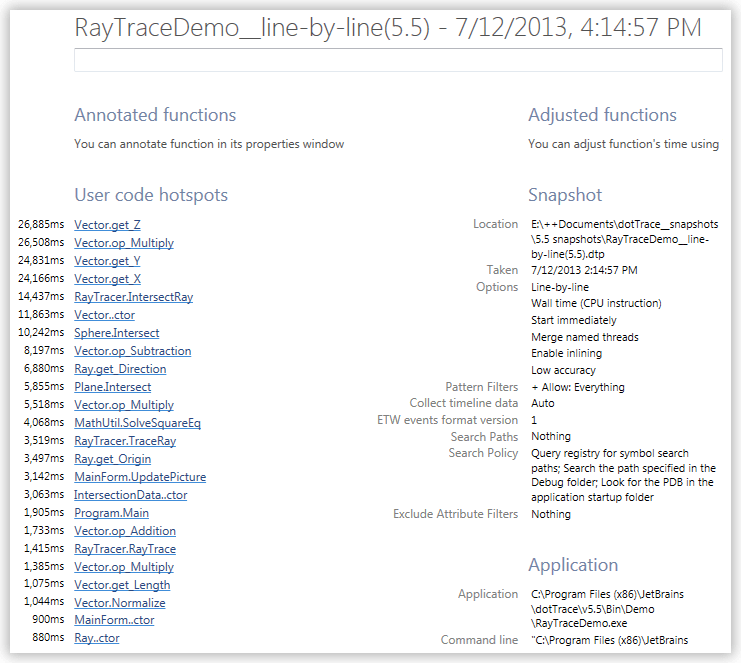
Overview provides some general information about a snapshot, system configuration, profiled application and profiling results.
To open Overview
Use the menu or the Ctrl+Shift+O shortcut.
Overview consists of the following sections:
Runtime chart shows application CPU activity and memory consumption during profiling. Double arrow lines show timeframes when performance data were collected.
Annotated Functions contains the list of function annotations you have added. Click a function name to open the function in a new tab.
Adjusted Functions contains the list of adjusted functions. Click a function name to open the function in a new tab. If you want to restore original values for all functions, click Clear all.
User code hotspots displays the list of top hotspots from the user code subsystem.
Snapshot contains information about snapshot location, creation date and time, profiling settings.
Application contains information about profiled application, which varies depending on the selected application type; the total number of functions and modules in the current snapshot
Environment lists system information about the computer where the application was profiled.
Main Thread displays time distribution between subsystems for the Main Thread.
Other Threads displays combined time distribution between subsystems for all other threads.
You can edit the snapshot description by typing in the field below a snapshot name.