Search for Functions
If you need to study the behavior of a specific function, you can find it easily and quickly in any view.
To find a function
Do one of the following:
From the menu bar, choose .
Click Find Function
![ThemedIcon.FindFunction.Screen.[-].png](https://resources.jetbrains.com/help/img/dotnet/2026.1/ThemedIcon.FindFunction.Screen.%5B-%5D.png "ThemedIcon.FindFunction.Screen.[-].png") on the toolbar.
on the toolbar.Press Ctrl+F.
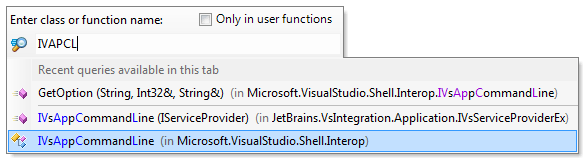
Start typing characters in the search field. As you type, the lookup list narrows down, suggesting names that match the entered substring.
Select a class or a function from the list and press Enter.
Also you can narrow down the list of items using CamelCase notation. It is case-insensitive, so there is no difference between 'ivapcl' and 'IVAPCL'.
26 May 2024