- Place the caret after the declaration of a function you want to document.
- Type opening triple quotes, and press EnterEnterEnterEnterEnterEnterEnterEnterEnterEnterEnter, or Space.
- Add meaningful description of parameters and return values.
- Place the caret somewhere within the function you want to document.
- Press Alt+EnterAlt+EnterAlt+EnterAlt+EnterAlt+EnterAlt+EnterAlt+EnterAlt+Enter, Alt+Shift+J or Ctrl+Shift+MAlt EnterAlt EnterMeta 1 to show the available intention actions.
- Choose Insert documentation string stub:
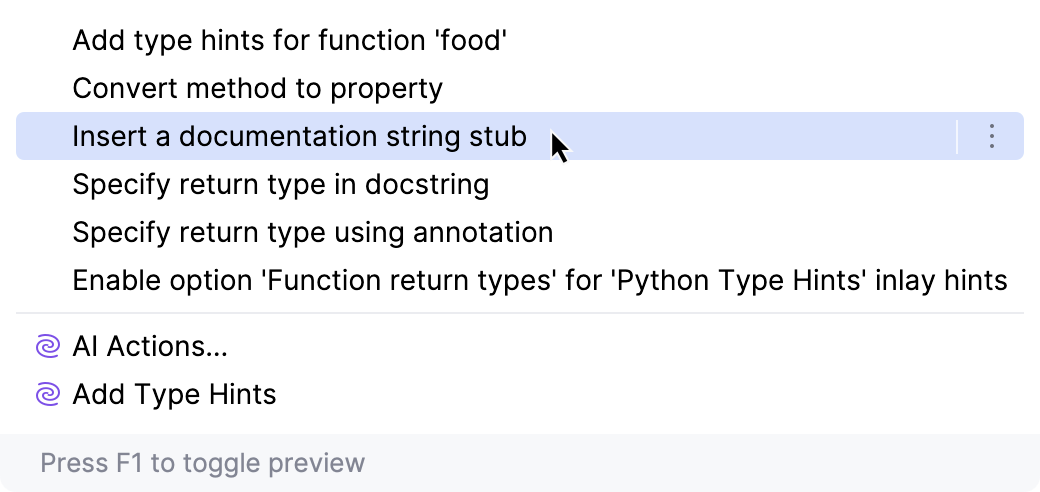
PyCharm generates documentation comment stub according to docstring format, selected in the Python Integrated Tools page.
- In a comment block, select the desired empty line and type @ or : character.
- Press Ctrl+SpaceCtrl+SpaceCtrl+SpaceCtrl+SpaceAlt+SlashCtrl+SpaceCtrl+Space or Ctrl+Back SlashCtrl+SpaceControl SpaceControl SpaceControl Space, or just wait for Code Completion to display the suggestion list:

- Select a tag from the suggestion list. For example, you can specify the parameters type, or return type.
- If a certain tag has several values, press Ctrl+SpaceCtrl+SpaceCtrl+SpaceCtrl+SpaceAlt+SlashCtrl+SpaceCtrl+Space or Ctrl+Back SlashCtrl+SpaceControl SpaceControl SpaceControl Space after the tag, and select
the desired value from the suggestion list. For example, PyCharm suggests to select the desired parameter name.

Example of Python comment
Consider the following function:
def handle(self, myParam1, myParam2):
In the Python Integrated Tools page, select Epytext. Then type the opening triple quotes and press EnterEnterEnterEnterEnterEnterEnterEnterEnterEnterEnter or Space. PyCharm generates documentation comment stub:
'''
@param self:
@param myParam1:
@param myParam2:
@return:
'''
Then select reStructuredText, type the opening triple quotes and press EnterEnterEnterEnterEnterEnterEnterEnterEnterEnterEnter or Space. PyCharm generates documentation comment stub:
'''
:param self:
:param myParam1:
:param myParam2:
:return:
'''
Tip
Documentation comment can be created with the dedicated action Fix Doc Comment. It can be invoked by means of Find Action command.
Press Ctrl+Shift+ACtrl+Shift+ACtrl+Shift+ACtrl+Shift+ACtrl+Shift+ACtrl+Shift+ACtrl+ICtrl+Shift+AMeta Shift AMeta Shift AMeta 3, with the caret somewhere within a class, method, function, or field, which should be documented, and enter the action name Fix Doc String. The missing documentation stub with the corresponding tags is added. For example:
function loadDocs(myParam1, myParam2){}
Type the opening documentation comment and press EnterEnterEnterEnterEnterEnterEnterEnterEnterEnterEnter to generate the documentation comment stub:
/** * @param myParam1 * @param myParam2 */
The next case lays with fixing problems in the existing documentation comments.
For example, if a method signature has been changed, PyCharm highlights a tag that doesn't match the method signature, and suggests an intention action UpdateJSDoc comment. You can also press Ctrl+Shift+ACtrl+Shift+ACtrl+Shift+ACtrl+Shift+ACtrl+Shift+ACtrl+Shift+ACtrl+ICtrl+Shift+AMeta Shift AMeta Shift AMeta 3, and type the action name:

Note that the action has no keyboard shortcut bound with it. You can do it as described in the section Configuring Keyboard Shortcuts.

