Generate code from usage
ReSharper lets you use code symbols (classes, methods, variables, properties, fields, and so on) before you declare them. When ReSharper detects an undeclared symbol, it suggests one or more quick-fixesAlt+Enter for generating a declaration based on the usage, and then smartly adjust the declaration according to the usage context:
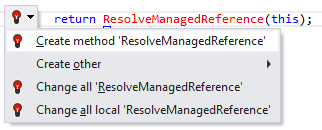
For example, if you create a method from usage, ReSharper will not only create a method, but also detect its return type and types of its parameters:

For additional examples of how ReSharper creates code symbols from usages, see Undefined variable and Undefined method call samples in the Examples of quick-fixes.
This feature is supported in the following languages and technologies:
|
|
|
|
|
|
|
|
|
|---|---|---|---|---|---|---|---|---|
|
|
|
|
|
| |
| |


The instructions and examples given here address the use of the feature in C#. For more information about other languages, refer to corresponding topics in the Languages and frameworks section.