Code generation
ReSharper provides a variety of ways to generate boilerplate code. For example, you can use undeclared code symbols and automatically generate these symbols based on usages, generate type members, and more.
If the design-time code inspection is enabled in the current file, ReSharper detects missing members and suggests the corresponding quick-fixes for implementing missing members:
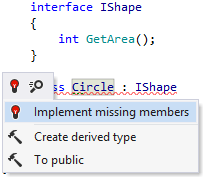
More ways to generate code are also available with Context actions and code templates.
In this section:
- Generate code from usage
- Generate null-checking routines
- Generate code with code completion
- Generate type members
You can control how new code is generated in two major ways:
Configure various aspects of code style (for example, naming style, formatting rules) ReSharper will enforce its requirements when generating code.
Depending on your settings, stubs for new members can be generated in different ways. For example, they can throw new
NotImplementedException(), return default value, or include code that will not compile. You can configure these and other preferences on the page of ReSharper options Alt+R, O.
Most of ReSharper's code generation features are available in C# and Visual Basic, some are available in several languages, others are language-specific. The table below lists all code generation features and languages/technologies where they are supported.
The instructions and examples given in the topics within this section address the use of code generation features in C#. For more information about code generation features available for specific languages, refer to the corresponding topics in the Languages and frameworks section.
Feature |
|
|
|
|
|
|
|
|
|
|---|---|---|---|---|---|---|---|---|---|
|
|
|
|
|
| |
| | |
|
|
| | | | | | | |
| | | | | | | | | |
|
|
| | | | | | | |
| | | | | | | | | |
|
|
| | | | | | | |
|
|
| | | | | | | |
|
| | | | | | | | |
|
| | | | | | | | |
|
| | | | | | | | |
|
|
| | | | | | | |
|
|
| | | | | | | |
|
|
| | | | | | | |
|
| | | | | | | | |
|
| | | | | | | | |
|
| | | | | | | | |
|
| | | | | | | | |
|
| |
| |
| | | | |
| |
| | | | | | | |
| |
| | | | | | | |
| |
| | | | | | | |
| |
| | | | | | | |
| |
| | | | | | | |
| | |
| | | | | |


