Navigate To: Object Browser
This command helps you locate a library symbol in the Visual Studio's Object Browser window, where you can get details about a symbol, such as base types or members, members of the type, and so on.
The command becomes available when you invoke Navigate To on a library symbol in your source code and on decompiled sources. You can invoke this command from the Solution Explorer, File Structure window, and other tool windows.
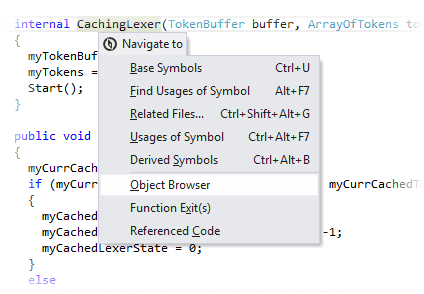
The Navigate To is available in the Object Browser window, so you can easily navigate further to: Metadata View, source code, decompiled sources, and other destinations.
This feature is supported in the following languages and technologies:
|
|
|
|
|
|
|
|
|
|---|---|---|---|---|---|---|---|---|
|
| | | | | | | |


The instructions and examples given here address the use of the feature in C#. For more information about other languages, refer to corresponding topics in the Languages and frameworks section.