Structural Search and Replace
Sometimes standard search methods, like searching for usages of a certain symbol or text occurrences that match some regular expression do not give the desired results. For example, you may need to find code smells specific to your project or find pieces of code that need to be refactored.
ReSharper allows you to find and, if necessary, replace blocks of code that match a specific pattern. These blocks may be quite different - they could contain different types, expressions, statements, and so on, but they would be logically similar. For example, you can create a general pattern that will match all foreach loops independently of what is iterated and what is inside the loop, or you can make this pattern more detailed to find only loops that iterate over a specific type. The pattern can be as complex as you need and have any desired level of detail.
All patterns that you create are stored in your pattern catalog and act as custom code inspections with custom severity levels. This means that all code blocks that match a specific pattern can be highlighted in the editor as hints, suggestions, warnings, or errors. Quick-fixes and fixes in scope could be also provided for the patterns — they could transform matched code blocks as defined in the 'replace' part of the pattern.
Placeholders in search patterns
A pattern normally consists of:
A textual part, which must contain only identifiers allowed in the target language. With the textual part, you define what should be matched exactly. Note that white spaces, tabulation characters, and line breaks are ignored.
Placeholders, which allow matching variable parts of the target code blocks. A placeholder has the following format:
$placeholder_name$- where placeholder_name is an arbitrary identifier.
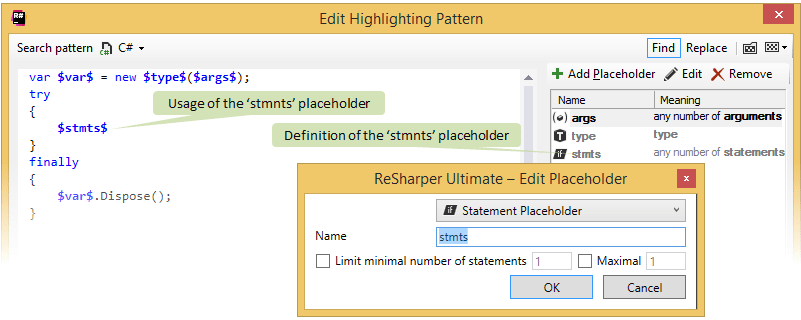
Each placeholder must be defined once and can be used several times in the pattern. When defining a placeholder, you need to define its kind and optional constraints. There are five kinds of placeholders:
Argument Placeholder — one or more arguments in a method invocation. If necessary, you can specify minimal or maximal number of arguments that should be matched.
Expression Placeholder — a sequence of operators and operands. You can optionally specify a type that is returned by this expression.
Identifier Placeholder — any symbol identifier. You can additionally specify a regular expression that will be used to match symbol names.
Statement Placeholder — a single-line statement that ends with a semicolon or a block of statements. If necessary, you can specify minimal or maximal number of statements that should be matched.
Type Placeholder — a value type or a reference type. By default, a placeholder of this kind will match any type, but you can specify a specific type explicitly.
Note that it is very important to choose the right kinds of placeholders for specific parts of your pattern. If your pattern does not match the block of code it is meant to matched, the problem is often with incorrectly chosen placeholder kinds.
Create a search pattern
To search or replace code blocks, or to create a custom code inspection, you need to create a search pattern. You can use an existing code block as a base for the pattern, or you can create a new one from scratch.
In the editor, select a block of code that should be matched by the pattern. This step is optional but it will help you create the pattern faster.
From the main menu, choose or right-click the selection, if any, and choose Search with Pattern in the context menu. The Search with Pattern dialog will open.
If some code block was selected at the first step, ReSharper detects all symbol names in the block and replaces them with placeholders. If necessary, you can edit the code, add and remove placeholders to get the desired pattern:
ReSharper checks that all placeholders used in the pattern have proper definition in the right part of the dialog. If there are placeholders without definitions, they are highlighted with red.
To add a new placeholder, just type a
$<placeholder_name>$and its definition will be added automatically.Always check the kind of automatically added placeholder definitions. Sometimes it is not possible to unambiguously define the kind, so you may want to correct it manually.
To change the kind of a placeholder or specify constraints, select the placeholder definition on the right, click Edit, and edit the placeholder definition.
As soon as you remove a placeholder usage in the pattern body, its definition is removed automatically.
It also possible to manually add and remove placeholder definitions. To do so, click the corresponding buttons above the list of placeholder definitions.
Depending on whether or not you want to match similar code blocks, select or clear the Match similar constructs checkbox.
ReSharper considers the following constructs as similar:
Single-line statement and single-line statement that is enclosed in braces.
Binary expressions as they are specified in the pattern and in reverse order.
Expressions as they are specified in the pattern and expressions with different order of operands.
Expressions where operands are enclosed in parentheses and expressions where operands are not enclosed.
Postfix and prefix increment operators.
Methods with different access modifiers.
ReSharper performs a basic code analysis in the pattern body. If no errors are found, you can search for the matching code blocks, define how the matched blocks should be replaced, or just click Save to save the pattern to the pattern catalog.
Specify a replace pattern
For each of your search patterns, you can add a replace pattern, which will allow you to quickly replace code blocks matched by the search pattern.
Create a new search pattern or open for editing a pattern from the pattern catalog.
In the Search with Pattern dialog, click Replace in the right-top corner.
In the Replace pattern area that appears in the lower part of the dialog, specify the replace part of the pattern.
Use the placeholders defined in the pattern. When a matched code block is replaced, each piece of code matched by a placeholder is copied according to the position of this placeholder in the replace part.
Use checkboxes below the replace area to specify whether to apply formatting rules and/or replace fully-qualified names with short names in the replaced code blocks.
ReSharper performs a basic code analysis in the replace part of the pattern. If no errors are found, you can replace the matching code blocks or save the pattern to the pattern catalog.
Manage the pattern catalog
When you save a created pattern, ReSharper places it in its pattern catalog. To see the catalog and study the existing patterns, go to the page of ReSharper options, or just click Pattern Catalog .png "ThemedIcon.PatternsCatalogue.Screen.(Gray).png") in the Search with Pattern dialog.
in the Search with Pattern dialog.
You can do the following in the pattern catalog:
To preview a pattern, select it in the list. You will see its body and definitions of placeholders at the bottom of the page.
To remove a pattern, select it in the list and click Remove on the page toolbar.
To add a new pattern, click Add pattern on the toolbar. ReSharper will open the Search with Pattern dialog where you can specify the pattern details.
All patterns are used in the ReSharper's code inspection engine so the matched code blocks are detected automatically.
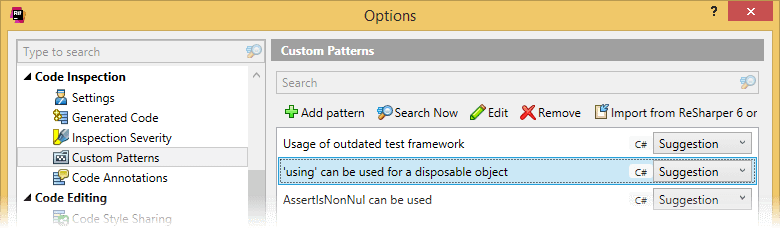
By default, all new patterns have 'Do not show' in the severity level selector, which means that matched code blocks are neither highlighted in the editor nor detected when running inspection in specific scope. If you would like to detect code matching the search pattern in code inspection, select an appropriate severity level for the pattern.
To edit an existing pattern, double-click it or select it and click Edit on the window toolbar.
When the pattern is open for editing, you can specify descriptions for its search and replace parts. The search description will be used to show the pattern in the catalog and as a description of the matched blocks highlighted in the editor. The replace description is shown as a name of the quick-fix, that is suggest for the highlighted block. For more information, refer to Create custom code inspections and quick-fixes.
You can specify a 'suppression key' for a pattern - an identifier that you can use to suppress ReSharper inspection that detects usage of the pattern, with a comment.
Find and replace code with the pattern
There are three approaches to searching and replacing code with patterns:
You can search or replace code right after you invoke the Search with Pattern command and create a new pattern. In this case, you just need to click Find/Replace button in the bottom right corner of the Search with Pattern dialog.
You can use one of the patterns from your pattern catalog. To do so, click Search Now on the toolbar of the page of ReSharper options.
Code blocks that match a pattern can be highlighted in the editor. If a replace logic is specified for the pattern, you will be able to replace the code block with a quick-fix. All you need to do is to specify some severity level other than 'Do not show' for the pattern. Use the corresponding selectors to the right of each pattern on the page of ReSharper options. For more information, refer to Create custom code inspections and quick-fixes.
If you run the search one of the first two ways, all matching code blocks in your solution are listed in the Find Results window. If the results do not include what you are looking for, you can quickly modify the pattern and invoke the search process once again. To do so, click Change Search Pattern .png "ThemedIcon.Edit.Screen.(Gray).png") on the window toolbar.
on the window toolbar.
If you run the replace one of the first two ways, all replace candidates in your solution are shown in the Replace with Pattern dialog. In this dialog, you can study and group the candidates, If you want to see the candidates in the context, click Show Preview .png "ThemedIcon.PreviewToggle.Screen.(Gray).png") on the toolbar. You can also double-click any of the candidates to open the containing file in the editor.
on the toolbar. You can also double-click any of the candidates to open the containing file in the editor.
If the displayed candidates are what you want to replace, click Replace at the bottom of the dialog.
Share patterns
Your search and replace patterns can be saved in a shared settings layer and become available to all your team.
If you create a pattern on the page of ReSharper options, click Save To and then select a shared settings layer when the pattern is ready.
To share an existing pattern that is not shared yet, open it for editing and click Save Copy in the Edit Highlighting Pattern dialog. Then click Save To and then select a shared settings layer.
This feature is supported in the following languages and technologies:
|
|
|
|
|
|
|
|
|
|---|---|---|---|---|---|---|---|---|
|
| |
| | | | | |


The instructions and examples given here address the use of the feature in C#. For more information about other languages, refer to corresponding topics in the Languages and frameworks section.