Add/Edit/Search with Highlighting Pattern dialog
This dialog helps create and edit custom patterns, which detect code that matches specific pattern and replace this code if necessary.
This topic describes controls in the dialog. For more information about searching and replacing code with custom patterns, refer to Structural Search and Replace and Create custom code inspections and quick-fixes.
This dialog can be opened in two modes.
When you use the command, which is duplicated in the context menu of the editor, the dialog opens in the search/replace mode, allowing you to start the search or replace right from the dialog using the corresponding buttons at the bottom.
When you use the Add Pattern/Edit buttons on the page of ReSharper options, the dialog opens in the pattern editing mode, providing additional fields for specifying pattern description. However, in this mode, the Search/Replace buttons are not available.
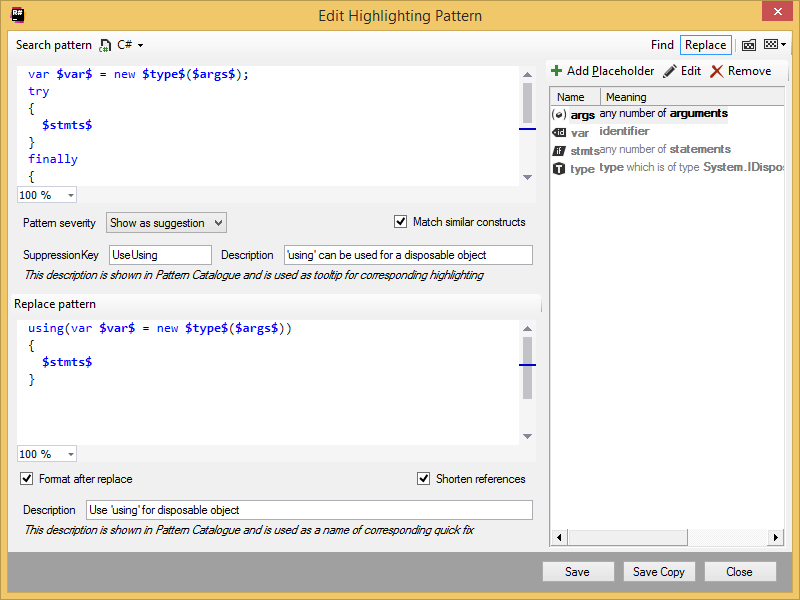
Menu bar
Language selector | Allows choosing a programming language for the pattern. ReSharper will only find the matching code in the specified language. |
Find/Replace | Use these selectors to show or hide the replace pattern. |
| Click to open the page of ReSharper options and look through the list of existing patterns. |
| Click to expand the list with recently used custom patterns. |
.png "ThemedIcon.PatternsCatalogue.Screen.(Gray).png")
.png "ThemedIcon.Pattern.Screen.(Gray).png")
Search area
Search pattern | Use this editor to enter your own search pattern using plain text and placeholders. |
Look in (available in the find/replace mode) | Use this list to specify one of the following search scopes:
|
Pattern severity (available in the pattern editing mode) | If you use the pattern as a custom code inspection, you can use the list to specify its severity level. |
Match similar constructs | Use this control to specify whether to match similar constructs. ReSharper considers the following constructs as similar:
|
Suppression key | If you specify a suppression key for a pattern, you will be able to suppress ReSharper inspection that detects usage of the pattern, with a comment, e.g: // ReSharper disable once [SuppressionKey] . If you want to suppress inspections for several patterns with a single comment, you can specify the same suppression key for all these patterns. |
Description (available in the pattern editing mode) | This field optionally lets you specify the description that is shown for the pattern on the page of ReSharper options. If you use the pattern as a custom code inspection, this description appears as a tooltip for highlighting the corresponding issues in the editor, as well as in the inspection results. 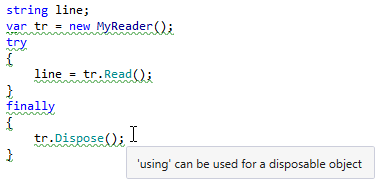 |
Replace area
This area contains controls that help you create a replace pattern and specify actions after the replacement. This area appears when you select Replace in the right top corner of the dialog.
Replace pattern | Use this editor to enter a replace pattern using plain text and placeholders. You can only use placeholders defined in the search pattern. |
Format after replace | Specify whether to apply formatting to the code produced by the replace pattern. You can configure code formatting options on the page of ReSharper options Alt+R, O and/or on Code Editing | [Language] | Formatting Style pages. |
Shorten references | Specify whether to replace fully qualified names with short names. |
Description (available in the pattern editing mode) | This field optionally lets you specify the description that appears as the name of the quick-fix if you use the pattern as a custom code inspection. 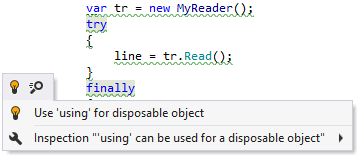 |
Placeholder area
Add Placeholder | Click this button to create new placeholder. There are 5 types of placeholders:
On clicking this button, the Create Placeholder dialog opens, where you can choose the type of the placeholder, specify its name and parameters: 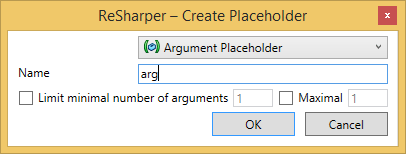 The following controls can be used in this dialog:
|
Edit | Click this button or double-click at the placeholder name to edit the selected placeholder using the Create/Edit Placeholder dialog. |
Remove | Click this button to remove the selected placeholder. Note that you cannot remove placeholders that are used in the search pattern. |
Command buttons
Find (available in the find/replace mode when the replace pattern is hidden) | Click this button to perform the search. |
Replace (available in the find/replace mode when the replace pattern is shown) | Click this button to find pattern occurrences and specify which of them to replace. |
Save | Click this button to save current pattern to the catalog using the smart save logic. To access the pattern catalog later, open the page of ReSharper options. |
Save Copy (available in the pattern editing mode) | Click this button to save a copy of the current pattern to the catalog. This may be helpful if you want to create a new pattern similar to the current pattern. Similarly to the 'Save' command, the smart save logic applies here. |
Close | Click this button to close the dialog. |