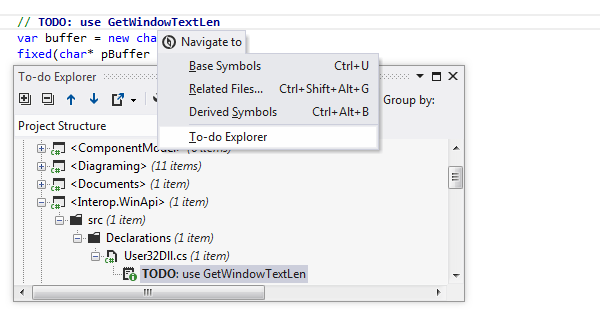
To-do Explorer helps
navigate between to-do items
within your solution.
Toolbar controls
| Control | Name | Description |
|---|
 | Expand All/Collapse All |
Expands/collapses all nodes in the current tab.
|
 | Previous/Next |
Navigate to the previous/next item and scrolls through the source code accordingly.
|
 | Export |
Click this button
to export the data currently displayed in the window in text format,
or use the drop-down selector to export the data in XML or HTML format.
The
Export Data dialog box that appears,
will help you to save the data to a file or copy it to the clipboard.
|
 | Todo Settings |
Opens the To-Do Items page of the ReSharper Options
dialog box where you can manage patterns for To-do items.
|
| Filter |
Use this drop-down list to select an appropriate filter to show items that pertain
to the corresponding pattern only. By default, five filters are provided:
- (all)
- Todos
- Notes
- Bugs
- Not Implemented
|
| Group by |
Use this drop-down list to select criteria for grouping to-do items. Several options are provided:
-
None - items are displayed as a plain list.
-
Patterns - items are grouped by patterns
(including "notes", "todo", "bugs" and "not implemented" as default patterns,
plus user-defined patterns, if any).
-
Types - items are grouped by containing types.
-
Namespaces - items are grouped by
namespaces, which are displayed as a plain list, with
nesting structure not taken into account.
-
Namespaces and Types - items are grouped by
namespaces and, on a lower level, by classes where they are
encountered.
-
Directories - items are grouped by
directories where they are stored; directories are displayed
as a plain list, with nesting structure not taken into
account.
-
Files - items are grouped by their
containing files.
-
Directories and Files - items are grouped
by directories where they are stored and, on a lower level,
by their containing files; directories are displayed as a
plain list, with nesting structure not taken into account.
-
Projects - items are grouped by their
containing projects.
-
Projects and Types - items are
grouped by containing projects and, on a lower level, by
types.
-
Projects and Directories - items are
grouped by containing projects and, on a lower level, by
directories; within a project, directories are displayed as
a plain list, with nesting structure not taken into account.
-
Project Structure - items are grouped
according to the physical structure of a project, with all
nesting relationships represented.
|