External Sources
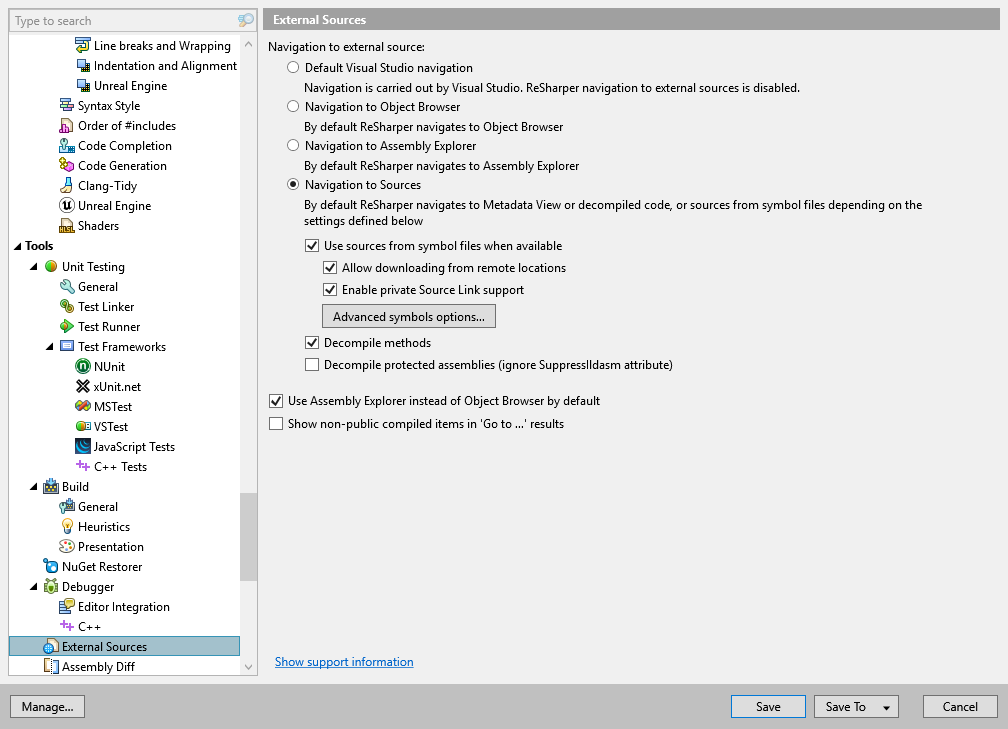
On this page of ReSharper options you can define the way ReSharper navigates to external sources.
Default Visual Studio navigation | Click this option to use Visual Studio navigation. ReSharper navigation to external sources is disabled. |
Navigation to Object Browser | Click this option to navigate to Object Browser by default. |
Navigation to Assembly Explorer | Click this option to make Assembly Explorer window the default target when navigating to compiled code. |
Navigation to Sources | Click this option to enable navigation to external sources by default. ReSharper navigates to Metadata View or decompiled code, or sources from symbol files depending on the settings defined below. Regardless of the chosen settings, ReSharper can navigate to any of those destinations when you specify the navigation destination explicitly. |
Use sources from symbol files when available | Select this checkbox to use debug information (PDB files) to find appropriate source files and use them to display and navigate the code. If this checkbox is selected and the source files are available via the debug information, ReSharper displays and navigates to the original source code . If this checkbox is cleared or if source files are not available, ReSharper decompiles the code or shows the metadata view depending on the Decompile methods option . |
Allow downloading from remote locations | Select this checkbox to enable downloading sources from Symbol Server or other remote locations. If symbol files are available both locally and remotely, ReSharper will display local symbol files. |
Enable private Source Link support | If this checkbox is selected, you will be able to navigate to the external sources that require connection to a private source server, for example Azure or GitHub Enterprise. In some cases, ReSharper will retrieve your connection credentials automatically, for example from Git Credential Manager. If this is not possible, it will ask for the authentication details when you first navigate using specific server. |
Advanced symbols options | Opens the Advanced symbols options dialog to create or edit folder substitution rules. If an external library was compiled with another computer, then paths inside PDB files may be relative to that computer, and therefore these paths could not be resolved automatically. To fix this, you need to add folder substitutions rules for each path. Each folder substitution rule contains two paths:
|
Decompile methods | Select this checkbox to decompile method bodies to C# code. If this checkbox is not selected, a metadata view with method signatures will be shown. This option doesn't have any effect if Use sources from symbol files when available option is selected and the required symbol files are available. |
Decompile protected methods (ignore SuppressIldasm attribute) | By default, ReSharper does not decompile assemblies marked with the [SuppressIldasm] attribute. Select this option if you want to decompile such assemblies. |
Use Assembly Explorer instead of Object Browser by default | Tick this checkbox if you want to open compiled assemblies in the Assembly Explorer window instead of the Object Browser when you double-click a reference in the Solution Explorer. Regardless of this preference, you can right-click the reference and choose where to open it. |
Show non-public compiled items in 'GoTo...' results | Select this option if you want to see non-public types and members from compiled code in the search results of the Search by name commands. It is disabled by default because you normally do not want to study such items as you cannot access them. |
Show support information | Click the link to show technical details on the current external sources configuration. |