Code analysis and helpers for string literals
In plain strings
Here is how ReSharper can help you when you are working with plain strings in your code:
By default, ReSharper highlights correct and incorrect escape sequences in all non-verbatim strings:

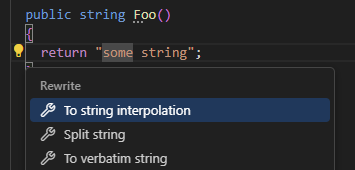
You can convert regular strings to verbatim strings and back by pressing Alt+Enter when your caret is in the string and choosing the corresponding context actions. This also works with interpolated strings.
You can split string literals simply by pressing Enter.
If a string contains regular expression, ReSharper can highlight its syntax and errors, and help you with code completion inside the expression. For more information, refer to Regular expressions assistance.
Similarly, you can make ReSharper analyze HTML in string literals. To make ReSharper aware of the specific language inside a string literal, you can either use the corresponding context actions or add a comment
/*language=regexp|jsregexp|html*/right before the string literal.You can select some substring within a string and automatically introduce a variable for the substring.
If your project is localizable, you can automatically move a string to resource.
In system string formatting methods
ReSharper analyzes format strings and arguments of all .NET string formatting methods, such as String.Format, Text.StringBuilder.AppendFormat, or Console.WriteLine.
In usages of string formatting methods, ReSharper highlights format placeholders and also synchronously highlights placeholder with the corresponding argument when your caret is at either of them:

If arguments and format placeholders mismatch (which leads to the FormatException in runtime if arguments are missing), ReSharper generates warnings for missing or redundant arguments:

You can easily fix this problem by pressing Alt+Enter over the warning. ReSharper will suggest either automatically adding the missing argument or to remove the mismatched format placeholder.
ReSharper also helps you detect and remove redundant calls of string formatting methods inside other string formatting methods. For example:
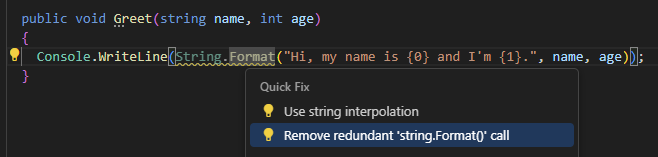
To quickly convert a concatenation of string literals and variables, press Alt+Enter anywhere within the concatenation and use the To String.Format invocation context action. For example, if we apply this context action in the return statement of the following method:
It will be converted to:
You can also use context actions to automatically add and remove format placeholders and arguments in strings. When you invoke the Insert format argument action within a string literal, ReSharper inserts a new placeholder with the proper index and brings you to the position where you can immediately start typing the argument. This action can also be invoked on a plain string. In this case ReSharper will automatically convert it to the String.Format call.
To quickly remove a format placeholder together with the corresponding argument, place the caret at the placeholder, press Alt+Enter and choose Remove format argument.
In custom string formatting methods
To enable code analysis and assistance features in custom string formatting methods, use the [StringFormatMethod] and [StructuredMessageTemplate] attributes from the JetBrains.Annotations namespace.
Consider a custom string formatting method ShowError:
If the method is called incorrectly, as shown below, ReSharper has no chance to detect the missing argument:

Make ReSharper aware of a custom string formatting method
Reference the
JetBrains.Annotationsnamespace as described in the Annotations in source code section.Annotate your custom string formatting method with the
[StringFormatMethodAttribute]attribute, which takes a single argument — the name of the format string parameter:[StringFormatMethod("formatString")] public void ShowError(string formatString, params object[] args) { // some custom logic Console.WriteLine(formatString, args); }ReSharper will be able to warn you about missing arguments when this custom formatting method is invoked. Even more, the Add argument quick-fix will make it easier for you to insert them:

Alternatively, annotate the parameter that accepts a formatted string with the
[StructuredMessageTemplateAttribute]:void LogNewUser([StructuredMessageTemplate] string message, params string[] args) { // Log new user } void Test() { // Warning: Non-existing argument in format string LogNewUser("User created: {username}"); }This second approach allows you to use custom strings as placeholders, as
usernamein the example above.
In interpolated strings
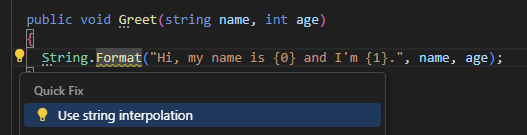
Modern versions of C# provide a more elegant alternative to the String.Format method — interpolated strings. That's why ReSharper highlights usages of String.Format with the suggestion to convert them into interpolated strings. You can use a quick-fix to apply the conversion for the current usage or for all usages in the specific scope with a couple of keystrokes.
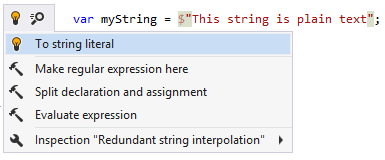
If an interpolated string contains no expressions, ReSharper highlights the $ sign as redundant and helps you remove it:
If you need to quickly add the $ at the beginning of the string when you are deep into typing out the string, you can press Alt+Enter and choose To string interpolation.
You can then also choose Insert interpolation argument and ReSharper will add the argument placeholder { } at your caret position.