Rearrange code elements
ReSharper allows you to quickly rearrange expressions, statements, type members, and other elements in your code.
How it works
To rearrange code, press Ctrl+Shift+Alt over a code element or selection that you want to move. If it makes sense to move the elements, ReSharper shows you a tooltip with possible move options.
If you invoke this command without selection, ReSharper selects the movable element automatically. Sometimes two selections are made. In this case, one selection is highlighted with blue, the other with yellow. For example, if you invoke this command over a function parameter, ReSharper makes two selections: the parameter itself, which you can move left or right relative to other parameters, and the whole function, which you can move up and down relatively to other type members:
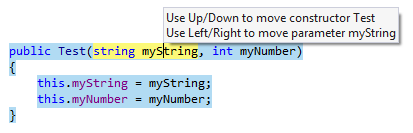
Move up and Move down commands are pretty straightforward — they can move elements within a specific scope up and down relatively to other elements in this scope. For example, you can move up and down types in a file, type members in a type, statements in a type member or in a compound statement, and so on.
If the current element is first or last in its scope, ReSharper will not allow you to move it any further with up/down commands.
Move left and Move right commands serve two purposes:
Rearrange elements that are normally written in a single line. For example, you can move left and right attributes, function parameters, operands in an expression, parts of assignment statements, and so on. Note that the left/right commands are applied to these elements even if they are written in multiple lines.
Move a statement inside the compound statement or region that directly follows it (move right) or move a statement outside the compound statement or region (move left).
Although ReSharper tries not to allow invalid moves, there are still cases when you can break either logic or compilation of your code. Note that ReSharper provides a lot of refactorings that help you safely rearrange your code, for example, Move Type to Outer Scope refactoring and Change Signature refactoring. If your code is broken after moving a code element, press Alt+Enter and check for available quick-fixes. Most of the time, you will find the right refactoring right in the action list.
Applicable cases
ReSharper allows you to move elements in the following ways:
Types and type members. Note that if the symbol has XML comments, ReSharper moves them together with the symbol.
Types up and down within the current file or within a containing declaration
Type members up and down within the type
Base types left and right
Type parameters left and right
Type parameter constraints up and down
Attributes left and right
Parameters in declarations and arguments in usages of functions left and right (if you reorder parameters for a function declaration, ReSharper suggests the Change Signature refactoring that makes sure to change arguments in all usages of the function)
Setters and getters of properties up and down
Statements
Parts of assignment statements left and right
Statements within a function or a compound statement up and down
Statements out of a compound statement (left) or into an immediately following compound statement (right)
Switch sections within a switch statement up and down
Statements from one clause of an if-else, try-catch statement, or from one switch section to another one up and down
catchclauses within a try-catch statement up and downClosing brace of a compound statement up and down (greedy brace). To move the closing brace, place the caret outside of the brace, press Ctrl+Shift+Alt and then use the up and down arrows to include statements that follow the current compound statement inside it or move the last statement outside it.
Opening or closing brace of a type or a namespace also works as a 'greedy brace'. In this case, it will include/exclude nested types/members/namespaces.
Expressions
Operands in expressions left and right
Elements in collection and array initializations left and right
Clauses in query expressions up and down
Range expression operands (C# 8) left and right
Other elements
Type parameters of generic type/method declarations
Arguments in template strings left and right
Values inside interpolated strings
Line and c-style comments up and down
#regionblock up and down, out of and into another#regionblock#regionand#endregiondirectives up and downLine in a text file where the caret is placed up and down
Selection in a text file up and down
This feature is supported in the following languages and technologies:
|
|
|
|
|
|
|
|
|
|---|---|---|---|---|---|---|---|---|
|
| |
|
|
|
|
|
|


The instructions and examples given here address the use of the feature in C#. For more information about other languages, refer to corresponding topics in the Languages and frameworks section.