Analyze and optimize project references
This feature helps manage your existing project/assembly references, browse usages of the referenced projects/assemblies, and remove unused references. You can invoke this feature on any single project and use the Analyze References window to analyze and optimize project references.
Analyze project references
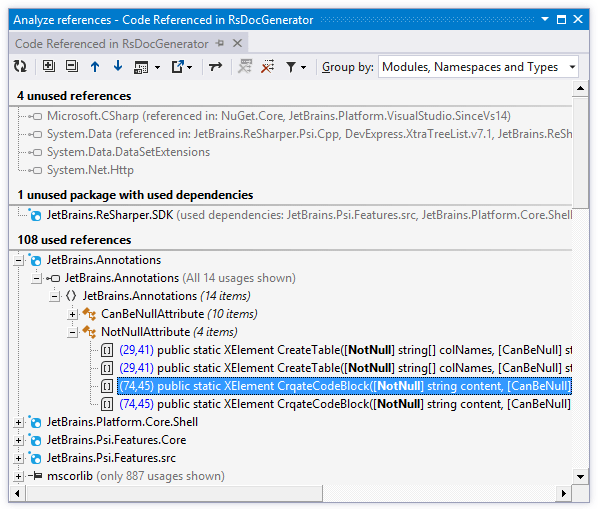
The Analyze References tool window displays project/assembly references in the current project, and let you explore how exactly the references are used. To explore usages of a specific assembly, namespace or type, you can filter them by kind and group them.
The symbol icons could help you distinguish between different kinds of symbols. Each usage is displayed with the line number and column; different icons mean different kinds of usages like read, write, attribute, or invocation usage. You can double-click any usage to navigate directly to the source code.
In the Solution Explorer, select a project that you want to analyze or its References node.
Do one of the following:
Choose
Right-click the selection and choose Optimize References in the context menu.
Press Control+Alt+Y.
Use controls in the Analyze References window to explore project references.
Remove unused references
The easiest way to clean up project references is to click Remove All Unused References .png "ThemedIcon.RemoveAllUnusedReferences.Screen.(Gray).png") on the toolbar. If you want ro retain some unused references or remove some of the used references (and manually resolve the compilation errors that follow), you can make the corresponding selection and click Remove Selected References
on the toolbar. If you want ro retain some unused references or remove some of the used references (and manually resolve the compilation errors that follow), you can make the corresponding selection and click Remove Selected References .png "ThemedIcon.RemoveSelectedReference.Screen.(Gray).png") .
.
When you remove project and assembly references, ReSharper also deletes all redundant namespace import directives (using in C#, Imports in Visual Basic) that reference namespaces from the removed assemblies.
All Visual Studio projects must reference mscorlib and, starting from Visual Studio 2010, System.Core assemblies. These assemblies are marked with the pin .png "ThemedIcon.Pin.Screen.(Gray).png") icon and you cannot remove these references.
icon and you cannot remove these references.
References that are needed for compilation, independently of whether they are used or not, are displayed in the References required by the compiler group. References in this group are normally have 'related usages', that is, implicit (non-direct) usages. In the simplest case, related usages are caused by a type’s hierarchy. That is, if you use a certain type, you have to reference all assemblies containing that type’s supertypes.
NuGet packages are displayed with the corresponding icons .png "ThemedIcon.NuGet.Screen.(Gray).png") . A faded icon means that the package has no usages and can be safely removed. When removing NuGet packages, ReSharper will use the NuGet uninstall mechanism.
. A faded icon means that the package has no usages and can be safely removed. When removing NuGet packages, ReSharper will use the NuGet uninstall mechanism.
There are other ways of cleaning project and assembly references.
You can invoke the Remove Unused References command on the project or on the References node in the Solution Explorer.
You can expand the References node in the Solution Explorer, select the references you want to remove and invoke the Safe Delete refactoring, which either silently removes unused references or opens a dialog showing how and where the selected references are used.
Retain references to implicitly loaded assemblies
Some project types use references implicitly, which means that these references are only used in runtime. These references cannot be safely removed even though there are no code dependencies on them.
If you still want to use ReSharper cleanup features (Remove All Unused References button in the Analyze References window and Remove Unused References refactoring), you need to mark the implicitly loaded assemblies as such.
Mark implicitly loaded assemblies
Open the Analyze References window.
In the Unused references section, find the implicitly used references you need to retain.
Right-click the references and choose one of the following options:
Mark reference as used at runtime - to exclude the selected reference from cleanup in the current project
Mark reference as used at runtime for whole solution - to exclude the selected reference from cleanup in all projects in the solution
ReSharper will save the information about implicitly used references in its layered settings — in a *.DotSettings.user file either for the project or solution.
Analyze References window
Control | Name | Description |
|---|---|---|
| Refresh | Updates window content to reflect any changes made in the code or externally. |
| Expand All/Collapse All | Expands/collapses all nodes in the current tab. |
| Previous/Next | Navigate to the previous/next item and scrolls through the source code accordingly. |
| Show Preview Ctrl+P | Hides or shows the pane with a preview of the selected item in the position specified using the list (at the bottom or in the right part of the window). |
| Export | Click this button to export the data currently displayed in the window in text format , or use the drop-down selector to export the data in an XML or HTML format. The Export Data dialog that appears will help you save the data to a file or copy it to the clipboard . |
| Merge Occurrences on the Same Line | When this option is selected, occurrences on the same line are shown as a single item. |
| Remove All Unused References | Removes all assembly references that are not used. |
| Remove Selected References | Removes all selected assembly references. |
| Filter Usages | With this list, you can select specific kinds of usages to display - for example, declaration, invocation, parameter, method return, and so on. Click Show All Usages to enable all kinds of usages or Clear Filters to disable all kinds of usages thus hiding all usages in the current tab. |
Group by | Allows grouping items in the window by different categories. |
.png "ThemedIcon.Refresh.Screen.(Gray).png")
.png "ThemedIcon.ExpandAll.Screen.(Gray).png")
.png "ThemedIcon.CollapseAll.Screen.(Gray).png")
.png "ThemedIcon.Up.Screen.(Gray).png")
.png "ThemedIcon.Down.Screen.(Gray).png")
.png "ThemedIcon.PreviewToggle.Screen.(Gray).png")
.png "ThemedIcon.Export.Screen.(Gray).png")
.png "ThemedIcon.Merge.Screen.(Gray).png")
.png "ThemedIcon.Filter.Screen.(Gray).png")
Window tabs
When results of the Optimize references command open in the window, they are displayed in new tabs, which show up on the left. The previously open tabs move to the right if the width of the window allows, otherwise they unload themselves saving memory - but you can always restore them by clicking the arrow that appears to the right of the tabs and clicking the required tab:
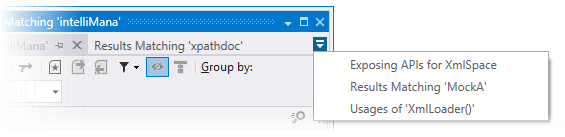
To prevent a tab from unloading, click the pin icon next to the tab title.