Remove Unused References
This command allows cleaning up project and assembly references that have no actual usages in your source code. You can apply this command on a project, solution folder, or the entire solution. Before deletion is complete, you will be able to see all references that are going to be removed and if necessary, preserve the ones that you want to keep.
When you remove project and assembly references, ReSharper also deletes all redundant namespace import directives (using in C#, Imports in Visual Basic) that reference namespaces from the removed assemblies.
Remove unused references
In the Solution Explorer, select one or more projects, solution folders or the root node of the solution, or alternatively, select the Dependencies node of a project.
Right-click the selection and choose Refactor | Remove Unused References in the context menu or press Control+Shift+R and then choose Remove Unused References
The Remove Unused References dialog will open.
All references that have no actual usages in the source code are displayed in a tree view grouped by projects. By default, all references are selected for deletion. If necessary, deselect references that you want to keep.
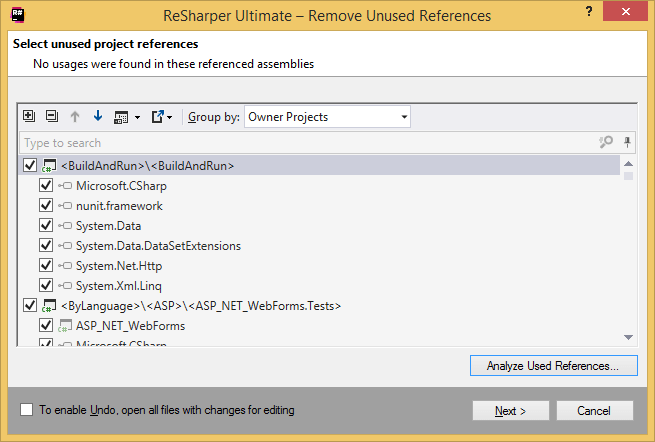
Click Next to remove the selected references.
You can also see all references (both used and unused) in the selected scope. To do so, click Analyze Used References. The references are shown in the Analyze References window, where you can also remove unused references. For more information about analyzing references, refer to Analyze and optimize project references
There are other ways of cleaning project and assembly references.
You can invoke the Optimize References command, which will let you analyze all references and remove unused ones.
You can expand the References node in the Solution Explorer, select the references you want to remove and invoke the Safe Delete refactoring, which either silently removes unused references or opens a dialog showing how and where the selected references are used.