Go to Declaration
Use this command to navigate to the declaration of a symbol from any symbol usage. You can invoke this command from the Solution Explorer, File Structure window, and other tool windows.
To navigate in the opposite direction (symbol usages) you can invoke the Go to Declaration command when you are already on the symbol declaration, or you can use the Go to Usages of Symbol command.
Navigate to a declaration of a symbol
Place the caret at a symbol in the editor or select the symbol in a tool window.
Choose in the main menu, press Control+B, or click the symbol while holding the Ctrl key.
If the command returns a single result, ReSharper navigates directly there. In case of multiple results, they will be listed in a drop-down where you can do one of the following:
Click the desired item to open it in the editor.
Select the desired item by pressing Up and Down and then press Enter to open it in the editor.
To view and analyze the list of matched items in the Find Results window, click Show in Find Results
.png "ThemedIcon.SearchResults.Screen.(Gray).png") , press Shift+Enter or + on the numeric keypad .
, press Shift+Enter or + on the numeric keypad .
By default, Go To Declaration works with Ctrl + left-click and with the middle button click. To disable this, clear the Rich mouse navigation in the editor checkbox on the page of ReSharper options Alt+R, O. You can also Ctrl+Shift-click usages of symbols to display their declarations in the Peek Definition view. If you want to disable this, clear the Use Ctrl+Shift click to open the result in the peek view checkbox.
If the item you navigate to belongs to the current solution, ReSharper opens the corresponding file in the editor and places the caret at the symbol declaration. If it is in referenced libraries, ReSharper navigates according to the settings defined on the page of ReSharper options Alt+R, O.
Invoke this command on declarations
As Go to Declaration (including its Ctrl-click access) is one of the most frequently used commands, ReSharper streamlines your navigation experience letting you use this command in navigation scenarios related to usages of the declared symbol, so you can invoke Go to Declaration even if your caret is already at a symbol declaration to study symbol usages.
To configure how Go to Declaration behaves when invoked on a declaration, use the Smart Go to Declaration behavior selector on the page of ReSharper options Alt+R, O, which provides the following options:
Show Navigate To menu — displays the Navigate To menu with all navigation destinations contextually available on the declaration. This menu is also always available with Control+Shift+G.
Show Usages of Symbol popup — list all usages of the declared symbol. You can also always get the list of usages with the Usages of Symbol command Control+Alt+F7.
Iterate usages — adds the corresponding command to the navigation menu, which enables the 'usage iteration' mode designated with a small popup in the upper-left corner of the editor:
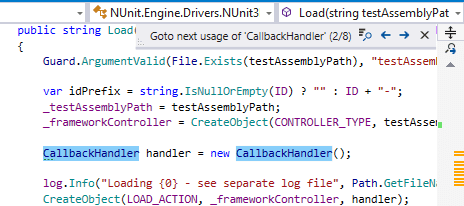
In the 'usage iteration' mode, you can navigate through the symbol usages as follows:
Invoke Go to Declaration to go to the next usage, if any, and so on, subsequently navigating through all symbol usages. The total number of symbol usages in the solution appears in the usage iteration popup.
Use Next and Back buttons in the usage iteration popup Control+Alt+PageDown/Control+Alt+PageUp to go to next and previous usages.
To view and analyze the list of matched items in the Find Results window, click Show in Find Results
, press Shift+Enter or + on the numeric keypad . To navigate through symbol usages in the current document, click the
.png "ThemedIcon.ErrorStripeFindNext.Screen.(Gray).png") icon at the top of the marker bar.
icon at the top of the marker bar.
Do nothing — Go to Declaration can only be invoked on symbol usages to go to its declaration.
Navigate to interface implementations in debug mode
When you invoke Go to Declaration on a usage of an interface member in debug mode, ReSharper will get you to its exact implementation that is used in the current frame instead of the interface declaration.
It will navigate to the member implementation when the member is invoked on local variables, parameters, and fields that hold the interface type.
If Enable property evaluation and other implicit function calls is selected on the page of Visual Studio's options, then navigation to the implementation will also work on properties that hold the interface type.
This feature is supported in the following languages and technologies:
|
|
|
|
|
|
|
|
|
|---|---|---|---|---|---|---|---|---|
|
|
|
|
|
|
|
| |


The instructions and examples given here address the use of the feature in C#. For more information about other languages, refer to corresponding topics in the Languages and frameworks section.