Deploy your application
WebStorm assumes that all development and testing is done on your computer, and then the code is deployed to a staging or production environment.
The reason to stick to this "local development — deployment" model lies in the way WebStorm provides code completion, code inspections, code navigation, and other coding assistance features. All this functionality is based on the project files index which WebStorm builds during project analysis when the project is loaded and updates on the fly as you edit your code. Fast analysis and reanalysis of files can be ensured only for local files, that is, files that are stored on your hard disk and are accessible through the file system.
When you are done with development, you can deploy your local project files to the web server using WebStorm.
Deploy local project files to a web server from WebStorm
With WebStorm, you can connect to a web server, browse and edit its files, upload files and resources from your local project to the web server, and synchronize changes between the local and deployed project versions.
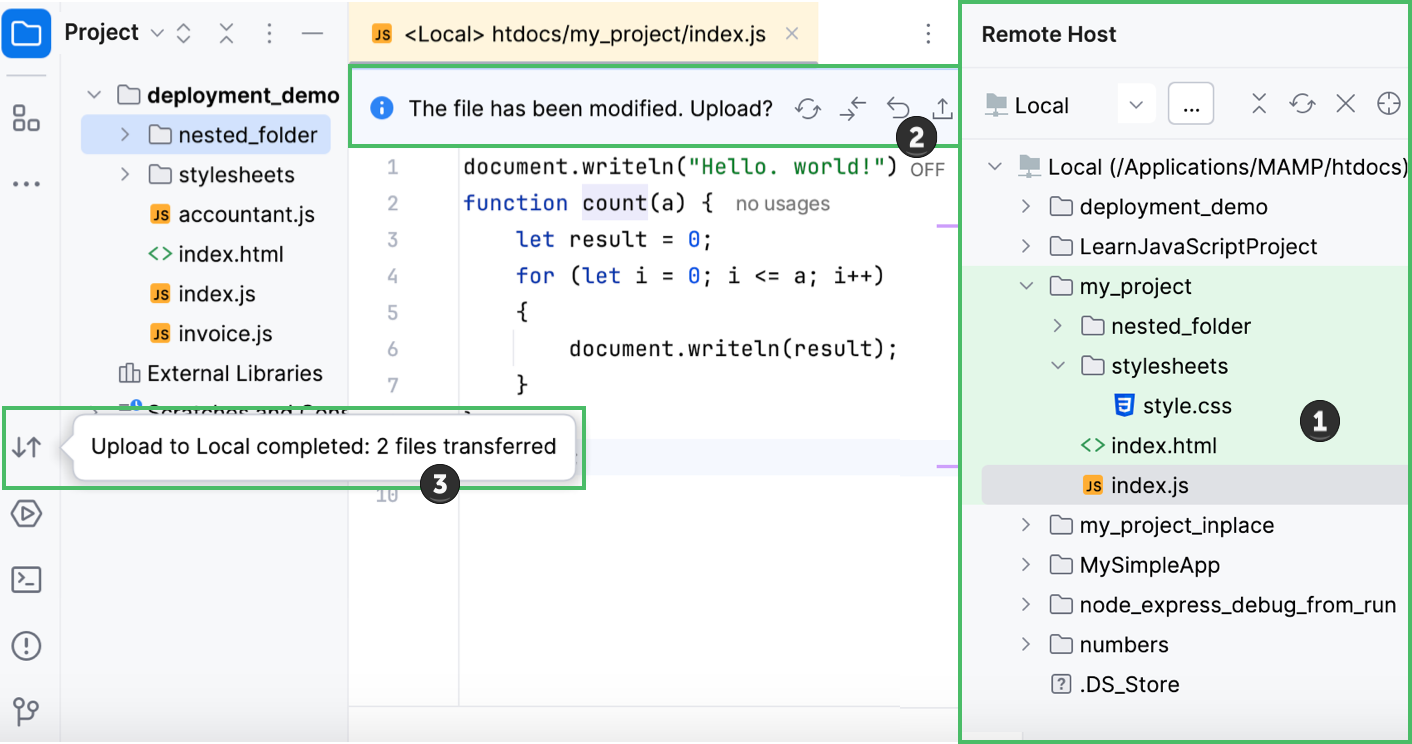
The Remote Host tool window () lets you select one of the configured server connections and browse the tree view of files and folders under the server document root. Folders on the server that are mapped to WebStorm projects are highlighted with a green background. For details, see:
When you open a file from the server file system in the WebStorm editor, a special toolbar appears at the top of the editor, showing the file editing status and available actions. For details, see:
You can transfer (upload/download), synchronize, and compare files between the WebStorm project and the project on the web server. For details, see: