Next edit suggestions
When you write or edit code, AI Assistant can predict which parts you might want to change or add next and suggest edits. This allows you to apply a suggestion and jump to the next place that might need a change, making it easier to update related code throughout the file.
Enable next edit suggestions
To enable the feature:
Go to .
In the Next Edit Suggestions section, select the Enable next edit suggestions setting. Additionally, you can further configure how the edits are suggested:
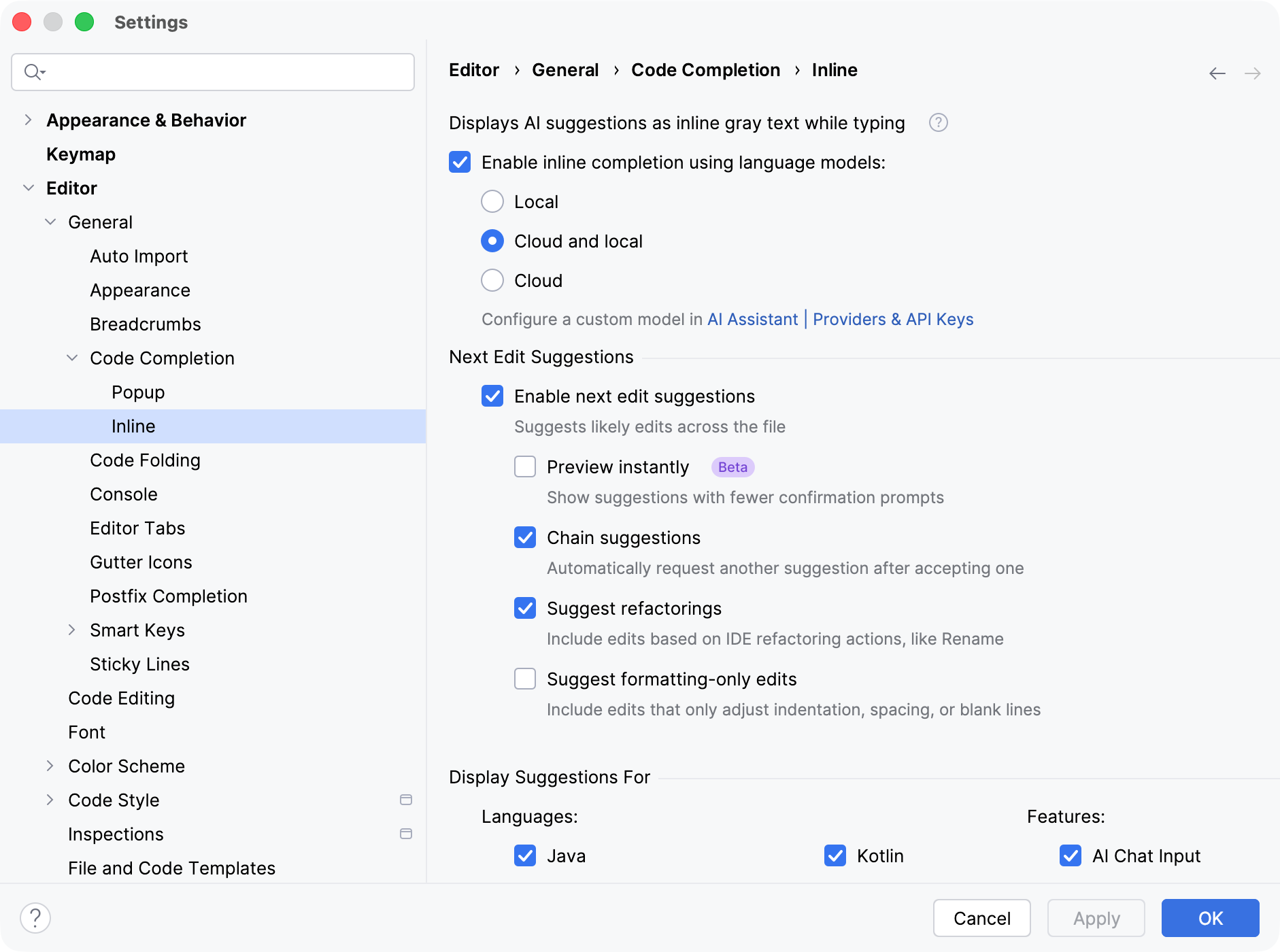
Preview instantly – enable this setting to display suggested edits with fewer confirmation prompts.
Chain suggestions – enable this setting to automatically request the next edit suggestion once the previous one has been accepted.
Suggest refactorings – enable this setting to allow AI Assistant to suggest edits based on IDE refactoring actions, such as Rename refactoring.
Suggest formatting-only edits – enable this setting if you want to receive suggestions that change indentation, spacing, and blank lines.
In the Display Suggestions For section, configure for which languages the suggestions are provided. The next edit suggestions feature will be available when working in files of the corresponding types.
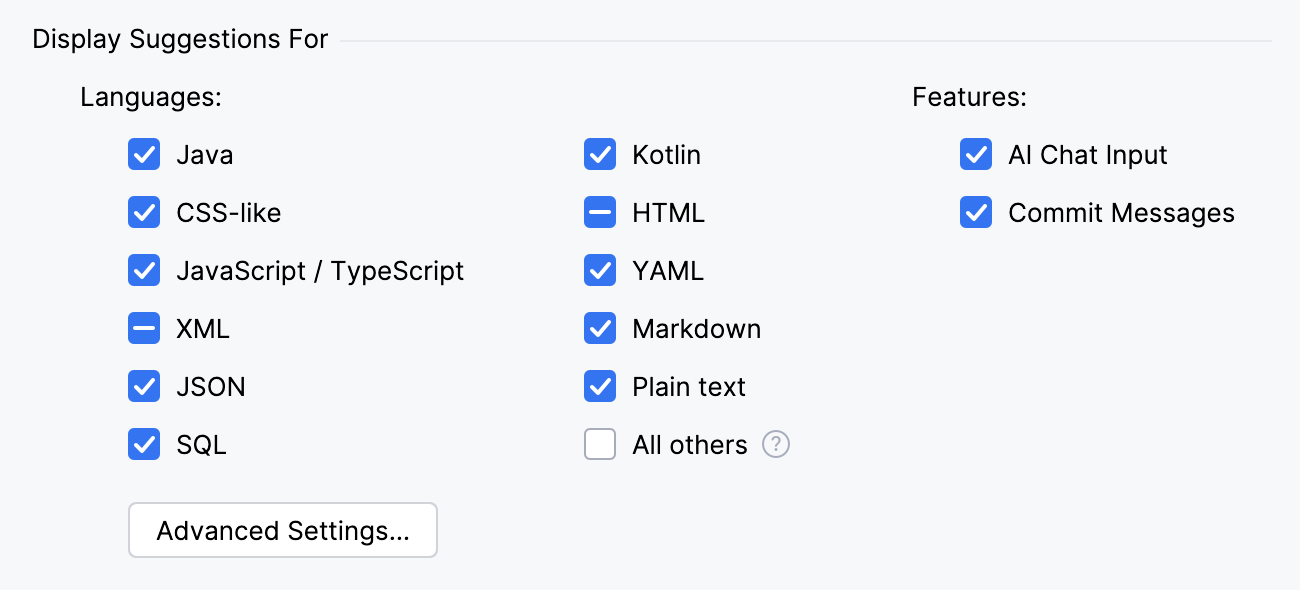
The All others option covers other file types and is disabled by default.
Alternatively, you can click the Advanced Settings button to fine-tune the configuration.
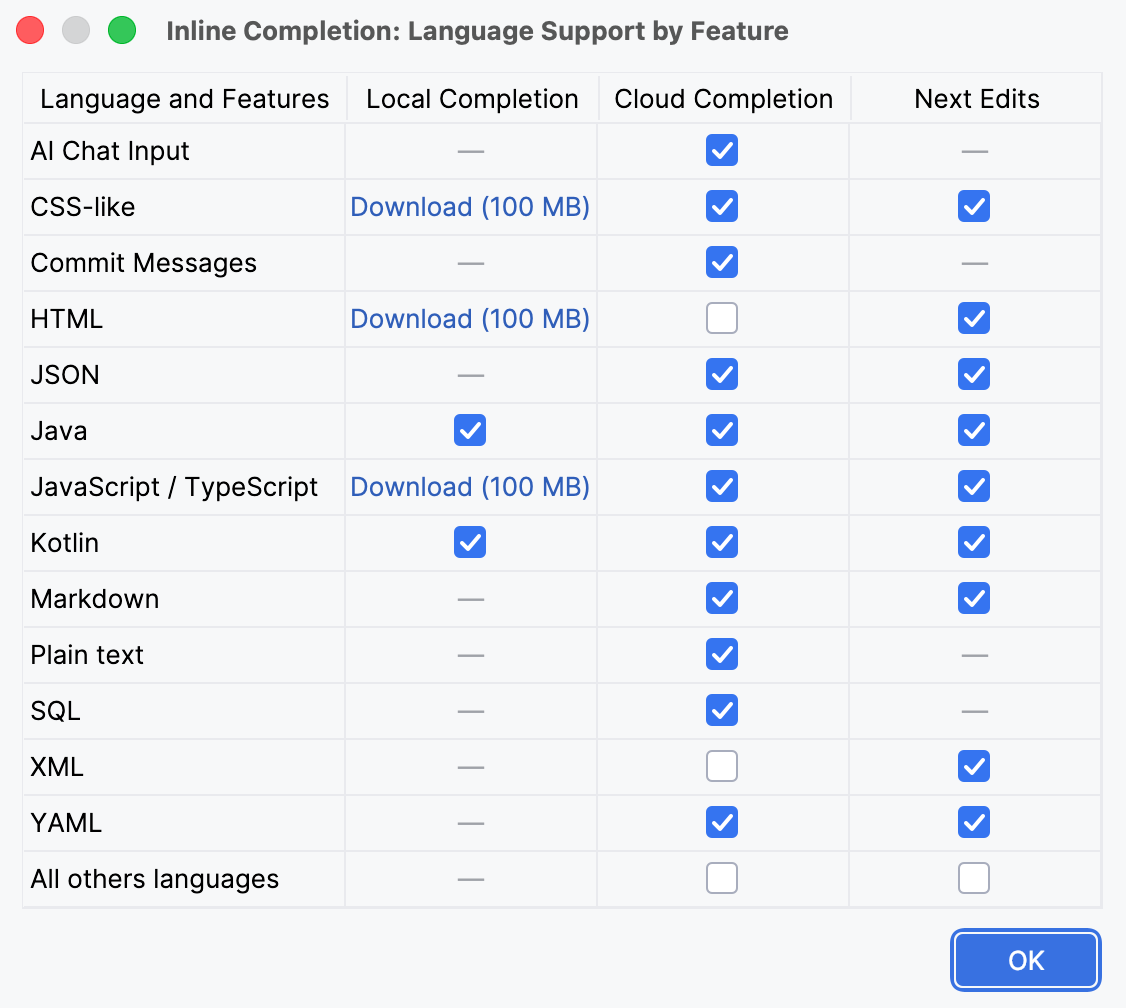
Click Apply to save changes.
- Languages and corresponding file types
Language/Type
Extension
Java
javaKotlin
kt,ktsPython
py,ipynbRust
rs,rsxGo
goC/C++
c,h,cpp,cc,cp,hpp,h++C#
csRuby
rb,ruby,rbw,ruRBS
rbsERB
erb,rhtmlPHP
php,phtml,phpt,ctpTerraform/OpenTofu
tf,hclXML
xmlJSON
jsonYAML
yml,yamlProperties
propertiesMarkdown
md,markdown,mkd,mkdn,rmdPlain text
txtHTML
html,htm,xhtml,xhtCSS-like
css,scss,sass,lessJavaScript/TypeScript
js,jsx,ts,tsx,es6,sjs,jsm,pac,vueSQL
sql,ddl,db2,udf- Languages and file types covered by the All others setting
Language / Type
Extension
Python/Cython
pyw,pyx,pxd,pxi,pydeRusty Object Notation
ronC++
cxx,c++,hh,hxx,ipp,tpp,inl,tccVisual Basic/VBScript/VBA
vb,vbs,vba,bas,frmF#
fs,fsi,fsxSwift
swiftPL/SQL
plsql,plb,pkb,pks,prcR
r,rdShell scripts
sh,bash,zsh,ksh,bats,command,tmuxWindows Batch
bat,cmdPowerShell
ps1,psm1,psd1Objective-C++
mmMake/ConTeXt
makefile,mk,mak,mkiv,mkii,mkviCMake
cmakeGYP
gypBazel
bzlTOML
tomlDocker
dockerfileBuild scripts (Dart, C#, Ruby, etc.)
tool,cake,builderreStructuredText
rstLaTeX
tex,sty,bib,dtx,insTemplates (Ruby, Elixir, .NET, etc.)
mustache,jinja,eex,rabl,cshtml,vbhtmlRuby DSLs
thor,rake,jbuilder,gemspecLaTeX components
cbx,bbx,lbxCassandra Query Language
cqlSAP HANA XS JavaScript
xsjslibRuby CocoaPods specification
podspec
Invoke next edit suggestions
Once the next edit suggestions are enabled:
In the editor, modify an existing line or write new code. AI Assistant will suggest the next edit.
Press Tab to jump to the suggestion to review it, then press Tab again to apply it.
Repeat the previous step to apply other suggestions.
To cancel the suggestion, press Escape.
Application examples
This section provides several examples of what can trigger the next edit suggestions feature.
- Simple formatting
In the example below, the code has a formatting issue: no space after commas in parameter lists. Once you fix it in one place, AI Assistant will detect the pattern and suggest fixing all similar cases.
- Fixing typos
The example below demonstrates another common case: when you make a typo in your code, AI Assistant suggests replacing the typo with the correct word.
- Introducing changes
The main case for this feature is when you introduce changes to your code. AI Assistant suggests the next place that you might want to change and provides the most relevant edit.