Commands
Commands are reusable prompt actions for common tasks. Use them when you want to trigger a predefined workflow, for example initialize project instructions, run a review workflow, or execute a project-specific helper action.
In the Chat tool, type / to open the slash menu. Commands appear there and can be inserted directly into the task input.
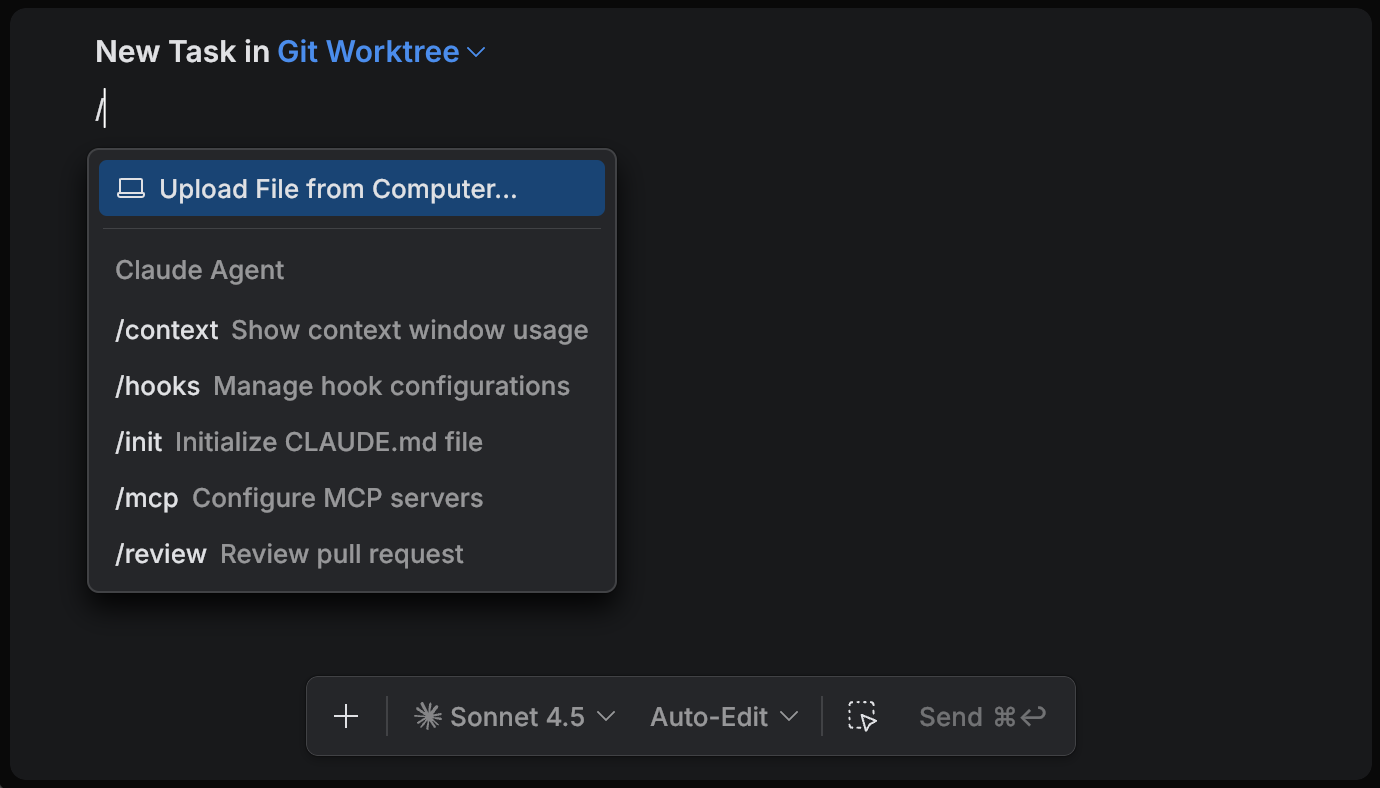
Predefined commands
Predefined commands are available without any additional configuration.
Built-in commands
These commands are built into the Air app and work with every agent. They are not agent-specific commands, and they are not in the browser, which offers the agent's own commands only.
Review with <agent> – starts an agentic review of the selected scope. Learn more
Upload File from Computer – uploads a file from your computer and adds it to the current task. Learn more
Agent commands
Each agent can also provide its own predefined commands. These commands depend on the selected agent and usually include basic built-in actions, for example /init or /review.
Custom commands
Custom commands are configured independently for each agent. If a project defines custom commands for the selected agent, they appear in the slash menu together with predefined commands.
Claude Agent
Claude Agent supports custom commands from .claude/commands. Command files use the standard Claude Code format and are stored as Markdown files.
Gemini CLI
Gemini supports custom commands from .gemini/commands. Command files use the standard Gemini CLI format and are stored as TOML files.
Junie
Junie supports custom commands from .junie/commands. Command files use the standard Junie format and are stored as Markdown files.