Configure AI assistance
In Datalore On-Premises, you can select whether AI assistance is enabled and what AI provider and model to use. By default, AI assistance is disabled.
- Supported models
OpenAl GPT-5.2
Anthropic Claude Opus 4.5
Anthropic Claude Sonnet 4.5
Google Gemini 3.1 Pro
Other models supported by your AI provider and local models through Bring Your Own Key
- Bring Your Own Key
BYOK allows you to use your own AI provider in your Datalore On-Premises instance, keeping control over data policies, costs, and model selection while using Datalore’s AI assistance. You can use either a cloud provider or a self-hosted LLM running on your infrastructure.
Supported providers:
OpenAI
Providers with OpenAI-compatible APIs, for example, through OpenRouter
Azure OpenAI
- Before you begin
Make sure that your network settings allow your Datalore On-Premises instance to connect to the AI provider:
Allow connections to the following URLs:
https://auth.grazie.ai https://api.jetbrains.aiAllow connections to your cloud AI provider or the local LLM running on your infrastructure.
Enable AI assistance
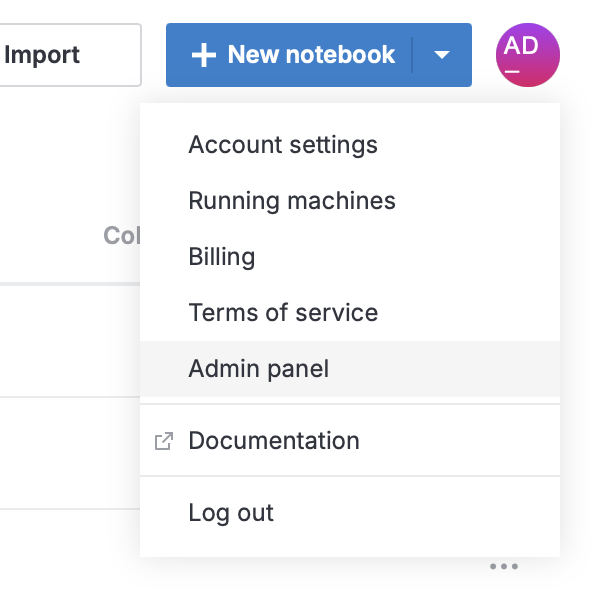
Click your avatar at the top right and select Admin panel.
Select
 AI in the sidebar.
In AI assistance, select JetBrains AI or Bring Your Own Key.
Configure AI settings depending on the type you selected.
In Default AI model, select the model you want to use.
Select the API type.
Provide the API key and other connection details.
To make sure that the connection details are correct, click Check connection.
Changes are saved automatically.
Change the model and other settings
Click the avatar at the top right and select Admin panel.
Select
AI in the sidebar.To change the settings:
In Default AI model, select the new model you want to use.
Edit the settings.
To make sure that the connection details are correct, click Check connection.
Changes are saved automatically.