Architecture overview
This article outlines the component architecture and infrastructure of IDE Services On-Premises.
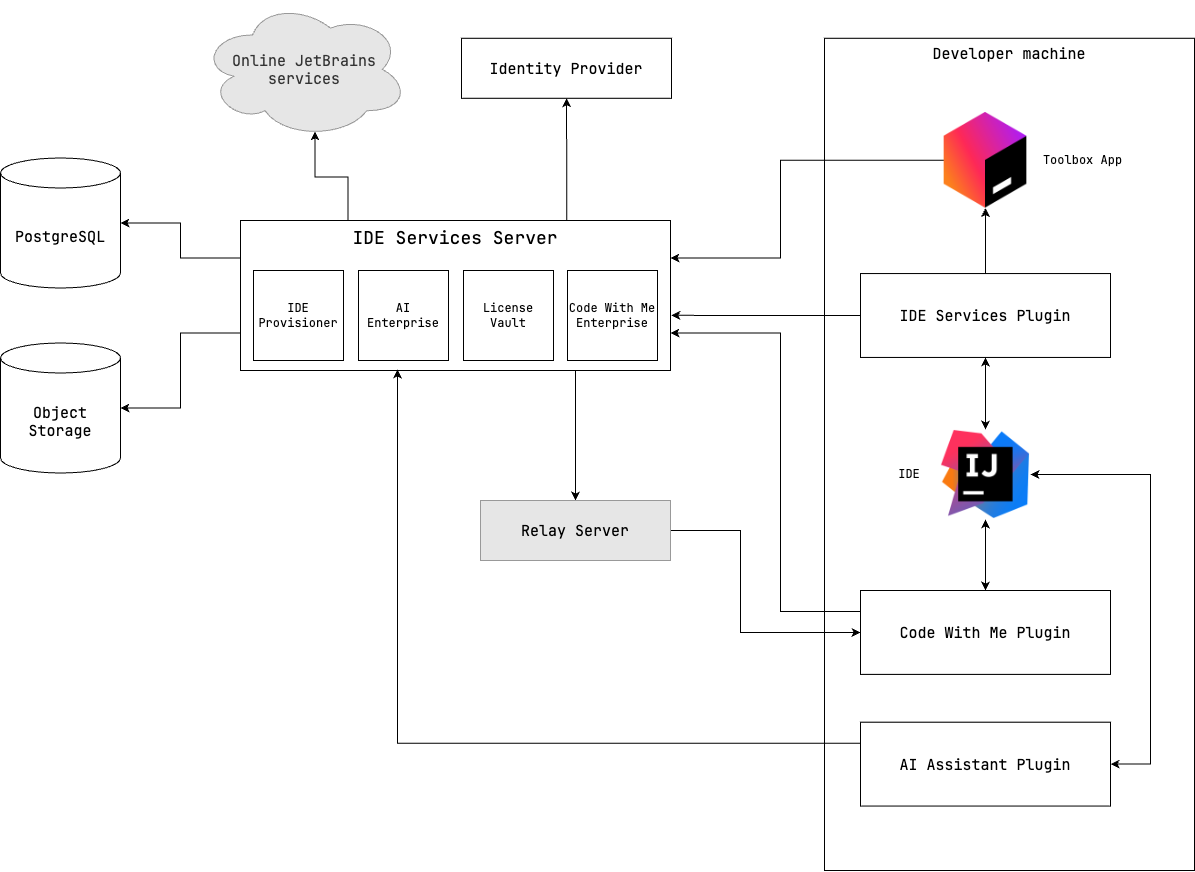
IDE Services components
- IDE Services Server
The IDE Services Server is the central component of the IDE Services architecture, which is installed within your organization's infrastructure. It is responsible for managing access to IDE Services products and distributing their configurations to developer machines.
You can administrate the IDE Services Server of your company both via the REST API and graphical user interface.
- JetBrains IDE Services plugin
The JetBrains IDE Services plugin implements the IDE Services features in JetBrains IDEs.
The plugin is installed to the developer's IDEs. In case the developer joins the organization in the Toolbox App, the plugin is installed automatically.
- Toolbox App
Required for IDE Provisioner and AI Enterprise.
Optional for License Vault; when present, it enables license auto-configuration on developer machines.
The Toolbox App is installed on developer machines and is used for downloading, updating, and configuring JetBrains IDEs. These features are activated using the client machine configuration file.
When connected to the IDE Services Server, the Toolbox App suggests working in enterprise mode. In this scenario, the Toolbox App serves as an agent on every developer machine and allows you to manage and install IDEs, distribute configurations and plugins.
- PostgreSQL database
The IDE Services Server uses a PostgreSQL database to store configurations, indexes, entity details, service data, audit logs, and more.
This database is deployed within your organization's infrastructure to ensure data security.
- Object storage
The IDE Services Server uses an S3-compatible bucket or Azure Blob Storage to store plugin binaries, installers, logs, and more. For more details, refer to What is stored in object storage.
- Identity provider
IDE Services integrates with your organization's identity provider to enable developers to use their existing credentials for accessing IDE Services features. For some identity providers, IDE Services also supports user and group import.
- Online JetBrains services
Required for online mode.
In case your IDE Services Server operates online, it communicates with external JetBrains domains. With offline mode enabled, IDE Services will make no external requests. For more details, refer to Offline mode.
- JetBrains AI Assistant plugin
The JetBrains AI Assistant Plugin integrates AI-powered features into IDEs, offering intelligent code suggestions, prompts to explain and refactor code, context-aware assistance for enhanced productivity, and more. For more details, refer to the AI Assistant documentation.