Most terminal commands, code execution, and execution of MCP tools are considered to be sensitive actions, and Junie by default requires explicit approval from the user for executing them. With Action Allowlist, you can specify the actions and commands that Junie is allowed to always execute without user approval.
Brave Mode
You can authorize Junie to execute all potentially sensitive actions without user approval by selecting Brave Mode in Junie's task window. However, using brave mode is not recommended. Opt for adding actions to the Action Allowlist whenever possible.
Types of Action Allowlist rules
For all sensitive actions, you can add a rule to the Action Allowlist in Settings | Tools | Junie | Action Allowlist. This will allow Junie to execute the action without user confirmation. Junie determines the following types of sensitive actions and the rules that correspond to them:
Type
Description
Terminal
Allows Junie to run the specified terminal commands without user confirmation.
RunTest
For JetBrains IDEs and languages where Junie can use the IDE’s functionality to run tests (namely, JVM in Intellij IDEA and C# in Rider), allows Junie to run tests from the current project without user confirmation.
Build
For JetBrains IDEs and languages where Junie can use the IDE’s functionality to build the current project (namely, JVM in Intellij IDEA and C# in Rider), allows Junie to build the current project without user confirmation.
Preview
For Android Studio and JetBrains IDEs that support Android and Compose development, allows Junie to use the IDE’s functionality to run the build or execute custom code without user confirmation.
MCP
Allows Junie to execute MCP tools without user confirmation.
Allows Junie to edit build scripts for the current project without user confirmation.
Editing build scripts within the IDE can in some cases lead to code execution (for example, editing build.gradle.kts could trigger project import, which could imply code execution). Because of that, editing a build script cannot be considered to be a safe action in all the cases, so potentially dangerous edits of build scripts will require manual confirmation.
Add rules to Action Allowlist
From Junie's tool window
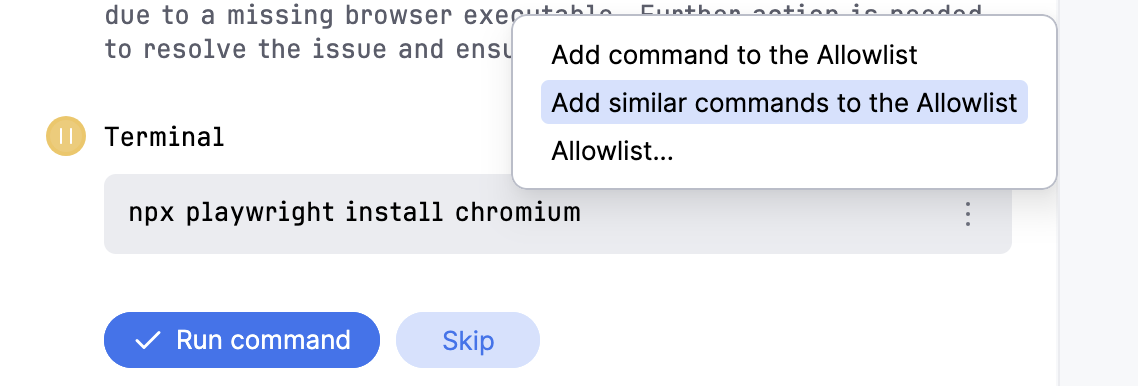
You can add rules to the Action Allowlist right from Junie's tool window while the agent is executing the task. To do so, click next to the executed action and select either of the following:
Allow this command to add only this particular command to the Action Allowlist.
Allow similar commands to have Junie generate a regular expression (Regex) for this command pattern and add it to the Action Allowlist. For example, for the git log --oneline -2 command, a ^\Qgit log --oneline \E\S+$ RegEx will be added.
Allow all <action type> commands to add all actions of this type to the Action Allowlist.


 next to the executed action and select either of the following: